Stage 18: F5 XC Site Networking on GCP
Key takeaways: A site is the unit that connects your infrastructure to XC. On GCP, the standard shape is a two-interface CE: SLO on an outside VPC for control plane and edge tunnels, SLI on an inside VPC for origins. GCP's one-NIC-per-VPC rule is why the design uses two VPCs instead of two subnets.
What a "site" is
In XC, a site is a logical location — a name that groups one or three CE nodes, their interfaces, and their site-local networks. Origin pools, LBs, and discovery all reference the site, not the VM — so the CE can be replaced or scaled without touching application config.
Site types
| Type | NICs | Use when |
|---|---|---|
| Ingress gateway | 1 | Only inbound delivery is needed and inside/outside share one subnet (small sites, App Stack) |
| Ingress/egress gateway | 2 | The classic dual-homed design — inbound delivery and outbound controls (this track's pattern) |
| Secure mesh node | 1–2 | Site-to-site connectivity between your sites over the XC backbone, no client-facing LB |
| App Stack (voltstack) cluster | 1+ | CE also runs a managed K8s and deploys workloads directly |
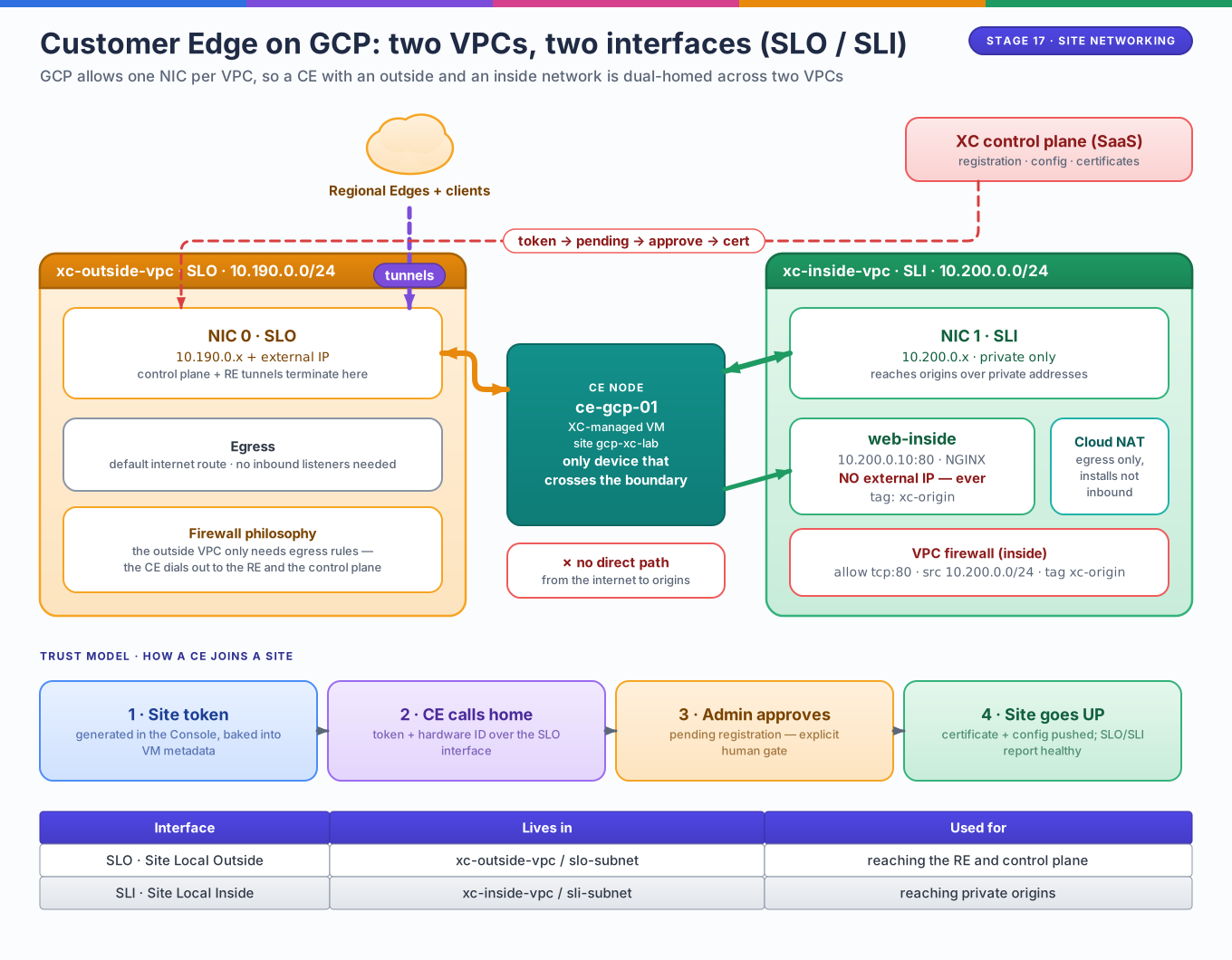
The two-interface ingress/egress mode is what gives the SLO/SLI split its meaning: SLO is a zone, not just an interface — it is where control-plane and RE-facing traffic is allowed to exist.
SLO vs SLI in GCP terms
| SLO — Site Local Outside | SLI — Site Local Inside | |
|---|---|---|
| Purpose | Control plane, RE tunnels, internet egress | Reach origins and site-local services |
| GCP VPC | xc-outside-vpc (slo-subnet) |
xc-inside-vpc (sli-subnet) |
| External IP | Yes — ephemeral is fine | Never |
| Firewall posture | Outbound-friendly; inbound managed by CE itself | Tight: only what origins need |
| Lab addressing | 10.190.0.0/24 |
10.200.0.0/24 |
Why two VPCs — the GCP constraint
GCP assigns at most one network interface per VPC to a VM. A dual-homed appliance therefore cannot be "two subnets in one VPC"; it needs two VPCs. This has two useful consequences:
- The inside VPC stays a clean security boundary — no route, no external IP, no internet-facing listener exists on the workload side by default.
- GCP firewall rules can treat the two zones differently: the inside rule in
the labs allows
tcp:80from10.200.0.0/24to tagxc-origin, which covers the CE's SLI address and nothing else.
Compare with earlier stages
The CE is structurally the dual-homed router of Stage 4 — it forwards across a boundary that has no other path — except the "routing" is policy-driven tunneling to REs rather than destination-prefix forwarding, and the management plane lives in SaaS.
The registration trust model
A CE is not trusted because it has an IP — it is trusted through a staged handshake:
- Site token — generated in the Console (or as a Terraform object), delivered to the VM through instance metadata.
- Registration request — the CE presents token + hardware identity over SLO to the control plane.
- Approval — an admin accepts the pending registration. A stolen token alone cannot silently join a site.
- Issued identity — the node gets a certificate and becomes a known, revocable endpoint; all later tunnels use node certs, not the token.
Deployment paths — three ways to the same node
| Path | How the CE VM is created | When to use |
|---|---|---|
| Console manual (Lab 02) | You launch the F5 marketplace image with 2 NICs + token metadata | Learning, demos, one-offs |
| XC-orchestrated Terraform (Lab 04) | volterra_gcp_vpc_site + volterra_tf_params_action — XC runs its own apply using your volterra_cloud_credentials GCP service account |
Repeatable, auditable infra |
| Custom automation | BYO Compute Engine with the certified image + registration metadata | Integrating with existing instance pipelines |
Notice that in the Terraform path, your google provider never creates the
CE VM — GCP shows the instance, but the resource lives in XC's plane. That
distinction decides where you look when the node fails to come up.
IAM and credentials map
| Credential | Held by | Grants |
|---|---|---|
.p12 API certificate |
You / CI | Manage XC objects for the tenant |
GCP SA key in volterra_cloud_credentials |
XC control plane | Create/modify Compute Engine VMs in your project |
| CE's own GCP service account | The CE VM | GCP API identity + firewall matching by SA |
| Site token | CE VM at boot | One-time registration into a named site |
Failure modes worth memorizing
| Symptom | Most likely layer |
|---|---|
| Node never appears in Registrations | SLO egress blocked, bad metadata/token |
| Registration pending forever | Human approval step — by design |
| Site UP but pools unreachable | Origin pool pointed at outside network, or inside VPC firewall missing |
| CE can't reach origins | SLI NIC on wrong VPC, or firewall tag mismatch |
| CE created but site shows errors | XC's SA lacks Compute permissions in your project |
Map it to the labs
Lab 01 builds this exact
topology by hand; Lab 02 walks the
registration path in the Console; Lab 04
turns the whole site into volterra_gcp_vpc_site code.