F5 XC Lab 04 — Automating End-to-End GCP Sites & Security
Capstone of the F5 XC track. One terraform apply builds the entire Lab
01–02 architecture: both VPCs, the private NGINX origin, the Customer Edge site,
the origin pool, the WAF, and the global HTTP load balancer — across two cloud
control planes.
Lab contract
| Item | This lab |
|---|---|
| Execution model | Standalone capstone; single Terraform root module, dual providers |
| Starts from | Lab 03 credentials working (.p12 + VES_P12_PASSWORD, gcloud ADC) plus a GCP service-account key for XC cloud credentials |
| Creates | 2 VPCs, subnets, NAT, firewall, private VM + XC cloud credentials, gcp_vpc_site, deploy action, health check, origin pool, app firewall, HTTP LB |
| Ends with | curl the LB domain → private NGINX; terraform destroy removes both clouds' resources |
| Previous | Lab 03 — Terraform Dual-Provider Setup |
Resource summary
| Terraform block | Count | Plane | Purpose |
|---|---|---|---|
google_compute_network ×2, google_compute_subnetwork ×2 |
4 | GCP | SLO and SLI VPCs/subnets |
google_compute_router + google_compute_router_nat |
2 | GCP | Egress for the private origin |
google_compute_firewall |
1 | GCP | Tag-based HTTP allow on the inside VPC |
google_compute_instance.web_inside |
1 | GCP | NGINX origin, no external IP |
volterra_namespace.netlab |
1 | XC | Namespace for app objects |
volterra_cloud_credentials.gcp |
1 | XC | GCP SA key XC uses to deploy the CE VM |
volterra_gcp_vpc_site.gcp |
1 | XC | Site object — the desired-state spec for the CE |
volterra_tf_params_action.apply |
1 | XC | Triggers XC's own apply that creates the CE VM in GCP |
volterra_healthcheck.http |
1 | XC | HTTP liveness on the origin |
volterra_origin_pool.web |
1 | XC | 10.200.0.10:80 on the site's inside network |
volterra_app_firewall.waf |
1 | XC | Blocking-mode WAF policy |
volterra_http_loadbalancer.web |
1 | XC | Public VIP + domain + WAF + route to the pool |
How the two planes cooperate
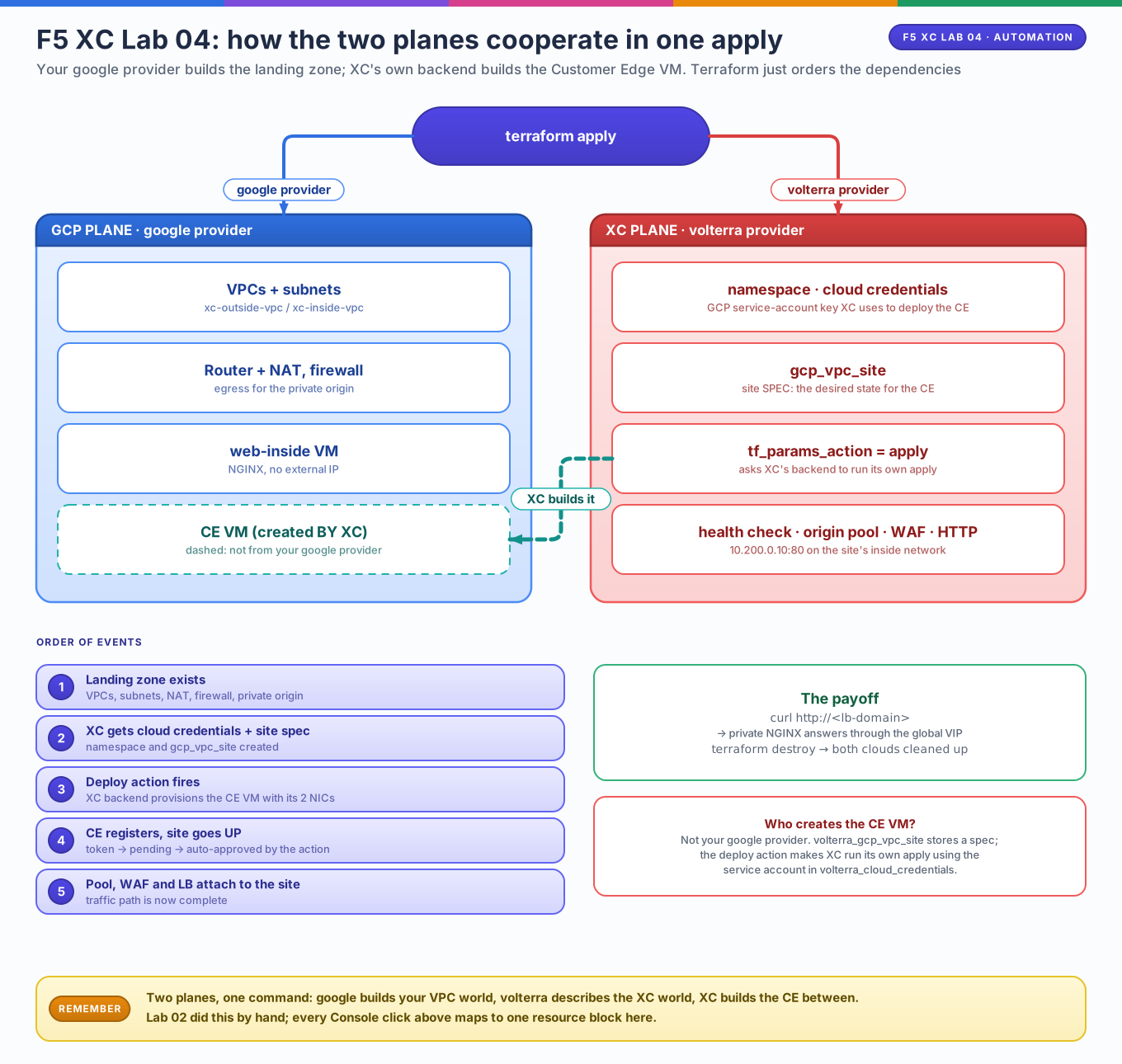
Editable source: f5-lab04-two-planes.drawio
flowchart TB
    TF[terraform apply]
    TF -->|google provider| GCP
    TF -->|volterra provider| XCa[ XC SaaS control plane]
    subgraph GCP[GCP project]
        OUT[xc-outside-vpc<br/>slo-subnet 10.190.0.0/24]
        IN[xc-inside-vpc<br/>sli-subnet 10.200.0.0/24]
        CE[ce node — created BY XC<br/>using cloud_credentials]
        WEB[web-inside 10.200.0.10]
    end
    XCa -->|tf_params_action: apply| CE
    CE --- OUT
    CE --- IN
    IN --- WEB
Who creates the CE VM?
Not your google provider. volterra_gcp_vpc_site creates a site
spec in XC; volterra_tf_params_action then asks XC's backend to run its
own apply, which provisions the Compute Engine VM using the GCP service
account in volterra_cloud_credentials. This mirrors what the Console did
for you in Lab 02.
1. Providers & variables
terraform {
  required_version = ">= 1.5.0"

  required_providers {
    google = {
      source  = "hashicorp/google"
      version = "~> 5.0"
    }
    volterra = {
      source  = "volterraedge/volterra"
      version = "~> 0.13"
    }
  }
}

provider "google" {
  project = var.project_id
  region  = var.region
}

provider "volterra" {
  api_p12_file = var.f5xc_p12_path
  url          = "https://${var.f5xc_tenant}.console.ves.volterra.io/api"
}

variable "project_id"    { type = string }
variable "region"        { type = string  default = "us-central1" }
variable "f5xc_tenant"   { type = string }
variable "f5xc_p12_path" { type = string  default = "~/creds/f5xc-api.p12" }

variable "gcp_sa_key_path" {
  description = "Path to a GCP service-account JSON key that XC uses to deploy the CE"
  type        = string
  sensitive   = true
}

variable "lb_domain" {
  description = "Hostname served by the XC load balancer (see DNS note below)"
  type        = string
}

variable "ssh_public_key" {
  description = "SSH key injected onto the CE node"
  type        = string
}
2. GCP side — the landing zone, as code this time
resource "google_compute_network" "outside" {
  name                    = "xc-outside-vpc"
  auto_create_subnetworks = false
}

resource "google_compute_network" "inside" {
  name                    = "xc-inside-vpc"
  auto_create_subnetworks = false
}

resource "google_compute_subnetwork" "slo" {
  name          = "slo-subnet"
  ip_cidr_range = "10.190.0.0/24"
  region        = var.region
  network       = google_compute_network.outside.id
}

resource "google_compute_subnetwork" "sli" {
  name          = "sli-subnet"
  ip_cidr_range = "10.200.0.0/24"
  region        = var.region
  network       = google_compute_network.inside.id
}

resource "google_compute_router" "inside" {
  name    = "xc-inside-router"
  network = google_compute_network.inside.name
  region  = var.region
}

resource "google_compute_router_nat" "inside" {
  name                               = "xc-inside-nat"
  router                             = google_compute_router.inside.name
  region                             = var.region
  nat_ip_allocate_option             = "AUTO_ONLY"
  source_subnetwork_ip_ranges_to_nat = "ALL_SUBNETWORKS_ALL_IP_RANGES"
}

resource "google_compute_firewall" "inside_http" {
  name    = "xc-inside-allow-http"
  network = google_compute_network.inside.id

  source_ranges = ["10.200.0.0/24"]
  target_tags   = ["xc-origin"]

  allow {
    protocol = "tcp"
    ports    = ["80"]
  }
}

resource "google_compute_instance" "web_inside" {
  name         = "web-inside"
  machine_type = "e2-micro"
  zone         = "${var.region}-a"
  tags         = ["xc-origin"]

  boot_disk {
    initialize_params {
      image = "debian-cloud/debian-12"
    }
  }

  # private only — deliberately no access_config block
  network_interface {
    subnetwork = google_compute_subnetwork.sli.id
    network_ip = "10.200.0.10"
  }

  metadata_startup_script = <<-EOS
    #!/bin/bash
    apt-get update && apt-get install -y nginx
    echo "<h1>Hello from private web-inside</h1>" > /var/www/html/index.html
  EOS
}
3. XC side — credentials, site spec, and the deploy action
resource "volterra_namespace" "netlab" {
  name = "netlab"
}

# GCP service-account key XC will use to create the CE VM
resource "volterra_cloud_credentials" "gcp" {
  name      = "gcp-lab-creds"
  namespace = "system"

  gcp_cred_file {
    credential_file {
      clear_secret_info {
        url = "string:///${base64encode(file(var.gcp_sa_key_path))}"
      }
    }
  }
}

resource "volterra_gcp_vpc_site" "gcp" {
  name           = "gcp-xc-lab"
  namespace      = "system"
  gcp_region     = var.region
  instance_type  = "n1-standard-4"
  ssh_key        = var.ssh_public_key

  cloud_credentials {
    name      = volterra_cloud_credentials.gcp.name
    namespace = "system"
    tenant    = var.f5xc_tenant
  }

  default_blocked_services = true
  logs_streaming_disabled  = true
  private_connect_disabled = true

  # Two-interface site = SLO + SLI, matching Lab 02 exactly
  ingress_egress_gw {
    gcp_certified_hw = "gcp-byol-voltmesh"
    gcp_zone_names   = ["${var.region}-a"]
    node_number      = 1

    outside_network {
      existing_network {
        name = google_compute_network.outside.name
      }
    }
    outside_subnet {
      existing_subnet {
        subnet_name = google_compute_subnetwork.slo.name
      }
    }
    inside_network {
      existing_network {
        name = google_compute_network.inside.name
      }
    }
    inside_subnet {
      existing_subnet {
        subnet_name = google_compute_subnetwork.sli.name
      }
    }

    no_network_policy        = true
    no_inside_static_routes  = true
    no_outside_static_routes = true
    no_global_network        = true
    sm_connection_public_ip  = true

    performance_enhancement_mode {
      perf_mode_l7_enhanced {
        jumbo_disabled = true
      }
    }
  }
}

# XC's backend runs its own apply that creates the CE Compute Engine VM
resource "volterra_tf_params_action" "deploy" {
  site_name       = volterra_gcp_vpc_site.gcp.name
  site_kind       = "gcp_vpc_site"
  action          = "apply"
  wait_for_action = true
}
Module alternative
The agenda suggests terraform-google-modules/network/google for the VPCs —
it works identically; the site object only needs the resulting names.
Raw resources are used here to keep every CIDR visible on one page.
For fleet deployments see F5's published GCP CE modules on the Volterra
registry/GitHub — they wrap volterra_gcp_vpc_site + tf_params_action.
4. XC side — health check, origin pool, WAF, load balancer
resource "volterra_healthcheck" "http" {
  name                = "web-http-hc"
  namespace           = volterra_namespace.netlab.name
  healthy_threshold   = 1
  interval            = 15
  timeout             = 3
  unhealthy_threshold = 2

  http_health_check {
    path                   = "/"
    use_origin_server_name = true
  }
}

resource "volterra_origin_pool" "web" {
  name                   = "web-inside-pool"
  namespace              = volterra_namespace.netlab.name
  endpoint_selection     = "LOCAL_PREFERRED"
  loadbalancer_algorithm = "LB_OVERRIDE"
  port                   = 80
  no_tls                 = true
  same_as_endpoint_port  = true

  origin_servers {
    private_ip {
      ip             = "10.200.0.10"
      inside_network = true
      site_locator {
        site {
          name      = volterra_gcp_vpc_site.gcp.name
          namespace = "system"
          tenant    = var.f5xc_tenant
        }
      }
    }
  }

  healthcheck {
    name      = volterra_healthcheck.http.name
    namespace = volterra_healthcheck.http.namespace
    tenant    = var.f5xc_tenant
  }
}

resource "volterra_app_firewall" "waf" {
  name      = "lab-waf"
  namespace = volterra_namespace.netlab.name

  allow_all_response_codes   = true
  default_anonymization      = true
  use_default_blocking_page  = true
  default_bot_setting        = true
  default_detection_settings = true
  blocking                   = true
  disable_ai_enhancements    = true
}

resource "volterra_http_loadbalancer" "web" {
  name      = "web-gcp"
  namespace = volterra_namespace.netlab.name
  domains   = [var.lb_domain]

  advertise_on_public_default_vip = true
  disable_api_definition          = true
  disable_api_discovery           = true
  disable_api_testing             = true
  no_challenge                    = true
  round_robin                     = true
  disable_malicious_user_detection = true
  disable_malware_protection      = true
  disable_rate_limit              = true
  default_sensitive_data_policy   = true
  no_service_policies             = true
  disable_threat_mesh             = true
  disable_trust_client_ip_headers = true
  user_id_client_ip               = true

  http {
    port_ranges = "80"
  }

  app_firewall {
    name      = volterra_app_firewall.waf.name
    namespace = volterra_app_firewall.waf.namespace
  }

  default_route_pools {
    pool {
      name      = volterra_origin_pool.web.name
      namespace = volterra_origin_pool.web.namespace
    }
  }
}
About var.lb_domain
XC must be able to answer for the hostname: either a domain delegated to XC
(Console → DNS Management → delegated domain, then dns_volterra_managed
can create the record for you), or any hostname you control where you add a
CNAME pointing at the VIP hostname shown in the LB's status after apply.
Apply & verify
export VES_P12_PASSWORD='YOUR_CERT_PASSWORD'

terraform init
terraform apply \
  -var="project_id=YOUR_PROJECT_ID" \
  -var="f5xc_tenant=YOUR_TENANT" \
  -var="gcp_sa_key_path=$HOME/creds/xc-deployer.json" \
  -var="lb_domain=web.your-delegated-domain.com" \
  -var="ssh_public_key="$(cat ~/.ssh/id_ed25519.pub)""
Watch the order in the plan graph — Terraform must finish the GCP subnets
before XC deploys the CE into them, and tf_params_action may take 10–15
minutes while XC provisions and registers the node.
# CE node exists in GCP (created by XC, not by your google provider)
gcloud compute instances list --filter='name~gcp-xc-lab'

# Private origin serves through the global VIP
curl -v http://web.your-delegated-domain.com/
What to notice
- Cross-plane references just work.
volterra_gcp_vpc_siteconsumesgoogle_compute_subnetwork.slo.name— Terraform sequences the clouds automatically because of the reference graph. - XC's provider is declarative twice. Your state holds the site object;
tf_params_actionmakes XC materialize it into real GCP VMs.wait_for_actionmeansapplydoesn't return until the CE is up. - The WAF travels with the code. Review, diff, and roll back security
policy like any other resource — the same
volterra_app_firewallblock can be reused across sites via a module. - Service discovery is the natural extension.
volterra_discovery(withdiscovery_gcp+ the same cloud credentials) lets XC inventory Compute Engine instances by label/tag so pools can track discovered endpoints instead of a hardcoded10.200.0.10— combine it with thexc-origintag from Lab 01 and GKE services for the fully dynamic version of this lab.
Break and repair (predict first)
- Remove
same_as_endpoint_port— predict where the health check lands. - Change
inside_network = truetooutside_network = truein the pool — which layer fails, and does the LB go 503 or timeout?
Cleanup
tf_params_action destroys the CE VM on the XC side as part of site deletion;
the GCP networks and VM leave with the rest of the state.
Track completion checklist
- One
terraform applyproduced a working global LB → private origin path - You can explain why the CE VM does not appear in
*.tfas agoogle_compute_instance - You can locate every secret path (
.p12, SA key, env vars) and confirm none are in code - You know which resource to change to switch the site from lab (1 node, 1 zone) to prod (3 nodes, 3 zones)