Terraform Lab 06 — VPC Network Peering & Shared VPC
In production cloud environments, single monolithic VPCs are rarely used. Instead, organizations deploy Multi-VPC Hub-and-Spoke topologies or Shared VPCs to segregate environments (Production vs. Staging vs. Shared Services).
Lab contract
| Item | This lab |
|---|---|
| Execution model | Standalone advanced scenario with a new working directory and state |
| Starts from | Provider/variable scaffolding from Lab 01; conceptual knowledge from Lab 05 |
| Creates | Two non-overlapping VPCs, two subnets, bidirectional peering, and cross-VPC policy |
| Scope boundary | Demonstrates peering in one project; Shared VPC is compared conceptually, not provisioned |
| Next | Lab 07 — L4 & L7 Load Balancing |
Resource summary
| Terraform block | Count | Purpose |
|---|---|---|
google_compute_network |
2 | Independent hub and production routing domains |
google_compute_subnetwork |
2 | Non-overlapping regional ranges |
google_compute_network_peering |
2 | One peering object in each direction |
google_compute_firewall.allow_hub_to_prod |
1 | Explicitly permits selected hub-to-production traffic |
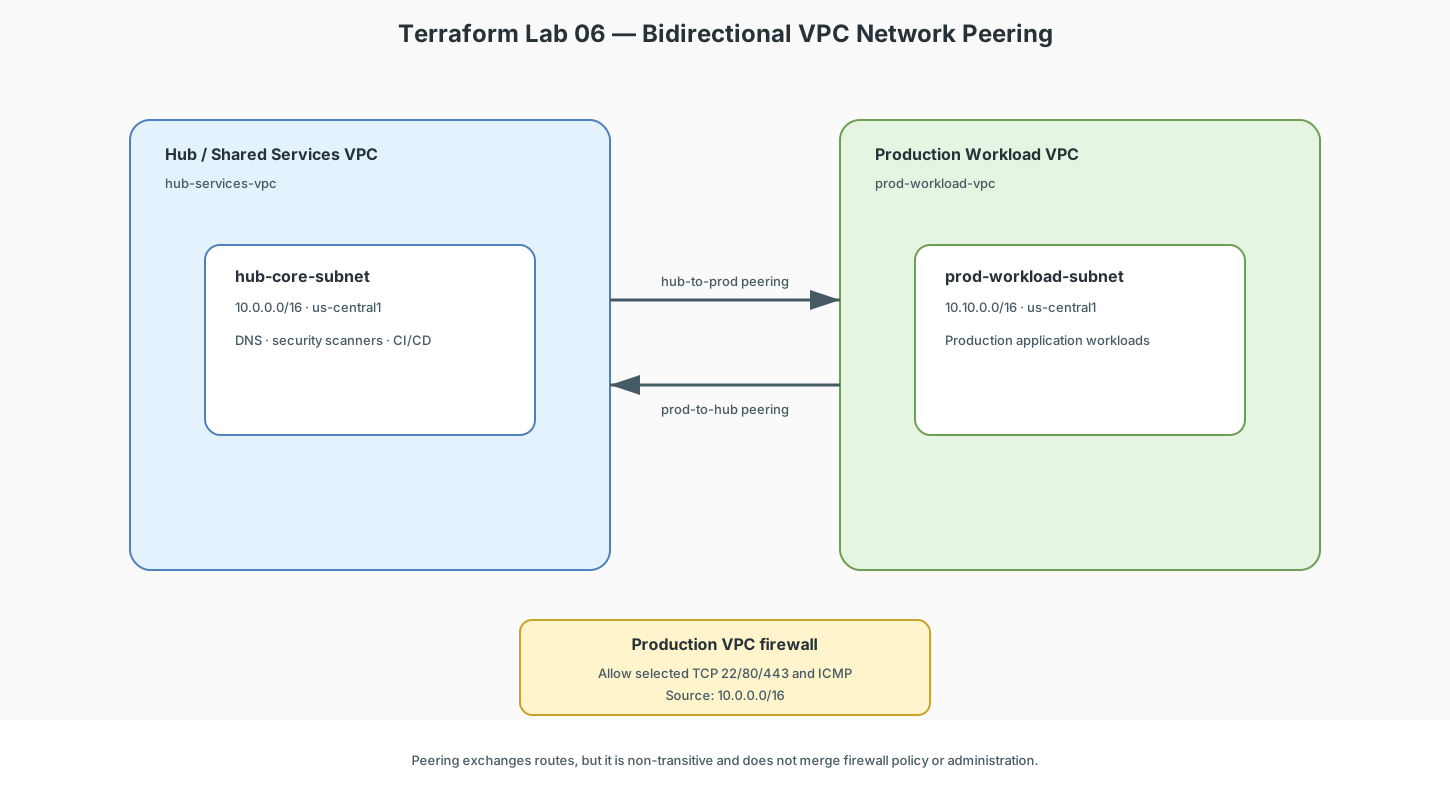
The runnable configuration below creates the hub and production VPCs. A staging VPC is a natural extension exercise, not part of this lab's resource summary.
Key Architectural Rules of VPC Peering
- Zero Gateway Bottleneck: Peering connects software-defined SDN controllers directly. Traffic travels over Google’s private fiber with line-rate latency and no single router bottleneck.
- Non-Transitive Routing: If VPC A peers with VPC B, and VPC B peers with VPC C, VPC A cannot talk to VPC C through VPC B. Peering is strictly direct (point-to-point).
- No Overlapping CIDRs: Peering will immediately fail if two VPCs share identical or overlapping IP subnets.
Complete Terraform Configuration: Hub-and-Spoke VPC Peering
terraform {
  required_version = ">= 1.5.0"

  required_providers {
    google = {
      source  = "hashicorp/google"
      version = "~> 5.0"
    }
  }
}

provider "google" {
  project = var.project_id
  region  = var.region
}

variable "project_id" {
  description = "GCP project ID to deploy into"
  type        = string
}

variable "region" {
  description = "GCP region for both VPC subnets"
  type        = string
  default     = "us-central1"
}

# -----------------------------------------------------------------------------
# 1. CREATE HUB VPC (Shared Services)
# -----------------------------------------------------------------------------
resource "google_compute_network" "hub_vpc" {
  name                    = "hub-services-vpc"
  auto_create_subnetworks = false
}

resource "google_compute_subnetwork" "hub_subnet" {
  name          = "hub-core-subnet"
  ip_cidr_range = "10.0.0.0/16"
  region        = var.region
  network       = google_compute_network.hub_vpc.id
}

# -----------------------------------------------------------------------------
# 2. CREATE PRODUCTION SPOKE VPC
# -----------------------------------------------------------------------------
resource "google_compute_network" "prod_spoke_vpc" {
  name                    = "prod-workload-vpc"
  auto_create_subnetworks = false
}

resource "google_compute_subnetwork" "prod_subnet" {
  name          = "prod-workload-subnet"
  ip_cidr_range = "10.10.0.0/16"
  region        = var.region
  network       = google_compute_network.prod_spoke_vpc.id
}

# -----------------------------------------------------------------------------
# 3. BI-DIRECTIONAL VPC PEERING (Both directions required!)
# -----------------------------------------------------------------------------

# Peering: Hub -> Production
resource "google_compute_network_peering" "hub_to_prod" {
  name                 = "peering-hub-to-prod"
  network              = google_compute_network.hub_vpc.self_link
  peer_network         = google_compute_network.prod_spoke_vpc.self_link
  export_custom_routes = true
  import_custom_routes = true
}

# Peering: Production -> Hub
resource "google_compute_network_peering" "prod_to_hub" {
  name                 = "peering-prod-to-hub"
  network              = google_compute_network.prod_spoke_vpc.self_link
  peer_network         = google_compute_network.hub_vpc.self_link
  export_custom_routes = true
  import_custom_routes = true
}

# -----------------------------------------------------------------------------
# 4. CROSS-VPC FIREWALL RULES
# -----------------------------------------------------------------------------

# Allow Hub Services to communicate with Production VMs on SSH and HTTP
resource "google_compute_firewall" "allow_hub_to_prod" {
  name    = "allow-hub-to-prod"
  network = google_compute_network.prod_spoke_vpc.name

  allow {
    protocol = "tcp"
    ports    = ["22", "80", "443"]
  }

  allow {
    protocol = "icmp"
  }

  source_ranges = ["10.0.0.0/16"]
}
Apply and verify
Lab 06 requires only project_id; region already defaults to us-central1.
Variables named web_instance_group or api_instance_group belong to Lab 07.
If Terraform requests them, stop and correct the terminal or IDE working
directory before continuing.
From the repository root:
cd docs/terraform/06-vpc-peering-shared-vpc

# Confirm Terraform is using Lab 06, not Lab 07.
pwd
terraform validate

export PROJECT_ID="YOUR_PROJECT_ID"
terraform init
terraform fmt -check
terraform plan \
  -input=false \
  -var="project_id=$PROJECT_ID"
terraform apply \
  -var="project_id=$PROJECT_ID"
Verify the two peering directions and firewall rule in the same project:
gcloud compute networks peerings list \
  --project="$PROJECT_ID"

gcloud compute firewall-rules describe allow-hub-to-prod \
  --project="$PROJECT_ID"
Both peering directions should report ACTIVE. This configuration creates no
VMs, so it proves control-plane connectivity and policy creation; add temporary
test VMs only if you want to verify data-plane traffic, then remove them.
Shared VPC vs. VPC Peering Comparison
| Dimension | VPC Network Peering | Shared VPC |
|---|---|---|
| Organizational Model | Decentralized (two separate teams connect their VPCs) | Centralized (one Network Admin team manages the Host VPC) |
| Subnet Ownership | Each project owns its own subnets | Projects share subnets created in a central Host Project |
| IAM Control | Independent IAM permissions | Central Network Admin controls network; Service Admins control VMs |
| Use Case | Multi-tenant SaaS, connecting partner networks | Large enterprise dividing Dev, QA, and Prod under one network team |
Cleanup and next step
Continue to Lab 07 — L4 & L7 Load Balancing.