F5 XC Lab 01 — GCP Networking & F5 Distributed Cloud Site Concepts
This is the first lab in the F5 Distributed Cloud (XC) track. Before writing any code, you need to understand how GCP's network model maps onto F5 XC's edge architecture — because GCP does networking differently than AWS or Azure.
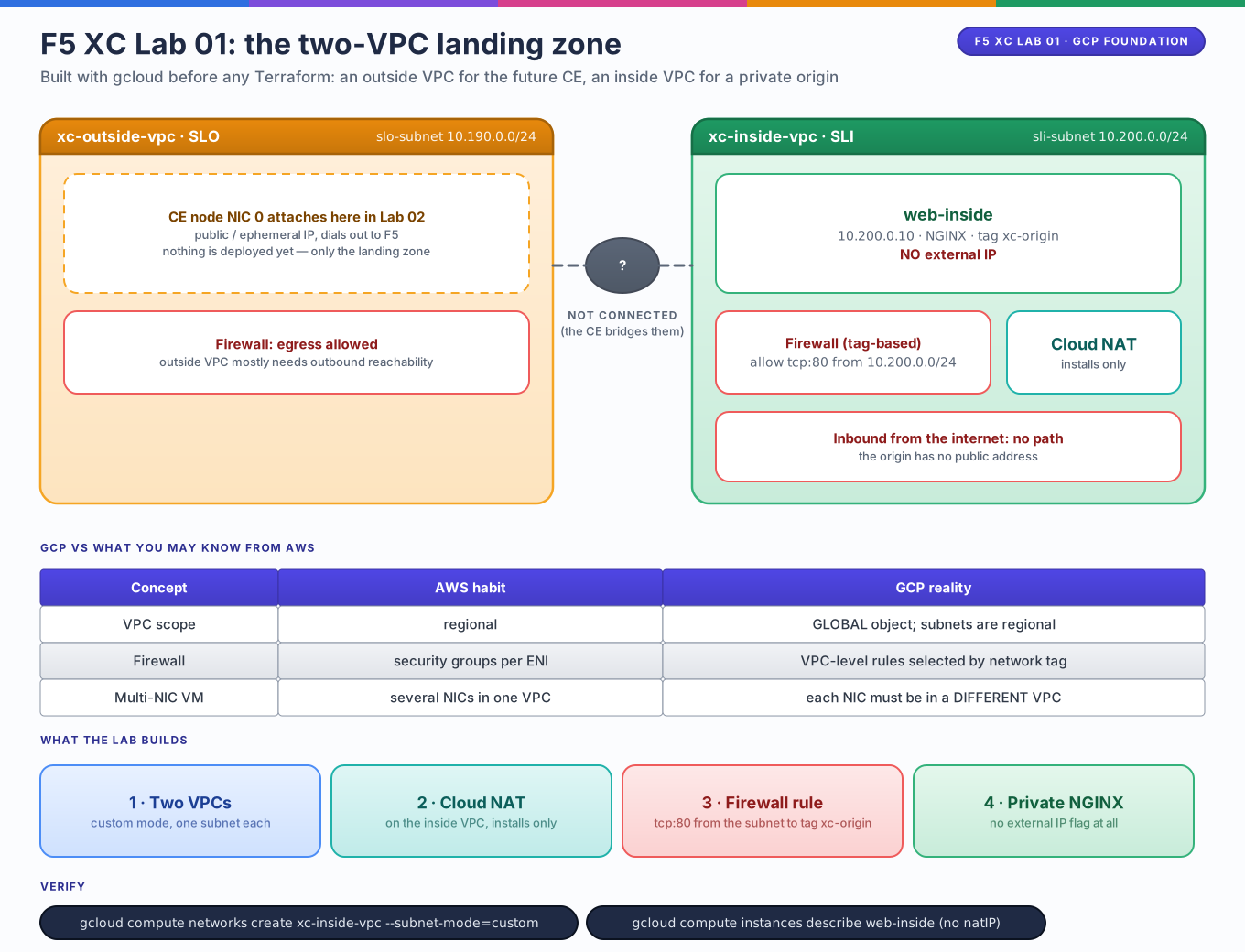
By the end you will have: two isolated GCP VPCs, a private NGINX web server with no public IP, and a clear mental model of Site Local Outside (SLO) vs Site Local Inside (SLI).
Lab contract
| Item | This lab |
|---|---|
| Execution model | Standalone foundation built with gcloud / Console (no Terraform yet) |
| Starts from | A billing-enabled GCP project; the concepts from the Terraform & GCP track help but are not required |
| Creates | xc-outside-vpc, xc-inside-vpc, one regional subnet each, firewall rules, Cloud NAT, and one private NGINX VM |
| Keep after completion | Yes; Labs 02–04 attach the F5 XC Customer Edge to these VPCs |
| Next | Lab 02 — Manual CE Deployment |
Resource summary
| Resource | Count | Purpose |
|---|---|---|
xc-outside-vpc + slo-subnet |
1 | Public-facing VPC that will host the CE node's SLO interface |
xc-inside-vpc + sli-subnet |
1 | Private VPC that hosts workloads and the CE node's SLI interface |
web-inside (Compute Engine VM) |
1 | NGINX origin with no external IP — reachable only through F5 XC |
| Firewall rules (both VPCs) | 2 | Tag-based ingress policy on the inside VPC; egress on the outside VPC |
| Cloud Router + Cloud NAT | 1 | Gives web-inside outbound internet for package installs only |
The architecture you are building toward
Editable source: f5-lab01-landing-zone.drawio
flowchart LR
    U((Internet user)) --> RE[F5 XC Regional Edge<br/>global ADN PoP]
    subgraph GCP[GCP project]
        subgraph OUT[xc-outside-vpc — SLO]
            CE0[CE node NIC 0<br/>public/ephemeral IP]
        end
        subgraph IN[xc-inside-vpc — SLI]
            CE1[CE node NIC 1<br/>private IP only]
            WEB[web-inside<br/>10.200.0.10 — no public IP]
        end
        CE0 --- CE1
        CE1 -->|origin traffic| WEB
    end
    RE <-->|encrypted tunnel / control plane| CE0
The F5 XC Customer Edge (CE) is a software node (a Compute Engine VM in this track) that bridges the F5 XC global network into your VPC. Users connect to an F5 XC Regional Edge (RE) — never to your VM directly — and the CE carries the traffic from the RE to your private workload.
Concept map — GCP vs what you may know from AWS
| AWS model | GCP model |
|---|---|
| VPC is a regional object | VPC is a global object — one VPC spans every region |
| Subnets are tied to an AZ | Subnets are tied to a region |
| Security groups attach to instance ENIs | Firewall rules attach to the VPC and select targets by network tag or service account |
| IGW + route table for egress | Egress is implicit if the VM has an external IP; otherwise Cloud NAT |
Why two separate VPCs?
A GCP VM can have at most one network interface per VPC. Because the CE node needs one foot in the public world (SLO) and one foot in your private workload network (SLI), the standard pattern is two VPCs — not two subnets in one VPC. This is the GCP equivalent of an appliance with a WAN NIC and a LAN NIC.
SLO vs SLI — the core F5 XC interface model
| Interface | Sits on | Talks to | Public IP? |
|---|---|---|---|
| SLO — Site Local Outside | xc-outside-vpc |
F5 XC SaaS control plane, Regional Edges, the internet | Yes (ephemeral is fine) |
| SLI — Site Local Inside | xc-inside-vpc |
Your Compute Engine / GKE workloads | No — never |
A two-interface CE is called an ingress/egress gateway site. Traffic enters from an RE on the SLO side and exits toward origins on the SLI side. Your backend VMs keep zero public exposure — the only thing that can reach them is the CE's inside interface.
GCP service accounts & IAM for F5 XC
F5 XC needs permission inside your project in two places:
- Site deployment — when XC provisions CE VMs itself (Labs 03–04), it uses a GCP service account JSON key that you upload to the XC Console as Cloud Credentials. Least privilege means a dedicated SA with Compute Admin scoped to the project, not your user account.
- VM identity — the CE VM itself runs as a service account so GCP firewall rules can match it by identity instead of IP range.
Key hygiene
Service account JSON keys are credentials. Keep them out of git, and prefer
creating a dedicated xc-deployer SA rather than reusing a personal one.
Hands-on exercise — build the two-VPC foundation
Do this once in the Console or with gcloud so you feel each object. Labs 03–04
will express the same thing in Terraform.
# Set your project once
gcloud config set project YOUR_PROJECT_ID
REGION=us-central1

# 1. Two custom-mode VPCs (global objects)
gcloud compute networks create xc-outside-vpc --subnet-mode=custom
gcloud compute networks create xc-inside-vpc  --subnet-mode=custom

# 2. One regional subnet in each
gcloud compute networks subnets create slo-subnet \
  --network=xc-outside-vpc --region=$REGION --range=10.190.0.0/24

gcloud compute networks subnets create sli-subnet \
  --network=xc-inside-vpc --region=$REGION --range=10.200.0.0/24

# 3. Cloud NAT on the inside VPC so the private VM can install packages
gcloud compute routers create xc-inside-router \
  --network=xc-inside-vpc --region=$REGION
gcloud compute routers nats create xc-inside-nat \
  --router=xc-inside-router --region=$REGION \
  --auto-allocate-nat-external-ips --nat-all-subnet-ip-ranges

# 4. Firewall: allow HTTP to tagged origins ONLY from the inside subnet
gcloud compute firewall-rules create xc-inside-allow-http \
  --network=xc-inside-vpc --direction=INGRESS --action=ALLOW \
  --rules=tcp:80 --target-tags=xc-origin --source-ranges=10.200.0.0/24

# 5. The private NGINX origin — note: NO --address / external IP flag
gcloud compute instances create web-inside \
  --zone=${REGION}-a --machine-type=e2-micro \
  --subnet=sli-subnet --no-address --tags=xc-origin \
  --image-family=debian-12 --image-project=debian-cloud \
  --metadata=startup-script='#!/bin/bash
    apt-get update && apt-get install -y nginx
    echo "<h1>Hello from private web-inside</h1>" > /var/www/html/index.html'
Verify
# The VM must have no external IP — this is the whole point of the design
gcloud compute instances describe web-inside --zone=${REGION}-a \
  --format='value(networkInterfaces[0].accessConfigs)'

# Prove NAT works (installs succeed) but inbound does not
gcloud compute ssh web-inside --zone=${REGION}-a --tunnel-through-iap \
  --command="curl -s localhost"
accessConfigsshould be empty — no NAT config means no public IP.curl localhostreturns your<h1>page via IAP SSH tunnel — the VM is alive, serving, and completely unreachable from the internet.
What to notice
- No external IP, yet it installed nginx. Cloud NAT solves egress without giving the VM an inbound presence — same idea as Terraform Lab 03.
- The firewall rule selects by tag, not subnet.
--target-tags=xc-originplus--source-ranges=10.200.0.0/24means any VM on the inside VPC — including the future CE's SLI NIC — can reach origins on port 80, and nothing else can. - Two VPCs, zero connectivity between them. Right now nothing can route
from
xc-outside-vpctoxc-inside-vpc. Lab 02 plugs the CE into both. --no-addressis the GCP way to say "private workload." Keep this habit — the F5 XC value proposition only matters if backends stay dark.
Checklist before lab 02
-
xc-outside-vpcandxc-inside-vpcexist, each with oneus-central1subnet -
web-insideserves NGINX and has no external IP - You can explain which interface (SLO or SLI) the CE uses to reach
web-inside, and why - You know why GCP needs two VPCs instead of two subnets for a dual-homed appliance