Stage 17: F5 Distributed Cloud Platform Architecture
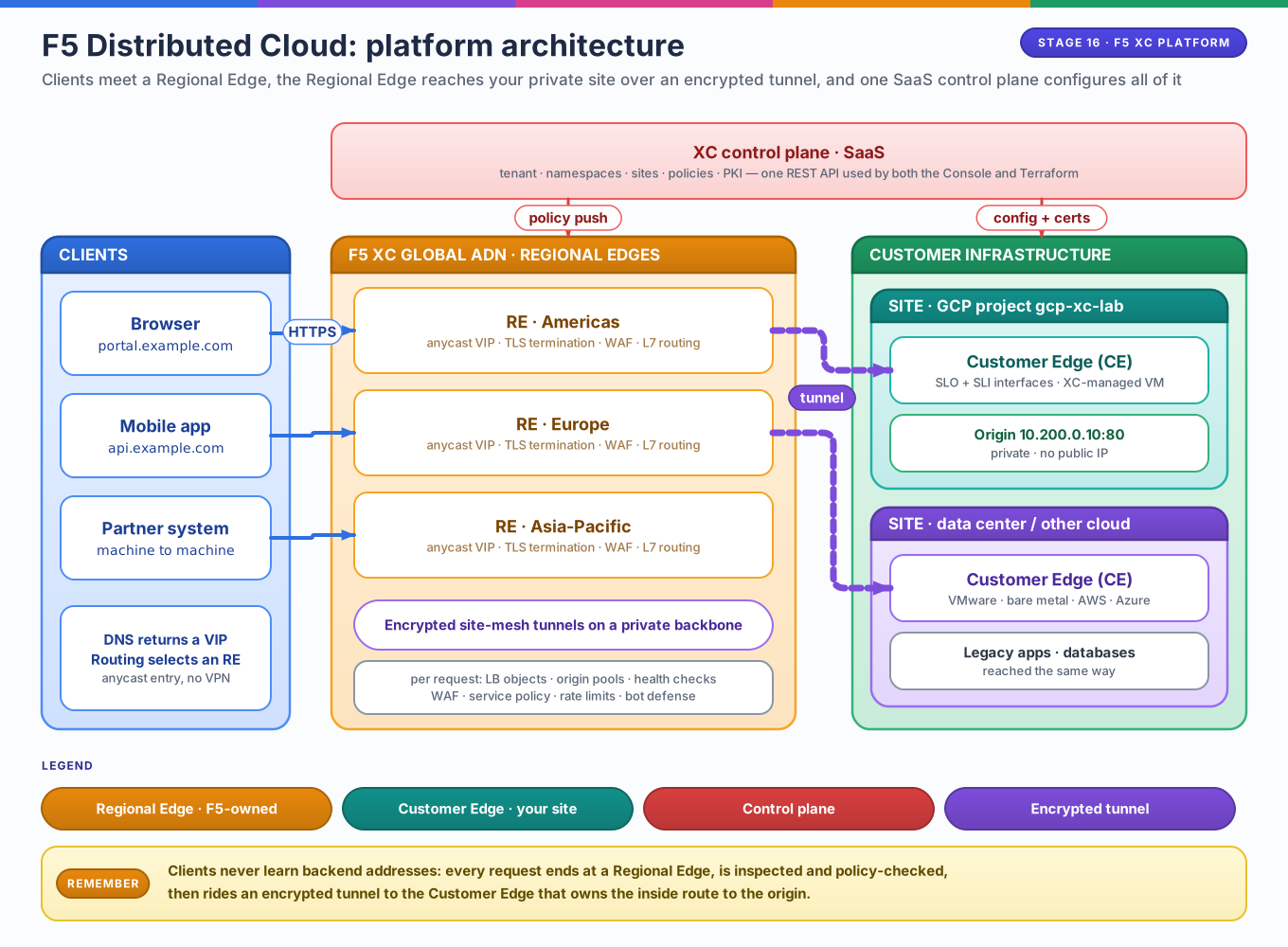
Key takeaways: F5 Distributed Cloud (XC) is a SaaS-delivered application delivery network. A central control plane manages two kinds of data plane edges: F5-owned Regional Edges (REs) that terminate client traffic, and your Customer Edges (CEs) that reach private workloads. Every object is API-defined, which is why the same platform is configurable by Console and Terraform.
The problem it solves
Publishing a private application to the internet classically requires some combination of public IPs on backends, a DMZ, your own WAF, DNS/global load balancing, and CDN contracts. Each is a different system with a different policy model.
XC collapses this into one claim: keep backends dark; terminate clients on our edges; carry traffic to your site over an encrypted mesh. The platform provides the anycast entry points, the tunnel fabric, the WAF, and the observability — you provide a CE node inside each network that hosts origins.
The two planes
| Plane | Runs where | Does what |
|---|---|---|
| Control plane | F5's SaaS (your tenant) | Stores every object's desired state, issues certificates, pushes config, collects logs and metrics, approves site registrations |
| Data plane | RE PoPs + your CEs | Terminates TLS, inspects requests, load balances, tunnels traffic to origins |
The separation matters operationally: a CE keeps forwarding with cached config if the control plane is briefly unreachable, and no traffic ever terminates at the control plane — it is policy and identity only.
Building blocks
| Object | One-line meaning | Analog in earlier stages |
|---|---|---|
| Tenant | Your organization boundary in the SaaS | AWS account / GCP org |
| Namespace | Object grouping + RBAC scope | Kubernetes namespace / GCP project |
| Site | A logical location made of CE nodes | A VPC + edge router pair |
| RE | F5-operated edge that clients connect to | CloudFront/Cloudflare PoP |
| CE | Your edge — a VM/appliance in your network | A dual-homed router + tunnel endpoint |
| Origin pool | Named set of backends + how to reach them | Backend service / target group |
| Health check | Liveness probe gating pool membership | GCP health check |
| HTTP/TCP LB | VIP + domain + routes + policy + pools | L7 load balancer + WAF rules |
| App firewall | The WAF policy attached to an LB | Cloud Armor / AWS WAF policy |
| Service policy | L3/L4+L7 allow/deny lists on an LB | Firewall rule scoped to a listener |
RE vs CE — the distinction everything hangs on
| Property | Regional Edge (RE) | Customer Edge (CE) |
|---|---|---|
| Owned/operated by | F5 | You (XC-managed software) |
| Runs on | F5's global PoP network | Your GCP project, DC, other cloud |
| Faces | Clients (anycast VIPs) | Your workloads (private IPs) |
| Role | Terminate, inspect, route | Connect site inward, forward to origins |
CE ≠ proxy exposed to the internet
The CE initiates outbound tunnels to REs; it does not need inbound ports open from the internet. This inverts the usual edge appliance model and is why a CE fits inside a private VPC design.
Anycast: one public IP, multiple possible edges
Anycast lets multiple geographically distributed locations serve the same IP address. Each participating location advertises a route for the prefix containing that address, typically using BGP. Internet routers select a best route, so a client's packets reach one of those locations—not every location. The packet still has an ordinary destination IP; there is no special "anycast" flag in its header.
Unicast vs anycast
| Model | Where the destination is served | What happens to a packet | Example |
|---|---|---|---|
| Unicast | One specifically addressed destination (which may itself be a load balancer) | Routing delivers it toward that destination | CE forwards to private origin 10.200.0.10 |
| Anycast | The same service IP is available at multiple locations | Routing delivers it to one selected location | Public XC VIP served at participating REs |
| Broadcast | All hosts in a broadcast domain | The local network distributes it to everyone in that domain | An IPv4 ARP request |
| Multicast | A receiver group | The network replicates packets toward group members | A multicast video stream |
Anycast is one-to-one-of-many, not one-to-all. Unlike broadcast or multicast, it does not send a copy of a client's request to every RE.
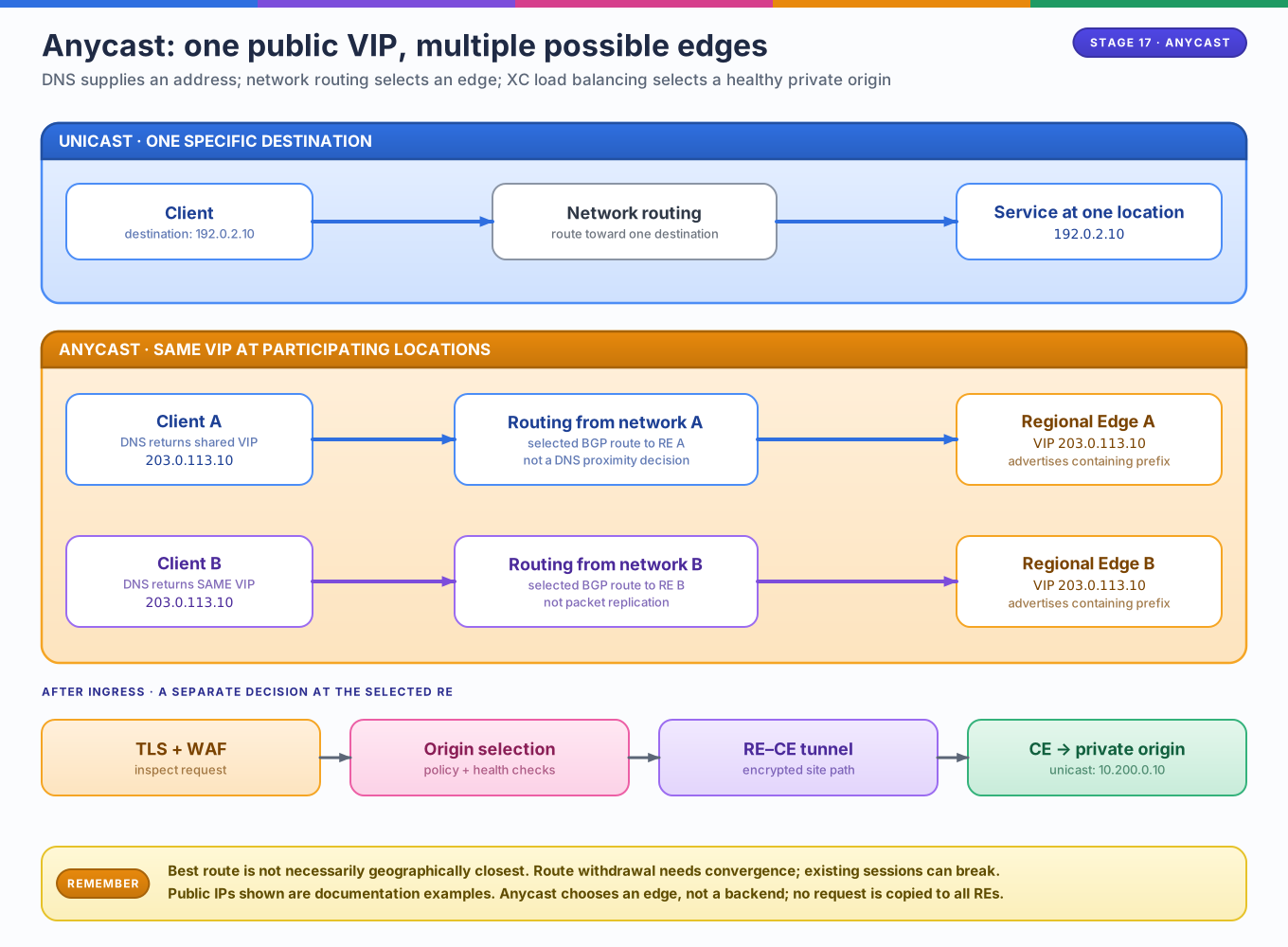
Editable source: anycast and unicast diagram.
How this applies to the XC labs
For the public, RE-advertised HTTP load balancer used in these labs:
- DNS returns the public VIP. The application's DNS record leads to the
XC load balancer's public address. For illustration, use
203.0.113.10(a documentation-only address, not a real XC endpoint). - Internet routing selects an RE. Participating RE locations advertise the prefix containing that VIP. The client's network follows its selected route to one RE. Another client can use the same VIP and reach a different RE.
- The RE processes the request. It terminates the client connection, applies TLS/WAF and routing policies, and selects a healthy origin using the configured load-balancing policy.
- XC reaches the private origin. For this lab's CE-backed pool, traffic crosses the RE–CE encrypted tunnel, then the CE forwards it to the origin's private unicast address through SLI. The origin does not need the public VIP or a public IP of its own.
DNS, anycast routing, and backend selection are different decisions
DNS: which address should the client use? Anycast routing: which participating edge receives packets for that address? Load balancing: which healthy origin should handle the request after it reaches the edge? Anycast alone does not choose a backend or apply a WAF policy. XC also supports other advertisement modes; not every CE or LB is automatically an internet-facing anycast endpoint.
What “nearest edge” actually means
“Nearest” means best according to network routing policy, not necessarily shortest geographic distance or lowest measured latency. BGP policy, peering, path attributes, and internal routing costs influence where traffic enters. DNS does not inherently pick the closest RE simply because the VIP is anycast.
Anycast can provide a stable entry address and distribute ingress across locations. If a location stops advertising its route and routing converges, clients can reach another location without changing the VIP or waiting for a DNS TTL. This is not instantaneous or guaranteed session migration: existing TCP/TLS connections can break when their path moves to a different edge, so clients may need to reconnect. An unhealthy backend is a separate concern: origin health checks and pool selection handle it; anycast does not inherently detect an application failure or withdraw an advertisement.
Identity and isolation: tenant + namespace
Almost every XC object lives in a namespace (system, shared, or one you
create). Site-level infrastructure (sites, cloud credentials, CEs) lives in
system; application objects (pools, LBs, WAFs) go in workload namespaces so
teams can be scoped independently — the same mental model as Kubernetes RBAC.
API-first, and why that matters for Terraform
The Console is a client of the same REST API the
volterraedge/volterra provider
calls. There is no "click-only" path: every object in the tables above is a
Terraform resource. Authentication is a .p12 API certificate scoped to your
tenant — one credential covers the whole SaaS side, while GCP resources still
use their own provider credentials. Lab 03 wires exactly that dual-provider
setup.
What XC is not
- Not a VPN replacement for clients. Users get no network-layer access; only applications you publish through LBs are reachable.
- Not a cloud of its own. It carries traffic between your sites and clients; your workloads stay in GCP/AWS/on-prem.
- Not a packet-forwarding router inside your VPC. The CE is a managed appliance for XC delivery, not a replacement for Cloud Router/NAT design.
Map it to the labs
| Concept here | Proven in |
|---|---|
| CE bridging two network zones | Lab 01 — SLO/SLI concepts |
| Site token + registration + pools + LB | Lab 02 — manual deployment |
| API-first → Terraform resources | Lab 03 — dual providers |
| Whole platform as code | Lab 04 — automated site + WAF |