F5 XC Lab 03 — Setting Up Terraform for GCP & F5 XC
Labs 01–02 proved the architecture works. This lab prepares your local
environment to manage two control planes from one Terraform project: GCP
infrastructure through the google provider, and F5 XC SaaS objects through
the volterra provider.
Lab contract
| Item | This lab |
|---|---|
| Execution model | Standalone Terraform config — smallest possible dual-provider proof |
| Starts from | Terraform + gcloud installed (Terraform Lab 01 pattern), an F5 XC tenant |
| Creates | One GCP VPC and one F5 XC namespace in a single apply |
| Ends with | Credentials working for both providers; destroy the two resources |
| Next | Lab 04 — Automated Site, Discovery & WAF |
Resource summary
| Terraform block | Count | Purpose |
|---|---|---|
provider google |
1 | Manages GCP resources via Application Default Credentials |
provider volterra |
1 | Manages F5 XC objects via a .p12 API certificate |
google_compute_network.xc_lab_vpc |
1 | Proof the GCP side works |
volterra_namespace.lab |
1 | Proof the XC side works — a namespace is the cheapest XC object |
Two providers, one state file
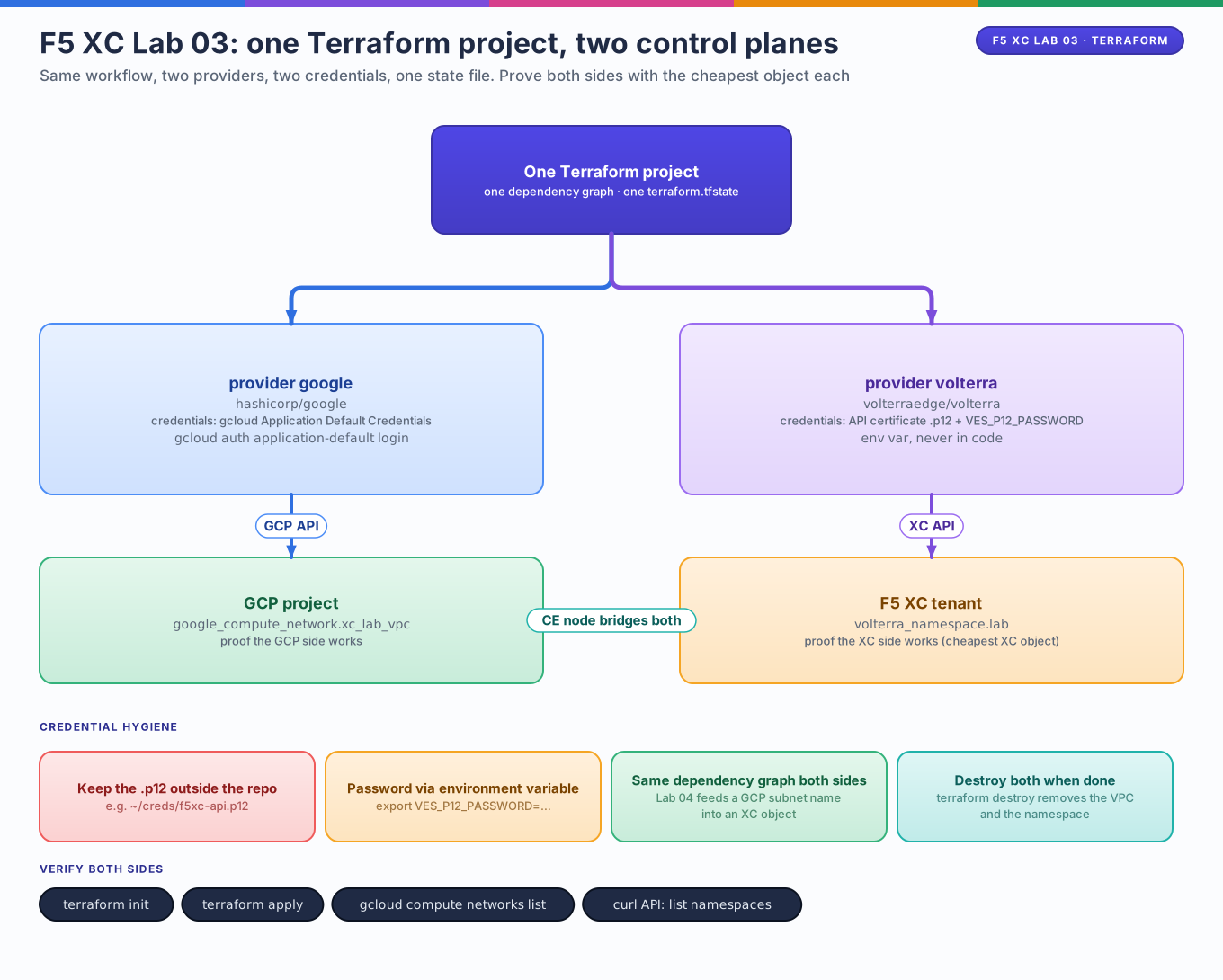
Editable source: f5-lab03-dual-provider.drawio
flowchart TB
    TF[One Terraform project<br/>one state file]
    TF -->|hashicorp/google| GCP[GCP project<br/>VPCs, VMs, firewall]
    TF -->|volterraedge/volterra| XC[F5 XC tenant<br/>sites, pools, LBs, WAF]
    GCP <-.->|CE node bridges both| XC
Each provider talks to its own API with its own credentials. Terraform doesn't care that they are different clouds — the dependency graph can even reference one side from the other (Lab 04 feeds a GCP subnet name into an XC site object).
1. GCP credentials — same as the Terraform track
The google provider picks up Application Default Credentials automatically.
2. F5 XC credentials — the .p12 API certificate
In the F5 XC Console:
- Administration → Personal Management → Credentials → Add Credentials.
- Type: API Certificate. Download the
.p12file and set a password. - Store it outside the repo — e.g.
~/creds/f5xc-api.p12.
# The provider reads the cert password from an env var, never from code
export VES_P12_PASSWORD='YOUR_CERT_PASSWORD'
Credential boundaries
The .p12 file, its password, and any GCP service-account JSON key are all
secrets. None of them belong in *.tf, in .tfvars committed to git, or in
screenshots. Lab 03 uses env vars for this reason.
3. main.tf — the dual-provider block
terraform {
  required_version = ">= 1.5.0"

  required_providers {
    google = {
      source  = "hashicorp/google"
      version = "~> 5.0"          # same line as the rest of this track
    }
    volterra = {
      source  = "volterraedge/volterra"
      version = "~> 0.13"         # vetted release line; check registry for newer
    }
  }
}

provider "google" {
  project = var.project_id
  region  = var.region
}

provider "volterra" {
  api_p12_file = var.f5xc_p12_path
  url          = "https://${var.f5xc_tenant}.console.ves.volterra.io/api"
}

variable "project_id" {
  description = "GCP project ID to deploy into"
  type        = string
}

variable "region" {
  type    = string
  default = "us-central1"
}

variable "f5xc_tenant" {
  description = "F5 XC tenant short name (the part before .console.ves.volterra.io)"
  type        = string
}

variable "f5xc_p12_path" {
  description = "Absolute path to the downloaded .p12 API certificate"
  type        = string
  default     = "~/creds/f5xc-api.p12"
}

# ---- GCP side: one VPC, like Lab 01's landing zone ----
resource "google_compute_network" "xc_lab_vpc" {
  name                    = "xc-tf-proof-vpc"
  auto_create_subnetworks = false
}

# ---- XC side: a namespace to hold future objects ----
resource "volterra_namespace" "lab" {
  name = "netlab"
}
Where did the agenda's ~> 6.0 go?
The roadmap's starter block suggests google ~> 6.0; this track pins
~> 5.0 to stay consistent with the earlier Terraform labs. Either works —
provider pinning is a repo convention, not an F5 requirement. What matters
is that volterra and google can coexist in required_providers.
Namespaces are XC's folders
Almost every XC object lives in a namespace (system, shared, or one
you create). The provider default is often system; real configs put apps
in their own namespace, exactly like Kubernetes.
Apply & verify both sides
terraform init          # downloads BOTH providers — watch it happen
terraform plan -var="project_id=YOUR_PROJECT_ID" -var="f5xc_tenant=YOUR_TENANT"
terraform apply -var="project_id=YOUR_PROJECT_ID" -var="f5xc_tenant=YOUR_TENANT"
Prove each side independently:
# GCP side
gcloud compute networks list --filter='name=xc-tf-proof-vpc'

# XC side — the namespace appears in the Console's namespace picker,
# or via the XC API:
curl -sk --cert-type P12 --cert ~/creds/f5xc-api.p12:$VES_P12_PASSWORD \
  https://YOUR_TENANT.console.ves.volterra.io/api/web/namespaces | grep netlab
What to notice
terraform initfetched two providers. Open.terraform.lock.hcl— bothhashicorp/googleandvolterraedge/volterraare pinned there.- One apply, two APIs. Terraform created the VPC and the namespace in the same run; there was no cross-dependency so it may have done them in parallel.
- The
volterraprovider wraps XC's REST API. Everything you clicked in Lab 02 — sites, tokens, pools, load balancers — is a resource type. urlis your tenant's API endpoint, not GCP's. The provider talks to*.console.ves.volterra.io, the same API the Console UI uses.
Exercise
Add a second resource to each side so the file manages four objects:
resource "google_compute_network" "xc_lab_inside" {
  name                    = "xc-tf-proof-inside"
  auto_create_subnetworks = false
}
Then run terraform plan and predict the action count before reading the
output. (Answer: 2 to add, 0 to change, 0 to destroy.)
Cleanup
terraform destroy -var="project_id=YOUR_PROJECT_ID" -var="f5xc_tenant=YOUR_TENANT"
unset VES_P12_PASSWORD   # when fully done for the session
Checklist before lab 04
-
terraform initsucceeds with both providers - One
applycreated a GCP VPC and an XC namespace -
.p12+VES_P12_PASSWORDauth works — you verified via API or Console - You can name which provider owns: the CE VM image, the site token, the origin pool, the GCP subnet