Lab 08 · North-South Entry: MetalLB LoadBalancer & The 4-Layer Ingress Gauntlet
Core Lesson: Expose an internal LoadBalancer IP (
10.10.0.240) onacme-mainusing MetalLB, call it from the externalprobebastion (10.10.1.3inacme-ops), and methodically diagnose and fix four cascading security breaks (Underlay Firewall → L4 NetworkPolicy → L7 STRICT mTLS → L7 SPIFFE AuthorizationPolicy).
GCP Twin: Phase P9 (Gatewaygke-l7-rilb,proxy-only-subnet10.10.254.0/23, health-check firewall rules).
1. Architecture Decision: Why North-South Ingress Hits Every Guard at Once
When an external client (or Google's Regional Internal L7 Load Balancer in proxy-only-subnet 10.10.254.0/23) sends an HTTP request into a zero-trust mesh workload, four independent guards evaluate the packet in sequence:
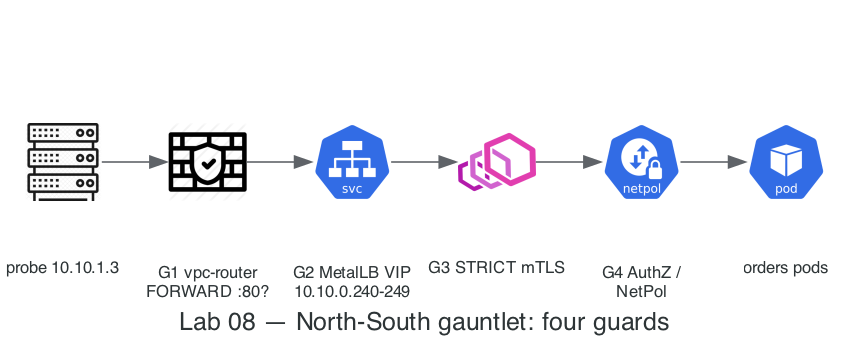
Why
externalTrafficPolicy: Localis mandatory here: with the defaultexternalTrafficPolicy: Cluster, a node receiving traffic for10.10.0.240SNATs the packet to its own Node IP (10.10.0.10) before forwarding to theorderspod. That destroys the client's true source IP (10.10.1.3), breaking both audit logging and IP-basedNetworkPolicy/AuthorizationPolicy! SettingexternalTrafficPolicy: Localpreserves10.10.1.3all the way to the pod.
2. Step-by-Step Hands-On Build
Step 1: Install MetalLB & Allocate the Internal VIP Pool (10.10.0.240-249)
# 1. Install MetalLB native manifest (+ waits for controller & speaker)
task lab08:metallb

# 2. Configure L2 IPAddressPool on acme-main (10.10.0.240 - 10.10.0.249)
kubectl apply -f - <<'EOF'
apiVersion: metallb.io/v1beta1
kind: IPAddressPool
metadata:
  name: acme-internal-pool
  namespace: metallb-system
spec:
  addresses:
    - 10.10.0.240-10.10.0.249
---
apiVersion: metallb.io/v1beta1
kind: L2Advertisement
metadata:
  name: acme-l2
  namespace: metallb-system
spec:
  ipAddressPools:
    - acme-internal-pool
EOF
Step 2: Create the orders-lb LoadBalancer Service
kubectl apply -f - <<'EOF'
apiVersion: v1
kind: Service
metadata:
  name: orders-lb
  namespace: dom-orders
spec:
  type: LoadBalancer
  externalTrafficPolicy: Local
  selector:
    app: orders
  ports:
    - name: http
      port: 80
      targetPort: 8080
EOF

LB_IP=$(kubectl -n dom-orders get svc orders-lb -o jsonpath='{.status.loadBalancer.ingress[0].ip}')
echo "Assigned Internal LoadBalancer IP: $LB_IP"
Step 3: Walk Through the 4-Layer Ingress Gauntlet (Break → Diagnose → Fix)
Break #1: Underlay Router Firewall Drop (000 Timeout)
Try calling http://$LB_IP/healthz from probe (10.10.1.3):
docker exec probe curl -sS -m 3 -o /dev/null -w 'HTTP Code: %{http_code}\n' "http://$LB_IP/healthz" || true
# Symptom: HTTP Code: 000 (Connection timed out)
- Why?
vpc-router(FORWARD DROPfrom Lab 01) only allows TCP8443to the control plane; it drops TCP80to$LB_IP. - Fix Break #1: Open TCP
80from10.10.1.3to$LB_IPonvpc-router:
Break #2: Cilium Ingress NetworkPolicy Drop (000 Timeout + Hubble DROPPED)
Test again from probe:
docker exec probe curl -sS -m 3 -o /dev/null -w 'HTTP Code: %{http_code}\n' "http://$LB_IP/healthz" || true
# Symptom: Still HTTP Code: 000! Let's check Hubble:
kubectl -n kube-system exec ds/cilium -- hubble observe --to-namespace dom-orders --verdict DROPPED --last 5
- Why? The packet passed
vpc-router, hit the worker node, was DNAT'd from$LB_IP:80→orders:8080, and was dropped bydom-ordersIngressNetworkPolicy—dom-ordershasdefault-denybut no ingress allow yet (Lab 05 only opened ingress onpayments/inventory). - Fix Break #2: Allow ingress from
ipBlock: 10.10.1.0/28on Pod port8080(On GCP P9, this isproxy-only-subnet10.10.254.0/23+ health-check ranges):
kubectl apply -f - <<'EOF'
apiVersion: networking.k8s.io/v1
kind: NetworkPolicy
metadata:
  name: allow-ops-lb-ingress
  namespace: dom-orders
spec:
  podSelector:
    matchLabels:
      app: orders
  policyTypes:
    - Ingress
  ingress:
    - from:
        - ipBlock:
            cidr: 10.10.1.0/28
      ports:
        - protocol: TCP
          port: 8080
EOF
Break #3: Istio STRICT mTLS Rejects Plaintext LB (Connection reset by peer)
Test again from probe:
docker exec probe curl -sS -m 3 -o /dev/null -w 'HTTP Code: %{http_code}\n' "http://$LB_IP/healthz" || true
# Symptom CHANGED! "curl: (56) Recv failure: Connection reset by peer"
- Why?
probe(and any external L4/L7 LoadBalancer that isn't an Istio Ingress Gateway) speaks plaintext HTTP, whereasdom-ordershas namespace-widePeerAuthentication: STRICT. - Fix Break #3: Apply a workload-specific
PeerAuthenticationonordersallowingPERMISSIVEon port8080(outbound calls fromorderstopayments/inventorystill use mTLS — PERMISSIVE only relaxes inbound):
kubectl apply -f - <<'EOF'
apiVersion: security.istio.io/v1
kind: PeerAuthentication
metadata:
  name: orders-lb-permissive
  namespace: dom-orders
spec:
  selector:
    matchLabels:
      app: orders
  mtls:
    mode: STRICT
  portLevelMtls:
    8080:
      mode: PERMISSIVE
EOF
Break #4: Istio AuthorizationPolicy Rejects Unauthenticated Caller (HTTP 403)
orders is the public API — but let's lock it the way we locked payments in Lab 06 (SPIFFE-principals-only), which is wrong for a north-south entrypoint:
kubectl apply -f - <<'EOF'
apiVersion: security.istio.io/v1
kind: AuthorizationPolicy
metadata:
  name: orders-entry
  namespace: dom-orders
spec:
  action: ALLOW
  rules:
    - from:
        - source:
            principals:
              - "cluster.local/ns/dom-orders/sa/orders"   # copied the east-west pattern — WRONG here
EOF
Test again from probe:
docker exec probe curl -i -sS -m 3 "http://$LB_IP/healthz" | head -n 10
# Symptom CHANGED AGAIN! "HTTP/1.1 403 Forbidden" -> "RBAC: access denied"
- Why?
orders' clients are north-south IPs, not mesh workloads — plaintext LB requests carry no SPIFFE principal, so a principals-only allow-list rejects 100% of legitimate traffic. The allow-list for a public entrypoint must beipBlocks, notprincipals. - Fix Break #4: Replace
orders-entrywith anipBlocksrule coveringacme-ops(which works becauseexternalTrafficPolicy: Localpreserved10.10.1.3!). On GCP this range isproxy-only-subnet10.10.254.0/23:
kubectl apply -f - <<'EOF'
apiVersion: security.istio.io/v1
kind: AuthorizationPolicy
metadata:
  name: orders-entry
  namespace: dom-orders
spec:
  action: ALLOW
  rules:
    - from:
        - source:
            ipBlocks:
              - "10.10.1.0/28"
EOF
Now run the final test from probe — not just 200, but the full order saga through the public door:
docker exec probe curl -i -sS -m 3 "http://$LB_IP/healthz" | head -n 5
# Expected: HTTP/1.1 200 OK!

docker exec probe curl -sS -m 5 -X POST -H 'Content-Type: application/json' \
  -d '{"item_id":1,"qty":1}' "http://$LB_IP/orders"
# Expected: {"order_id":N,"status":"confirmed","amount":19.99}
#   -> orders called inventory (mTLS), wrote commerce-db, charged payments (mTLS):
#      every layer you built in Labs 03–07 just carried one real transaction.
3. Master Ingress Gauntlet Summary Table
| Step | What Was Broken | Exact Symptom from probe |
Proof Command | Fix Applied |
|---|---|---|---|---|
| 1 | Underlay Firewall (vpc-router) |
000 (Connection timed out) |
iptables -L FORWARD -n -v |
Allow 10.10.1.3 -> $LB_IP:80 |
| 2 | Cilium Ingress NetworkPolicy |
000 (Connection timed out) |
hubble observe --verdict DROPPED |
Allow ipBlock: 10.10.1.0/28 on :8080 |
| 3 | Istio PeerAuthentication: STRICT |
curl: (56) Connection reset by peer |
istioctl x describe pod |
portLevelMtls: {8080: {mode: PERMISSIVE}} |
| 4 | Istio AuthorizationPolicy |
HTTP/1.1 403 Forbidden (RBAC: access denied) |
kubectl logs -c istio-proxy |
Add ipBlocks: ["10.10.1.0/28"] (externalTrafficPolicy: Local) |
Next Step: Lab 09 · GitOps Ordering with FluxCD: Controllers → Configs → Apps →