Acme Labs: Docker → Minikube → GKE Platform Engineering Playbook
Visual, Hands-On, Zero-Fluff Architecture & Lab Site
Build an enterprise-grade Kubernetes platform locally on Docker + Minikube so that deploying to GCP GKE (Phases P3–P9) is a 1:1 muscle-memory replay.
Quick Navigation
| Section | Focus | Direct Link |
|---|---|---|
| Reference & Cheat Sheets | Architectural Decisions (ADRs), Handy Commands, Failure Triage, GCP Rosetta Stone | 00 - Architecture & ADRs · 01 - Command Cheat Sheet · 02 - Failure Triage Matrix · 03 - Local-to-GCP Rosetta Stone |
| Part A: Underlay & Cluster | Docker VPC/Subnets, Router, Stateful Firewalls, Minikube IPAM, Cilium eBPF | Lab 01: Docker Underlay & Firewalls · Lab 02: Minikube IPAM & Cilium CNI |
| Part B: Workloads & Egress | Services, DNAT, CoreDNS, Multi-Container Docker/Helm, Egress & The 4 Doors | Lab 03: Services, DNS & App Packaging · Lab 04: Egress & The 4 Outbound Doors |
| Part C: Zero-Trust Security | L3/L4 Cilium NetworkPolicy + Hubble, L7 Istio Sidecar mTLS + SPIFFE AuthZ | Lab 05: L3/L4 Zero-Trust NetworkPolicy · Lab 06: L7 Istio mTLS & SPIFFE AuthZ |
| Part D: Observe, Enter & GitOps | 4-Container Pod Logging, MetalLB Ingress Gauntlet, FluxCD Dependency Ordering | Lab 07: 4-Container Pod & Central Logs · Lab 08: North-South Ingress Gauntlet · Lab 09: FluxCD GitOps Ordering |
| Part E: Production Handoff | Disposable Cold-Rebuild Script & GKE Terraform Handoff Checklist | Lab 10: Cold Rebuild & GKE Handoff |
| Part G: Secrets, Delivery & Operations | ESO & sops secrets, Flagger canary, PDBs/drains, Velero DR, RBAC/cert-manager, Kyverno, Kustomize promotion | Lab 12 · Lab 13 · Lab 14 · Lab 15 · Lab 16 · Lab 17 · Lab 18 · Lab 19 |
| Planning (Original Docs) | The source plans & design deck this site expands into labs | GKE Plan · Minikube Plan · kind Lab · Design Deck |
1. The Master Mental Model: The 7-Layer Platform Stack
Every packet in your local lab and on GCP GKE traverses this exact dependency stack. When something breaks, identify the layer from the error signature before running a single command.

2. Target Topology: Local Lab vs GCP GKE Twin
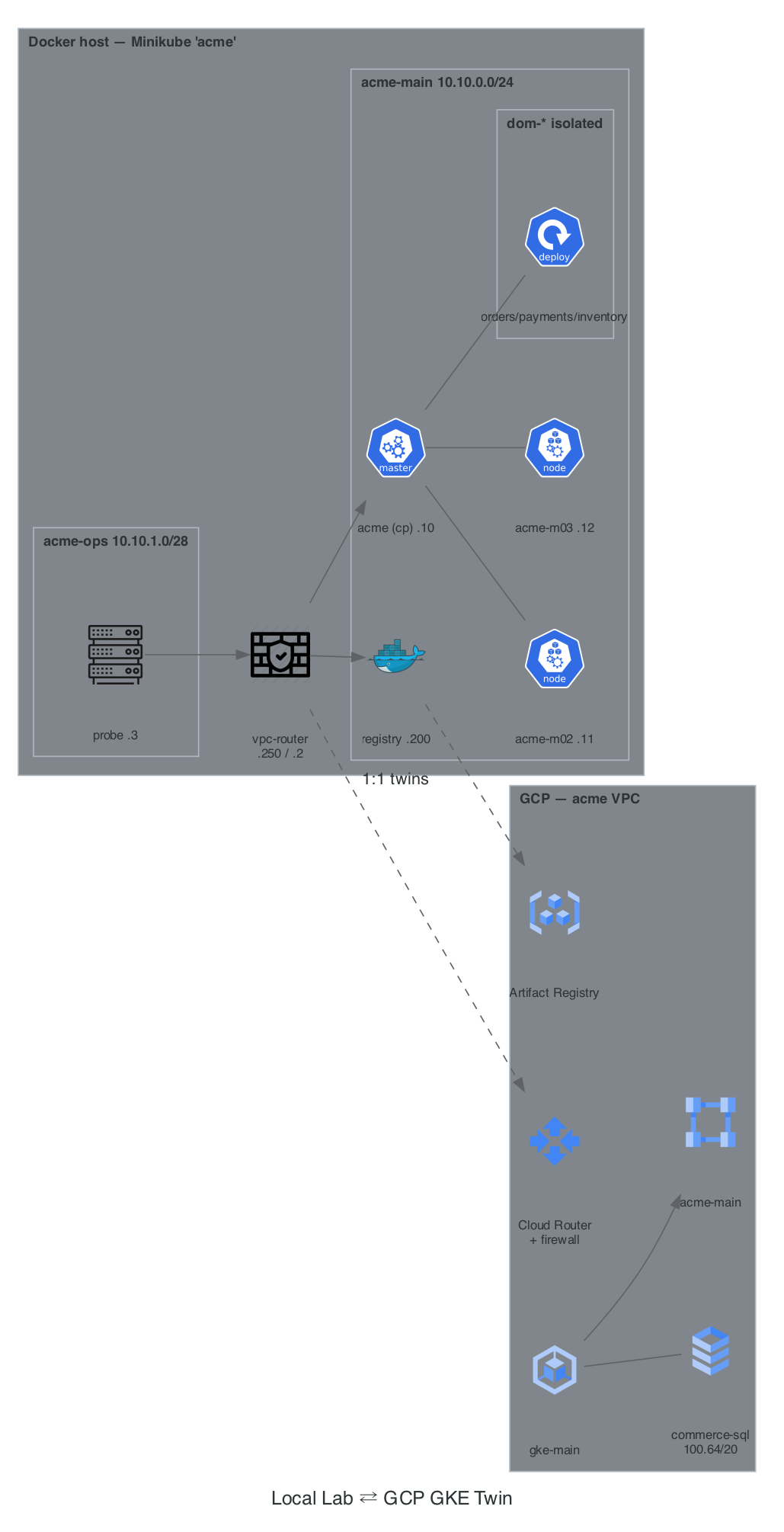
3. Why This Lab Order Works (And Tweaks Made to Your Original Plan)
To make the concepts stick permanently and transfer directly to GCP GKE, we refined the flow with four key improvements:
- Docker Underlay First (Lab 01 before Minikube): Instead of treating Docker as a black box, you first build two isolated Docker bridge networks (
acme-mainandacme-ops), connect them with a dual-homedvpc-routercontainer, and write rawip route+ statefuliptablesrules. Once you seeconntrackdrop an asymmetric packet in Docker, GCP VPC Routes and Firewall rules become trivial. - Local Registry Mirror as "Door 1" (Lab 03 & Lab 04): Your original plan noted that Door 1 (Private Google Access) had no local equivalent. We added a local Docker Registry container (
10.10.0.200:5000) onacme-main+ a/32route so that when you delete the default internet route in Lab 04, your nodes can still pull images privately—mirroring GCP Artifact Registry over Private Google Access. - Cilium CNI with Hubble Observability (Lab 02 & Lab 05): Minikube's built-in
--cni=ciliumuses cluster-pool IPAM by default and skips Hubble. We install Cilium via Helm withipam.mode=kubernetesand Hubble enabled, giving you 1:1 parity with GKE Dataplane V2 and real-timehubble observe --verdict DROPPEDpacket inspection. - Every Lab Follows the 4-Step Architect's Loop:
- Architecture Decision (Why): Trade-offs and when to choose Option A vs Option B.
- Visual Blueprint: Mermaid topology or sequence diagram of the exact packet/control flow.
- Hands-On Build & Verify: Copy-pasteable commands with expected outputs.
- Deliberate Break & Triage Drill: Break the layer on purpose, capture the exact error text, and prove the fix.
4. Prerequisites & Workstation Setup (macOS / Linux)
Run this once to install all CLI tools and initialize your local workspace:
# 1. Install CLI toolchain (macOS Homebrew)
brew install minikube kubectl helm cilium-cli hubble istioctl fluxcd/tap/flux jq

# 2. Verify versions & Docker daemon resources (allocate >= 8 GB RAM, 4 CPUs in Docker Desktop)
docker info --format 'CPUs: {{.NCPU}} | Memory: {{.MemTotal}}'
minikube version
kubectl version --client
helm version --short
cilium version --client
istioctl version --remote=false
flux --version

# 3. Create working directory for lab manifests and scripts
mkdir -p ~/acme-k8s-lab/{scripts,manifests,charts,apps}
cd ~/acme-k8s-lab
macOS Docker Desktop Rule #1: On macOS, Docker runs inside a lightweight Linux VM. Your Mac host terminal cannot directly
pingorcurlcontainer IPs (10.10.0.xor10.10.1.x). Always run network tests from theprobecontainer (docker exec probe ...) or inside the cluster (kubectl exec ...).
5. How to View This Site as an Interactive Web App
This directory is a MkDocs Material site with icon-based architecture diagrams (generated by diagrams/generate.py → docs/diagrams/*.png, rerun with uv run --with diagrams python diagrams/generate.py), Mermaid sequence diagrams, tabbed navigation, full-text search, and one-click code copy buttons.