Lab 01 · Docker Underlay: VPC Subnets, Next-Hop Routing & Stateful Firewalls
Core Lesson: Kubernetes sits on top of the network; it cannot create VPCs, subnets, route tables, or cloud firewalls. Before starting Minikube, you will build the underlay network yourself using two Docker bridge subnets, a dual-homed Linux router container (
vpc-router), andiptablesconnection tracking. GCP Twin: Phase P3 (google_compute_network,google_compute_subnetwork,google_compute_route,google_compute_firewall, IAP bastion VM).
RFC 1918 — Address Allocation for Private Internets
Step 0 — The Starting Point: Repos & Folders
One VPC acme-main (np) — both subnets are private; there is no public subnet because the default internet route is deleted at birth (that's Lab 04):
- subnet
gke-main10.10.0.0/24— the cluster subnet (nodes; pod10.20.0.0/20+ svc10.30.0.0/24are secondary ranges inside it, not separate subnets) - subnet
ops10.10.1.0/28— the bastion/probe subnet; admin traffic enters here and must route + pass firewall to reach the cluster
KubernetesConcepts/                 ← this repo (lab docs + runnable manifests)
├─ apps/orders  apps/payments  apps/inventory     # the 3 domain microservices
├─ apps/data/                                     # dom-data tier: Postgres + secrets + seed Job
├─ charts/acme-microservice/                      # vendored Tier-2 Helm chart
└─ src/1-pods … src/12-troubleshooting-scenarios  # concept manifest library

~/acme-k8s-lab/                     ← your scratch dir (nothing here is committed)
├─ charts/acme-microservice/        # the chart YOU author in Lab 03
├─ gitops/                          # clusters/local + infrastructure/{controllers,configs,data} + apps/local
└─ scripts/                         # cluster-up.sh, cluster-down.sh, verify-all.sh

gitlab.com/acme-labs-<handle>/      ← the GCP twin: one GitLab PROJECT per box
├─ platform/          bootstrap · network · gke-platform · observability · terraform-modules · ci-templates
├─ domain-shared/     shared-services (Cloud SQL) · configurations/helm-charts · configurations/flux-releases
└─ applications/      orders/{orders-svc,orders-infra} · payments/{…} · inventory/{…}

environments/
├─ np   = my-devops-journey-502420  → cluster acme-np, pipeline-np SA, flux clusters/np   ← labs build this
└─ prod = acme-labs-p-<suffix>      → state+SAs only, pipeline-p (protected main) / pipeline-p-ro, flux clusters/p
1. Architecture Decision: Where Does Underlay End and Kubernetes Begin?
| Question | Architect's Answer |
|---|---|
Why build two Docker networks (acme-main + acme-ops)? |
A single subnet hides routing bugs because every host is L2-adjacent (ARP). Separating the bastion (acme-ops 10.10.1.0/28) from the cluster (acme-main 10.10.0.0/24) forces every admin and ingress packet through a Layer 3 next hop and a stateful firewall—just like an enterprise Bastion/VPN subnet talking to GKE. |
Why do we need conntrack ESTABLISHED,RELATED on the firewall? |
GCP VPC Firewalls are stateful: if you allow probe -> API Server (6443), the return packet (6443 -> probe) is automatically allowed. Raw iptables with FORWARD DROP is stateless until you explicitly add a conntrack rule. Forgetting this creates the classic "one-way ping / asymmetric drop" bug. |
Why pre-deploy a local registry (10.10.0.200) and echo server (10.10.0.201)? |
In Lab 04, we will delete the default internet route (0.0.0.0/0). Having 10.10.0.200:5000 on acme-main gives us a local twin of GCP Artifact Registry over Private Google Access (Door 1), and echo (10.10.0.201) logs client source IPs to prove Pod SNAT/masquerade. |
2. Visual Blueprint: The Underlay Topology
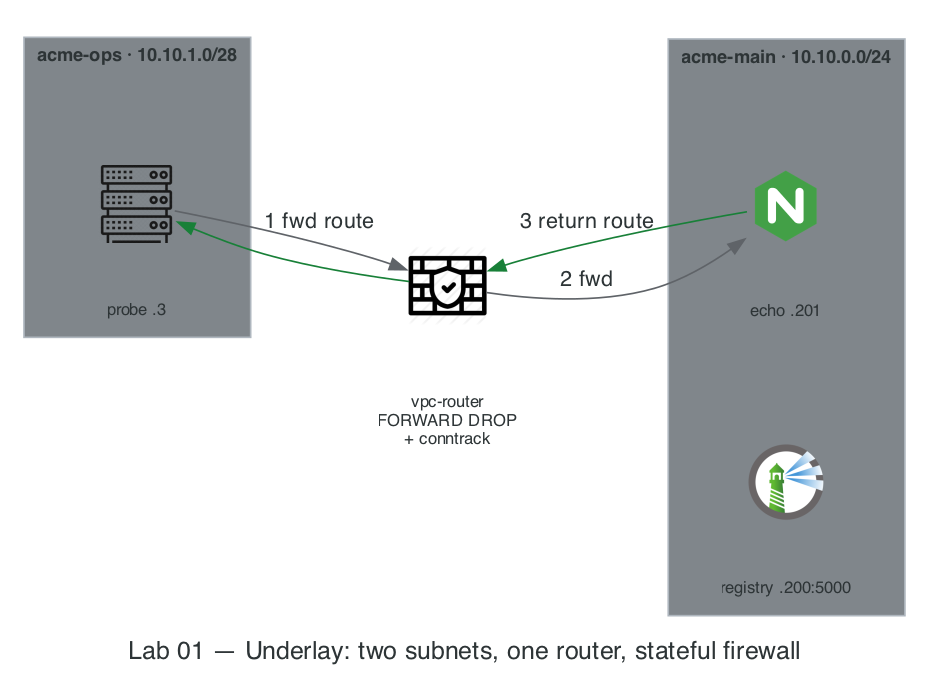
3. Step-by-Step Hands-On Build
Commands live in
Taskfile.yml. Each step below names itstask— runtask --listto see the whole build order. Inline commands that remain are verification or break/drill commands — the evidence you're meant to read, not boilerplate.
Step 1: Create the Two Subnets (acme-main & acme-ops)
task lab01:up   # creates BOTH subnets AND the 4 containers in Step 2 (idempotent)

# Verify both networks exist with exact CIDRs
docker network inspect acme-main acme-ops \
  --format '{{.Name}}: {{range .IPAM.Config}}{{.Subnet}} (gw {{.Gateway}}){{end}}'
Expected Output:
Notes:
In any standard IPv4 subnet (like 10.10.0.0/24), two IP addresses are reserved and cannot be assigned to individual devices, but they aren't for the gateway:
- Network Address:
10.10.0.0— identifies the network itself. - Broadcast Address:
10.10.0.255— used to send data packets to every device on this subnet simultaneously.
Where does the Gateway go?
The default gateway (your router) is actually a standard host device on the network. It requires an assignable host IP address. By convention/best practice, network administrators typically assign the default gateway to either:
- The first usable IP:
10.10.0.1 - The last usable IP:
10.10.0.254
Quick Summary Table for 10.10.0.0/24
| Address | Type | Assignable to a device? |
|---|---|---|
10.10.0.0 |
Network Identifier | ❌ Reserved |
10.10.0.1 |
First Usable IP (often assigned to Gateway) | ✅ Yes |
10.10.0.2 – 10.10.0.254 |
Usable Host IPs | ✅ Yes |
10.10.0.255 |
Broadcast Address | ❌ Reserved |
- Gateway (
10.10.0.1): Acts as the default router for any container on theacme-mainnetwork. When a container needs to talk to the outside world or another network, it sends traffic here. - Usable Container IPs (
10.10.0.2through10.10.0.254): These are the addresses Docker can dynamically assign or statically bind to your containers. - Network (
10.10.0.0) & Broadcast (10.10.0.255): Still reserved and blocked from assignment, just as discussed.
Step 2: Launch vpc-router, probe, registry, and echo
task lab01:up already launched all four — what each one twins:
| Container | Address | Role | GCP twin |
|---|---|---|---|
vpc-router |
10.10.0.250 (main) + 10.10.1.2 (ops), dual-homed |
Router between subnets, ip_forward=1, hosts the firewall |
Cloud Router + VPC firewall |
probe |
10.10.1.3 |
Ops bastion — your "corporate HQ" client | Bastion host / on-prem client |
registry |
10.10.0.200 |
Private image registry | Artifact Registry (Door 1) |
echo |
10.10.0.201 |
nginx logging client source IPs | Test backend behind the firewall |
Verify the router has two interfaces (eth0 on 10.10.0.250/24 and eth1 on 10.10.1.2/28):
Step 3: Observe Asymmetric Routing Failure, Then Wire Next-Hop Routes
Right now, probe (10.10.1.3) only knows its default gateway (10.10.1.1). If it pings echo (10.10.0.201), the packet goes to Docker's bridge gateway instead of vpc-router.
sequenceDiagram
    autonumber
    participant P as probe · 10.10.1.3 (acme-ops)
    participant R as vpc-router
    participant E as echo · 10.10.0.201 (acme-main)
    participant G as docker0 gw · 10.10.0.1

    rect rgb(255, 235, 235)
        Note over P,G: PHASE 1 — only the forward route exists ⇒ asymmetric path
        P->>R: ping request — dst 10.10.0.201 via next-hop 10.10.1.2
        R->>E: forwarded out eth0 (10.10.0.250)
        Note over E,G: echo has no route to 10.10.1.0/28,<br/>so its reply falls back to the default route
        E->>G: reply sent to default gw 10.10.0.1
        G--xP: ✗ lost — docker bridges are isolated
        Note over P: request arrived, reply never returned → ping timeout
    end

    rect rgb(232, 245, 233)
        Note over P,G: PHASE 2 — BOTH directions routed ⇒ symmetric path
        P->>R: ping request — dst 10.10.0.201 via next-hop 10.10.1.2
        R->>E: forwarded out eth0 (10.10.0.250)
        Note over E: return route added: 10.10.1.0/28 via 10.10.0.250
        E->>R: reply sent to next-hop 10.10.0.250
        R->>P: forwarded out eth1 → ping replies ✓
    end
Run this hands-on proof:
# 1. Add ONLY the forward route on probe:
docker exec probe ip route add 10.10.0.0/24 via 10.10.1.2

# 2. Try to ping echo (Fails! Because echo doesn't know how to reach 10.10.1.0/28)
docker exec probe ping -c 1 -W 2 10.10.0.201 || echo "EXPECTED FAIL: Missing return route on echo"

# 3. Now add the return route on echo and test again:
docker exec echo ip route add 10.10.1.0/28 via 10.10.0.250
docker exec probe ping -c 2 10.10.0.201
docker exec probe curl -sI http://10.10.0.201 | head -n 1
That manual dance was the lesson — from now on, task lab01:routes applies the same end state idempotently.
Step 4: Enforce a Stateful Firewall on vpc-router (GCP VPC Firewall Twin)
By default, Linux FORWARD policy is ACCEPT (everything talks to everything). On GCP, VPC ingress is deny-all by default, and you open specific ports via google_compute_firewall. Let's configure vpc-router to match GCP:
task lab01:firewall   # FORWARD policy DROP + conntrack ESTABLISHED,RELATED + ICMP allow
                      # (order matters: routes from Step 3 first, THEN close the door)

# 4. Verify: Ping works, but HTTP (port 80) to echo is BLOCKED!
docker exec probe ping -c 1 10.10.0.201
docker exec probe curl -sS -m 3 -o /dev/null -w 'HTTP Code: %{http_code}\n' http://10.10.0.201 || echo "Blocked by firewall as expected"

# 5. Inspect packet drop counters on vpc-router
docker exec vpc-router iptables -L FORWARD -n -v --line-numbers
Step 5: Your Reusable routes.sh
Because container routing tables live in volatile kernel memory, restarting a container or Minikube node wipes manual routes. The idempotent fix-it script is vendored at ./acme-k8s-lab/routes.sh — open it and read the three route blocks (probe forward-route, helper return-routes, Minikube-node return-routes selected by the name.minikube.sigs.k8s.io=acme label). Run it via task routes after every restart — this is triage signature #03.
4. Deliberate Break & Triage Drills
Run each break, observe the exact symptom, and restore:
Drill 1: The Stateless Firewall Trap (Missing ESTABLISHED,RELATED)
# Temporarily allow port 80 from probe -> echo, but DELETE the conntrack rule (Rule #1)
docker exec vpc-router iptables -A FORWARD -s 10.10.1.3 -d 10.10.0.201 -p tcp --dport 80 -j ACCEPT
docker exec vpc-router iptables -D FORWARD 1

# Test: SYN goes through, echo sends SYN-ACK, router DROPS the SYN-ACK!
docker exec probe curl -sS -m 3 http://10.10.0.201 || echo "Timed out - Return SYN-ACK dropped"

# Restore conntrack at Rule #1 and remove temporary port 80 rule:
docker exec vpc-router iptables -I FORWARD 1 -m conntrack --ctstate ESTABLISHED,RELATED -j ACCEPT
docker exec vpc-router iptables -D FORWARD -s 10.10.1.3 -d 10.10.0.201 -p tcp --dport 80 -j ACCEPT
5. Readiness Gate G-01
Before moving to Lab 02, verify you can answer without looking:
- Why did
pingfail when onlyprobehad a route to10.10.0.0/24? (Packets must route in both directions;echosent replies to10.10.0.1instead of10.10.0.250). - What is the difference between
Connection refusedandConnection timed out (000)across a firewall? (DROPdiscards the SYN silently → client waits for timeout;REJECTor a closed port with an open firewall sends TCP RST → immediateConnection refused).
Next Step: Lab 02 · Minikube Cluster, IPAM & Cilium CNI Dataplane →