Lab 04 · Egress Architecture: Delete the Default Route & Open the 4 Doors
Core Lesson: In enterprise GCP environments, the default internet route (
0.0.0.0/0 → default-internet-gateway) is deleted at VPC birth. Every outbound flow must use one of Four Approved Doors. Here you will prove Pod SNAT/masquerade, delete the default route on your Minikube worker nodes, and open each of the 4 Doors one by one.
GCP Twin: Phase P3 & P8 (delete_default_routes_on_create = true, Door 1 PGA199.36.153.8/30, Door 2vip_allowlist, Door 3allowed-open-nat+ Cloud NAT, Door 4 Hybrid VPN).
1. Architecture Decision: Why Node Routes & Tags Cannot Do Per-Pod Egress Control
| Architectural Reality | Implication for Design |
|---|---|
| Pods inherit their Node's routing table and network tags. | When a Pod (10.20.1.x) sends a packet outside the cluster, the packet is SNAT'd (masqueraded) to the Node's IP (10.10.0.11) and routed by the Node's kernel routing table. Therefore, adding the GCP network tag allowed-open-nat to a node pool gives every pod scheduled on that node internet access at the VPC layer! |
| How do you restrict egress per-pod if the node has a default route? | Use two layers: (1) VPC Route/Tag opens the door for the node pool (e.g., Flux source-controller needs gitlab.com), and (2) Cilium NetworkPolicy (L4) or Istio ServiceEntry (REGISTRY_ONLY L7) restricts which specific pods on that node can exit. |
| Why does DNS still resolve when the default internet route is deleted? | Pod → CoreDNS (10.30.0.10) → Node /etc/resolv.conf → Docker internal DNS (127.0.0.11 / GCP Metadata 169.254.169.254). DNS resolution is out-of-band from TCP routing! A pod can resolve example.com to 93.184.215.14 and then immediately hang on curl because there is no route to 93.184.215.14. |
2. Visual Blueprint: The 4 Outbound Doors
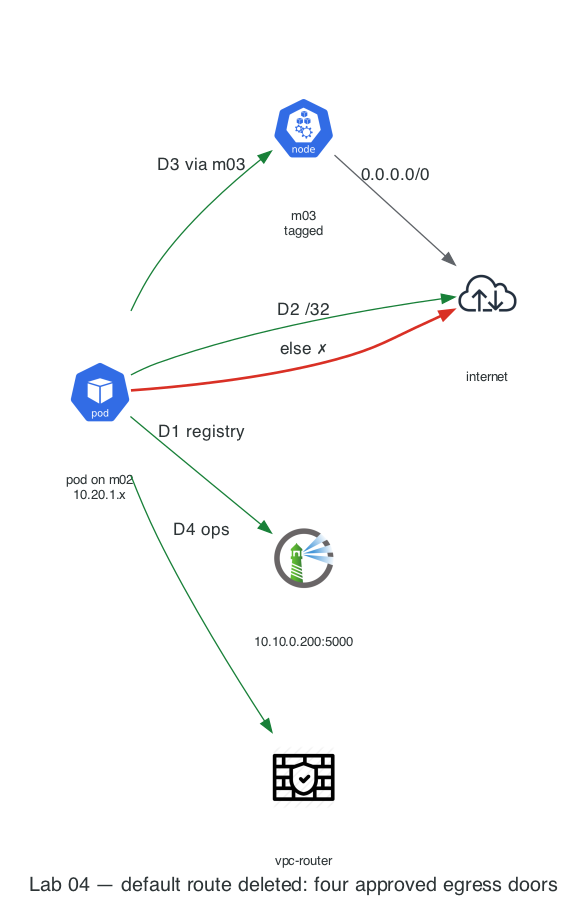
3. Step-by-Step Hands-On Build
Step 1: Define the Node-Pinned Probe Helper & Resolve Target IP
# Helper: Run a one-shot curl pod pinned to a specific worker node
probe_node() {
  local node=$1; shift
  kubectl run p-$RANDOM --rm -i --restart=Never -q \
    --image=curlimages/curl --image-pull-policy=Never \
    --overrides="{\"spec\":{\"nodeSelector\":{\"kubernetes.io/hostname\":\"$node\"}}}" \
    -- -sS -m 5 -o /dev/null -w '%{http_code}\n' "$@" 2>&1 | tail -1
}

# Grab a real public IP for example.com to use as our Door 2 (/32 Partner VIP)
EX_IP=$(docker exec probe dig +short example.com A | head -n 1)
echo "Target Partner VIP for example.com: $EX_IP"
Step 2: Prove Pod SNAT (Masquerade) Before Cutting Egress
When a Pod on acme-m02 (10.20.1.x) calls echo (10.10.0.201) outside the cluster, what source IP does echo see in its access logs?
# 1. Baseline check with "training wheels" (default route still present)
probe_node acme-m02 https://example.com          # Expected: 200

# 2. Call the external echo server on acme-main (10.10.0.201) from a pod on acme-m02
probe_node acme-m02 http://10.10.0.201/

# 3. Inspect echo's access log:
docker logs echo --tail 3
Expected Output: The log shows 10.10.0.11 (the Node IP of acme-m02), not the Pod IP (10.20.1.x)!
Why? Because 10.10.0.201 has no idea how to route back to 10.20.0.0/20. Cilium SNATs (masquerades) the pod's source IP to the node's eth0 IP when leaving the cluster.
Step 3: Close the Doors (Delete the Default Route on Workers)
Now flip training_wheels = false by deleting default (0.0.0.0/0) on both worker nodes (acme-m02 and acme-m03):
Test internet access from acme-m02 now:
# Fails with 000 / exit code 7 (No route to host / timeout)!
probe_node acme-m02 https://example.com || echo "EXPECTED: Internet egress is completely cut!"
Step 4: Open the 4 Outbound Doors One by One
Door 1: Private Services / Local Registry (10.10.0.200:5000)
Even with 0.0.0.0/0 deleted, 10.10.0.200 is reachable on acme-main (just as 199.36.153.8/30 private.googleapis.com is reachable on GCP via Door 1):
probe_node acme-m02 http://10.10.0.200:5000/v2/
# Expected: 200! Private registry works without an internet default route!
Door 2: Exact /32 Partner VIP Route ($EX_IP/32)
Suppose acme-m02 must call only example.com ($EX_IP/32) and nothing else on the internet:
# Add a /32 static route on acme-m02 pointing to the gateway (10.10.0.1)
docker exec acme-m02 ip route replace "$EX_IP/32" via 10.10.0.1

# Test example.com (Works: 200!) vs google.com (Fails: blocked!)
probe_node acme-m02 --resolve "example.com:443:$EX_IP" https://example.com
probe_node acme-m02 https://www.google.com || echo "Blocked! Only the /32 VIP has a route!"
Door 3: Tag-Gated Open NAT (allowed-open-nat=true on acme-m03 Only)
In Lab 02, we labeled acme-m03 with allowed-open-nat=true. In GCP, a tag-scoped route 0.0.0.0/0 applies only to nodes with that tag:
# Restore default route ONLY on the tagged node (acme-m03 carries allowed-open-nat=true)
task lab04:restore   # on GCP this is a tag-scoped 0.0.0.0/0 route — tags select targets

# Compare untagged node (acme-m02) vs tagged node (acme-m03) for google.com:
probe_node acme-m02 https://www.google.com || echo "acme-m02: Blocked (No tag)"
probe_node acme-m03 https://www.google.com    # Expected: 200!
Door 4: Hybrid / On-Prem Route via vpc-router (10.10.1.0/28)
Because scripts/routes.sh added 10.10.1.0/28 via 10.10.0.250 on all nodes, traffic to acme-ops (10.10.1.3) uses the internal router regardless of whether default exists:
# Allow acme-main -> acme-ops on vpc-router and ping probe (10.10.1.3) from acme-m02
docker exec acme-m02 ping -c 2 10.10.1.3
4. Summary Verification Table (Your Evidence Sheet)
| Outbound Flow | Node acme-m02 (No Default Route) |
Node acme-m03 (allowed-open-nat=true) |
Door Used | GCP P3/P8 Twin |
|---|---|---|---|---|
http://10.10.0.200:5000/v2/ |
200 |
200 |
Door 1 | PGA + 199.36.153.8/30 + Private DNS |
https://example.com ($EX_IP/32) |
200 |
200 |
Door 2 | google_compute_route.public_services (/32) |
https://www.google.com (Any IP) |
000 (Dropped) |
200 |
Door 3 | Tag allowed-open-nat + Cloud NAT |
ping 10.10.1.3 (acme-ops) |
0% loss |
0% loss |
Door 4 | Cloud Router BGP + HA VPN |
commerce-db / payments-db pods → anywhere |
000 |
000 |
None — by design | Cloud SQL never egresses; the seed Job's postgres:16-alpine pull is a Door-1 mirror candidate (like dockerhub-mirror) |
5. Deliberate Break & Triage Drills
Drill 1: The Un-Preloaded Image Pull Trap (ImagePullBackOff)
What happens when a pod is scheduled onto acme-m02 (no default route) requesting an image from Docker Hub (alpine:3.19) that wasn't preloaded or mirrored in Door 1?
kubectl run broken-pull --image=alpine:3.19 \
  --overrides='{"spec":{"nodeSelector":{"kubernetes.io/hostname":"acme-m02"}}}' -- sleep 3600
sleep 8
kubectl get pod broken-pull
kubectl describe pod broken-pull | tail -n 8

# Clean up
kubectl delete pod broken-pull --wait=false
Lesson: Image pulls are a node-level egress dependency. On GKE with
delete_default_routes_on_create = true, pulling fromdocker.iofails with this exactImagePullBackOffunless you configure Artifact Registry Remote Repository (dockerhub-mirror) over Door 1!
6. Readiness Gate G-04
- Why did
dig example.comsucceed from a pod onacme-m02even afterip route del default, whilecurl https://example.comtimed out? (DNS queries go to CoreDNS → Docker host resolver out-of-band; TCP packets to93.184.215.14:443use the node's routing table and hitNo route to host). - If you only want the
flux-system/source-controllerpod to reachgitlab.comover Door 3, why isn't tagging the nodeallowed-open-natenough by itself? (The tag opens the route for the entire node; every pod on that node inherits it unless restricted by KubernetesNetworkPolicyor IstioREGISTRY_ONLY).
Next Step: Lab 05 · L3/L4 Zero-Trust with Cilium NetworkPolicy & Hubble →