Lab 02 · Minikube Cluster, IPAM & Cilium eBPF Dataplane
Core Lesson: Design your 3 address spaces (Node, Pod, Service) before booting the cluster, attach Minikube to your existing
acme-mainVPC subnet, install Cilium via Helm with Kubernetes IPAM and Hubble, and prove how authorized networks control access to the Kubernetes API server.
GCP Twin: Phase P3 & P4 (ip_allocation_policy,max_pods_per_node,datapath_provider = "ADVANCED_DATAPATH",master_authorized_networks_config).
1. Architecture Decision: IPAM & CNI Wiring
| Decision Point | Choice Made | Why It Matters on GCP GKE |
|---|---|---|
| How are Pod IPs allocated? | kube-controller-manager carves 10.20.0.0/20 into /24 per-node slices (node.spec.podCIDR), and Cilium runs with ipam.mode=kubernetes. |
On GKE VPC-Native clusters, GKE carves the gke-pods secondary range (10.20.0.0/20) into per-node alias IP ranges based on max_pods_per_node. Using ipam.mode=kubernetes locally ensures your pods get 10.20.x.x IPs instead of Cilium's private 10.0.x.x default pool! |
Why install Cilium via Helm instead of minikube start --cni=cilium? |
Start Minikube with --cni=bridge (or minimal CNI), then install Cilium via Helm with hubble.relay.enabled=true. |
Minikube's built-in --cni=cilium manifest uses cluster-pool IPAM (ignoring 10.20.0.0/20) and disables Hubble. Installing via Helm gives you exact CIDR parity + hubble observe for L3/L4 packet debugging. |
Why 3 Nodes (acme, acme-m02, acme-m03)? |
1 Control Plane (10.10.0.10) + 2 Workers (acme-m02, acme-m03). |
Lets you test cross-node pod traffic (Lab 02), and in Lab 04 we will label acme-m03 with allowed-open-nat=true (Door 3) while keeping acme-m02 locked down. |
2. Visual Blueprint: The 3 Address Spaces & eBPF Datapath
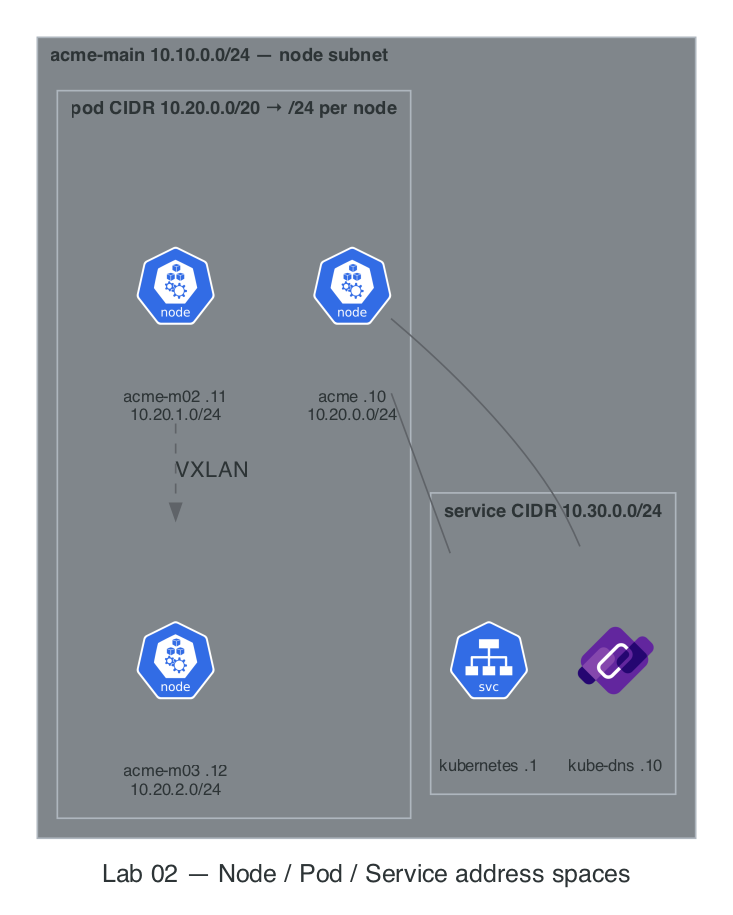
CIDR Capacity Math (Do This Before Every Cluster Build)
- Pod CIDR:
10.20.0.0/20= \(2^{32-20} = 4,096\) total IPs. - Per-Node Slice (Default
/24): \(2^{32-24} = 256\) IPs per node → \(\frac{4096}{256} =\) 16 nodes maximum. - GKE Optimization (
max_pods_per_node = 64): GKE allocates a/25(\(128\) IPs,always \(2 \times \text{max\_pods}\)) per node → \(\frac{4096}{128} =\) 32 nodes maximum.
3. Step-by-Step Hands-On Build
Commands live in
Taskfile.yml. Each step names itstask(task --listfor the full order). Remaining inline commands are verification or drills — evidence, not boilerplate.
Step 1: Boot the 3-Node Minikube Cluster on acme-main
task lab02:start    # boots 'acme' on acme-main: 3 nodes, CP 10.10.0.10,
                    # pods 10.20.0.0/20, svc 10.30.0.0/24, bridge CNI
task lab01:routes   # return routes so acme-ops (probe) can reach the new nodes
The profile name is load-bearing — it must be
acme.routes.shfinds nodes by thename.minikube.sigs.k8s.io=acmecontainer label, and Labs 04/10 hardcodeacme-m02/acme-m03. A differently-named profile (-p acme-cluster) gets its own isolated docker network and silently misses every later step. If a profile exists half-built,task cleanfirst.
Step 2: Install Cilium CNI + Hubble (GKE Dataplane V2 Engine)
Container Network Interface (CNI) : Cilium CNI is an open-source Container Network Interface (CNI) plugin for Kubernetes and other container orchestration platforms that provides high-performance networking, security, and observability
task lab02:cilium   # removes bridge CNI on all nodes, installs Cilium via Helm
                    # (ipam.mode=kubernetes + vxlan + Hubble), restarts CoreDNS,
                    # labels m02 pool=main and m03 pool=main allowed-open-nat=true
Step 3: Prove the 3 Address Spaces with Evidence
Run these four commands and verify every range matches your IPAM blueprint:
What you're looking for in that output:
- Node IPs
10.10.0.10/.11/.12and per-node pod CIDRs10.20.0.0/24,10.20.1.0/24,10.20.2.0/24(check.spec.podCIDRper node). - Service CIDR —
kubernetes.default=10.30.0.1,kube-dns=10.30.0.10. - Pod IPs — notice which kube-system pods show Node IPs (
10.10.0.x) vs Pod IPs (10.20.x.x).
Architect's Observation: Why do
kube-apiserver,etcd,kube-proxy, andciliumshow10.10.0.x(Node IP) instead of10.20.x.x? Because they sethostNetwork: true—they must run in the node's root network namespace to program the networkbefore any Pod network exists!
Step 4: Configure Registry Trust on Nodes (Prep for Door 1 in Lab 03/04)
Configure containerd on all three Minikube nodes to allow pulling from our HTTP local registry (10.10.0.200:5000) on acme-main:
Step 5: Master Authorized Networks Drill (probe → Control Plane API)
In Lab 01, we set iptables -P FORWARD DROP on vpc-router. Let's test whether probe (10.10.1.3 in acme-ops) can reach the Minikube Kubernetes API server (https://10.10.0.10:8443/version):
# 1. Predict first: What will curl return right now? (Answer: 000 timeout — blocked by vpc-router!)
docker exec probe curl -sk -m 3 -o /dev/null -w '%{http_code}\n' https://10.10.0.10:8443/version || true

# 2. Authorize probe's IP (10.10.1.3) to reach the Control Plane on TCP 8443
#    (GCP Twin: master_authorized_networks_config cidr_blocks = ["10.10.1.3/32"])
docker exec vpc-router iptables -A FORWARD -s 10.10.1.3 -d 10.10.0.10 -p tcp --dport 8443 -j ACCEPT

# 3. Re-test: Now returns HTTP 200 (or 401/403 from apiserver RBAC, proving TCP + TLS connected!)
docker exec probe curl -sk -m 3 -o /dev/null -w 'HTTP Status: %{http_code}\n' https://10.10.0.10:8443/version
docker exec probe curl -sk https://10.10.0.10:8443/version
4. Deliberate Break & Triage Drills
Drill 1: Trace Cross-Node Pod Encapsulation with tcpdump
Let's see how a pod on acme-m02 (10.20.1.x) talks to a pod on acme-m03 (10.20.2.x):
# Schedule two netshoot pods on different worker nodes
kubectl run pod-m02 --image=nicolaka/netshoot \
  --overrides='{"spec":{"nodeSelector":{"kubernetes.io/hostname":"acme-m02"}}}' -- sleep 3600
kubectl run pod-m03 --image=nicolaka/netshoot \
  --overrides='{"spec":{"nodeSelector":{"kubernetes.io/hostname":"acme-m03"}}}' -- sleep 3600
kubectl wait --for=condition=ready pod/pod-m02 pod/pod-m03 --timeout=90s

IP_M03=$(kubectl get pod pod-m03 -o jsonpath='{.status.podIP}')
echo "pod-m03 IP is $IP_M03"

# Ping from pod-m02 -> pod-m03 while inspecting Hubble
kubectl exec pod-m02 -- ping -c 2 "$IP_M03"
kubectl -n kube-system exec ds/cilium -- hubble observe --protocol icmp --last 5

# Clean up test pods
kubectl delete pod pod-m02 pod-m03 --wait=false
5. Readiness Gate G-02
Verify you can answer from memory:
- Why can a second cluster on the same VPC never share
10.20.0.0/20if the networks are routed together? (Both clusters allocate overlapping10.20.0.xpod IPs; return traffic routes to the wrong cluster). - Which Kubernetes component assigns
10.20.1.0/24toacme-m02, and which component assigns10.20.1.15to an individual Pod on that node? (kube-controller-managerassigns the/24podCIDRto the Node object; the local CNI IPAM plugin onacme-m02assigns individual IPs from that/24to Pods).
Next Step: Lab 03 · Services, CoreDNS & App Packaging with Docker/Helm →