Lab 1 — First Proxy
Goal: deploy the labs-proxy bundle, hit it with curl, and trace the
request in the Apigee UI. ~15 min.
What you'll learn
- How a bundle maps to a deployed revision
- What
BasePath+pathsuffixmean on the wire - How a flow condition selects which policies run
- How to read the Trace (Debug) tool
Before you start
Skim Proxy Anatomy. You should be able to say what PreFlow, conditional Flow and RouteRule mean. If not, that's fine — this lab makes them concrete.
The moving parts
The bundle's front door (apiproxy/proxies/default.xml), reduced to what
this lab needs:
<HTTPProxyConnection>
  <BasePath>/labs</BasePath> <!-- (1)! -->
  <VirtualHost>default</VirtualHost> <!-- (2)! -->
</HTTPProxyConnection>
<RouteRule name="default"> <!-- (3)! -->
  <TargetEndpoint>default</TargetEndpoint> <!-- (4)! -->
</RouteRule>
- The public URL prefix. A request to
https://$APIGEE_HOST/labs/hellois claimed by this proxy;/hellobecomesproxy.pathsuffix. - Always
defaultin Apigee X — the hostname actually comes from the environment group. - "Where should the request go next?" Rules are checked in order; this one has no condition, so it matches everything not caught by an earlier rule.
- Hand the request to
targets/default.xml.
And the backend (apiproxy/targets/default.xml):
<TargetEndpoint name="default"> <!-- (1)! -->
  <HTTPTargetConnection>
    <URL>https://mocktarget.apigee.net</URL> <!-- (2)! -->
  </HTTPTargetConnection>
</TargetEndpoint>
- Must match the
<TargetEndpoint>name in the RouteRule above. - Apigee appends the remaining path and query:
/labs/foo?x=1→https://mocktarget.apigee.net/foo?x=1.
So GET https://$APIGEE_HOST/labs/foo → GET https://mocktarget.apigee.net/foo.
The mock target echoes what it received — perfect for observing what Apigee
added or removed.
Deploy
export TOKEN=$(gcloud auth print-access-token)

cd examples/labs-proxy
./deploy.sh
# or directly:
# apigeecli apis create bundle -o "$APIGEE_ORG" -e "$APIGEE_ENV" \
#   --proxy-folder apiproxy -n labs-proxy -t "$TOKEN" --ovr
Check it's deployed:
You should see labs-proxy with a revision number deployed to your
environment.
Predict, then run
Predict
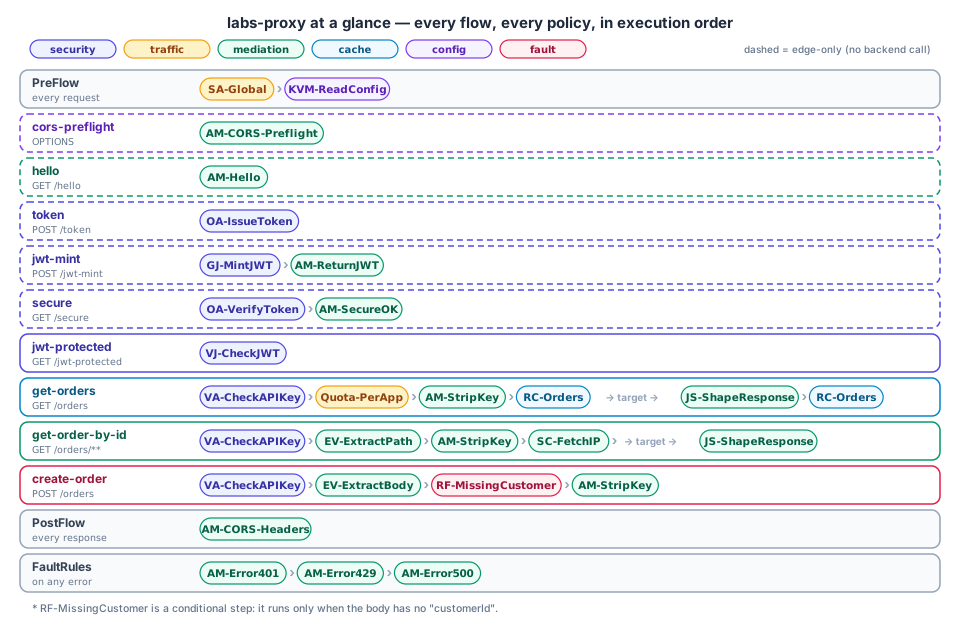
The proxy has a /hello flow that only runs AM-Hello in the
response, and /hello is on the edge-only RouteRule list. What do you
expect: (a) the mock target's JSON, (b) a JSON message produced by Apigee
itself, or (c) a 404?
Answer
(b). No backend call is made at all.
That JSON comes from an AssignMessage policy in the response flow — the
request never reaches the backend for /hello. Look at the hello
conditional flow:
<Flow name="hello">
  <Condition>(proxy.pathsuffix MatchesPath "/hello") and (request.verb = "GET")</Condition> <!-- (1)! -->
  <Request/> <!-- (2)! -->
  <Response>
    <Step><Name>AM-Hello</Name></Step> <!-- (3)! -->
  </Response>
</Flow>
- The guard. Both parts must be true: the path after
/labsis exactly/hello, and the HTTP method isGET. Anything else skips this flow. - Nothing to do in the request phase, so the element is empty.
- Run the policy whose file is
policies/AM-Hello.xml. The text between<Name>tags must equal that policy'snameattribute.
<AssignMessage async="false" continueOnError="false" enabled="true" name="AM-Hello"> <!-- (1)! -->
  <DisplayName>AM-Hello</DisplayName>
  <Set> <!-- (2)! -->
    <Payload contentType="application/json"> <!-- (3)! -->
      {"message": "hello from apigee", "path": "{proxy.pathsuffix}"} <!-- (4)! -->
    </Payload>
    <StatusCode>200</StatusCode> <!-- (5)! -->
  </Set>
  <IgnoreUnresolvedVariables>true</IgnoreUnresolvedVariables> <!-- (6)! -->
  <AssignTo createNew="false" type="response">response</AssignTo> <!-- (7)! -->
</AssignMessage>
AssignMessage= "create or edit a message". Attributenameis the policy's identity;continueOnError="false"means a failure here aborts into fault handling;enabled="true"can be flipped to switch it off.<Set>overwrites parts of the target message. Siblings you'll meet:<Add>(append),<Copy>,<Remove>.- The body, and the
Content-Typeheader to send with it. {proxy.pathsuffix}is replaced at runtime by the flow variable's value (/hello). Anything in{ }that is a valid variable name is looked up; JSON braces/quotes don't qualify, so they pass through untouched. (If a payload gets ambiguous, setvariablePrefix="@" variableSuffix="#"on<Payload>and write@proxy.pathsuffix#instead.)- HTTP status of the response.
- If
{proxy.pathsuffix}couldn't be resolved, use empty text instead of failing the policy. - Which message to edit: the
responseobject, andcreateNew="false"means "use the existing one rather than creating a fresh message".
Trace it
- Apigee console → API Proxies → labs-proxy → Debug tab (called Trace in older docs).
- Start a session (pick the revision and environment), then run the
curlagain. - Click the transaction. In the step list find, in order:
SA-Global,KVM-ReadConfig(PreFlow) →AM-Hello(flow response). ClickAM-Helloand look at the variables panel:proxy.pathsuffix = "/hello"— the exact variable theConditionmatched on.
Where's the target call?
There isn't one: the edge-only RouteRule matched first and has no
target. Contrast with curl "https://$APIGEE_HOST/labs/anything", whose
Trace does show a "Request sent to target" and the mock target's reply.
Experiments
curl "https://$APIGEE_HOST/labs/hello?x=1"— does it still match? (MatchesPathlooks at the path only; query strings don't affect it.)curl -X POST "https://$APIGEE_HOST/labs/hello"→ falls through to the target (verb mismatch). Compare the response.curl "https://$APIGEE_HOST/labs/hello/"— trailing slash. DoesMatchesPath "/hello"match? Check in Trace before you answer.- Change the
BasePathto/labs2, redeploy, and confirm/labs/hellonow fails while/labs2/helloworks. - Set
enabled="false"onAM-Helloand redeploy. What does/helloreturn now, and why is it not a fault?
Check yourself
1. What are proxy.basepath and proxy.pathsuffix for GET /labs/orders/42?x=1?
/labs and /orders/42 — the query string is separate
(request.queryparam.x).
2. Why is AM-Hello attached to the Response while nothing runs in the Request?
On an edge-only route there's no backend, so the proxy builds the reply itself; the response phase is where a reply is shaped, and putting it there keeps "build the answer" in the conventional place.
3. What would happen if the policy file were named AM-Hi.xml but <Name>AM-Hello</Name> stayed in the flow?
Import/deploy fails or the step can't resolve a policy — names must match
across file, name attribute and <Step>.
4. Experiment 5: why isn't a disabled policy a fault?
enabled="false" makes the policy a no-op; Apigee skips it without error,
so whatever response exists at that point is what the client gets. Check
it in Trace — and notice that a silently skipped policy is a classic
"why did nothing happen?" cause.
Next
Lab 2 — API Key Security: lock down /orders with
VerifyAPIKey and a real developer app.