Debugging & Troubleshooting
Debugging Apigee is a skill with a short, repeatable method. Learn the method once and you can fix proxies you have never seen.
By the end you can...
- Capture a transaction in Debug (formerly Trace) and read it.
- Map any HTTP status to the first place to look.
- Tell "my condition didn't match" from "my policy failed" from "the backend failed".
The method
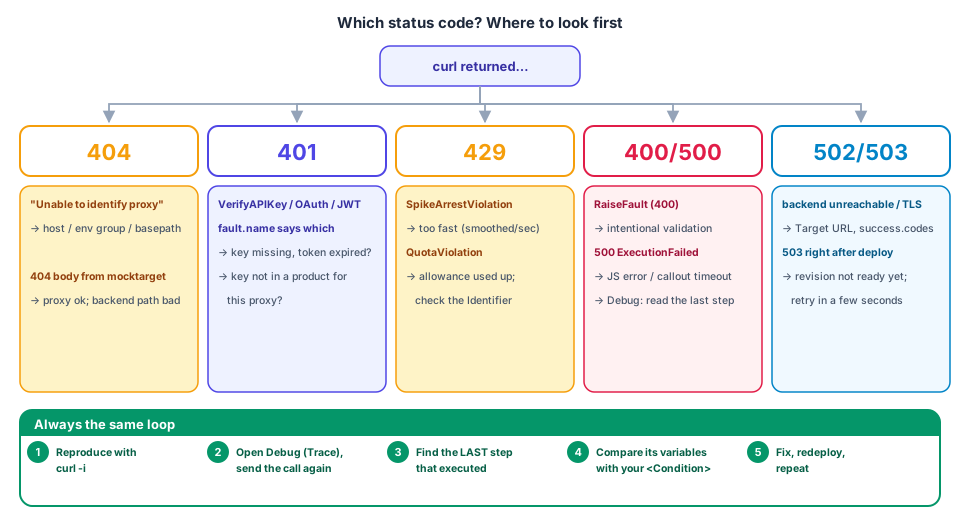
- Reproduce with
curl -i(headers matter —-ishows them). - Capture in the Debug tool: API Proxies → labs-proxy → Debug → Start debug session, pick environment + revision, send the call again.
- Find the last step that executed. Everything after it never ran.
- Inspect variables at that step and compare with the
<Condition>orrefyou wrote. - Fix, redeploy, repeat. Change one thing at a time.
Reading a Debug transaction
A capture is an ordered list of phases; each phase lists the policies that ran with their status:
| What you see | Meaning |
|---|---|
Request received from client |
raw request as it arrived — check verb, path, headers |
Flow Info / flow name |
which conditional flow matched (none listed = none matched) |
| policy icon, green tick | policy executed successfully |
| policy icon, red | policy failed → fault handling starts next |
Request sent to target |
what the backend actually received (verify stripped keys here!) |
Response received from target |
the backend's raw answer |
Error / FaultRule phase |
which rule matched and what it executed |
Click any step to see variables read/written, properties and
output (anything you print() in JS).
Masking
Variables prefixed private. appear masked in Debug, and a debug
session's data masks configured fields. Don't paste debug output with
real tokens into tickets.
First-hour failure catalogue
| Symptom | Likely cause | How to confirm | Fix |
|---|---|---|---|
Unable to identify proxy for host: ... and url: ... |
host not in env group, proxy not deployed to that env, or BasePath mismatch | apis listdeploy; check env-group hostnames |
attach env, fix BasePath, redeploy |
| 404 from the backend (body from mocktarget) | no proxy flow matched or you forwarded to a wrong path | Debug: "Request sent to target" URL | adjust condition / target URL |
401 FailedToResolveAPIKey |
key variable empty (wrong param/header name) | variables panel: request.queryparam.apikey |
match ref to what clients send |
401 InvalidApiKey |
key unknown/revoked | apigeecli apps get |
recreate/attach app |
401 InvalidApiKeyForGivenResource |
app's product doesn't cover this proxy/env | product → proxies/envs | add proxy/env to product |
401 TokenExpired / InvalidSignature |
JWT expired / wrong secret | decoded claims in Debug | mint fresh; check secret equality |
401 InsufficientKeyLength |
HS256 secret < 32 bytes | KVM value length | use ≥ 32-byte secret |
429 SpikeArrestViolation |
too many calls too fast (global!) | fault.name in body |
slow down / raise rate |
429 QuotaViolation |
per-app allowance used | ratelimit.*.used.count |
wait for reset / raise Allow |
500 with fault.name = ExecutionFailed |
JS error or callout failure | step output | read exception text |
500 fallback body, you expected a 400 |
DefaultFaultRule overwrote your RaiseFault |
Error phase shows both rules ran | add condition / drop AlwaysEnforce |
502/503 from backend |
backend down, TLS or DNS issue | Debug: target response phase | test backend directly with curl |
| Policy "didn't run" | enclosing Flow condition false, or step <Condition> false |
no Flow Info for it | print variables, fix condition |
| Variable resolves empty | typo, set later than read, or wrong policy name in var | Debug variable list at that step | reorder / fix name |
| Deploy ok but old behaviour | KVM cache (300 s), response cache (TTL), or env deployed an older revision | apis listdeploy revision no. |
wait / bust cache / redeploy |
Practice: break it on purpose
Each of these is a 2-minute exercise that teaches you to recognise a
failure. For each, predict the status and fault.name first.
- Rename
<Step><Name>VA-CheckAPIKey</Name>toVA-CheckAPIKeand import. (Expected: import/deploy rejection — a configuration error, not a runtime one.) - Change
VA-CheckAPIKey'sreftorequest.header.apikey, keep calling with?apikey=. (401FailedToResolveAPIKey.) - Put
Quota-PerAppaboveVA-CheckAPIKey. (Shared bucket / empty identifier — see Lab 4.) - Shorten
jwt.secretto 10 characters. (InsufficientKeyLength.) - Point
SC-FetchIPtohttps://does-not-exist.invalid. (500ExecutionFailed; look at the Error phase.) - Remove the
Conditionfrom theDefaultFaultRuleand call theRaiseFaultendpoint. (400 becomes 500.)
Useful commands
# Which revision is live where?
apigeecli apis listdeploy -o "$APIGEE_ORG" -n labs-proxy -t "$TOKEN"

# Full request/response headers + timing breakdown
curl -sS -o /dev/null -D - -w "\nconnect=%{time_connect}s ttfb=%{time_starttransfer}s total=%{time_total}s\n" \
  "https://$APIGEE_HOST/labs/hello"

# Static analysis of the bundle
apigeelint -s examples/labs-proxy/apiproxy -f table.js

# Is the backend itself healthy? (bypass Apigee)
curl -i https://mocktarget.apigee.net/
Check yourself
1. Debug shows VA-CheckAPIKey red and nothing after it. Did Quota-PerApp run?
No. A failed policy (with continueOnError=false) diverts to fault handling;
later steps in the flow never execute.
2. How do you prove the backend never saw the API key?
Open the Request sent to target phase in Debug and inspect the URL and headers.
3. A client reports 403. Where might it come from, given this bundle only produces 400/401/429/500?
Not from the bundle's own policies — suspect Google Cloud IAM/org policy (for management calls), the backend itself, or a Cloud Armor/WAF rule in front of Apigee.