Advanced Topics
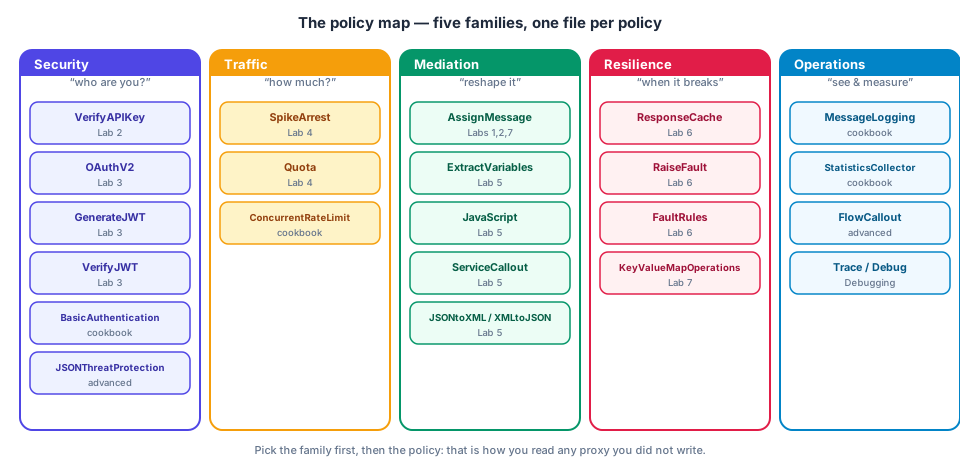
The labs cover the core policy set. This page maps the rest of what you need to know to run Apigee in production, with enough detail to know when to reach for each tool. Each section ends with a one-line "when".
1. Shared flows and flow hooks

A shared flow is a reusable sequence of policies (a mini-proxy with no
endpoints). Instead of copying SpikeArrest + VerifyAPIKey + logging into
twenty proxies:
<FlowCallout name="FC-CommonSecurity"> <!-- (1)! -->
  <SharedFlowBundle>common-security</SharedFlowBundle> <!-- (2)! -->
</FlowCallout>
- A policy of type
FlowCallout— attach it as a step like any other. - The name of the deployed shared flow. It runs inline and shares the caller's flow variables.
A flow hook attaches a shared flow to every proxy in an environment at
fixed points (PreProxy, PreTarget, PostTarget, PostProxy) — ideal for
org-wide logging or a baseline threat check, with no per-proxy edit.
apigeecli sharedflows create bundle -o "$APIGEE_ORG" -e "$APIGEE_ENV" -n common-security -f sharedflowbundle -t "$TOKEN"
apigeecli flowhooks attach -o "$APIGEE_ORG" -e "$APIGEE_ENV" -n PreProxy -s common-security -t "$TOKEN"
When: the same policy sequence appears in more than one proxy.
2. Input validation and threat protection
Policies that reject hostile payloads before they reach your code:
| Policy | Blocks |
|---|---|
JSONThreatProtection |
huge/deeply nested JSON (ArrayElementCount, ContainerDepth, StringValueLength) |
XMLThreatProtection |
XML bombs, XXE-style abuse, deep nesting |
RegularExpressionProtection |
SQL/script injection patterns in params, headers, body |
OASValidation |
requests not conforming to your OpenAPI spec |
<JSONThreatProtection name="JTP-Orders">
  <ArrayElementCount>20</ArrayElementCount>  <!-- (1)! -->
  <ContainerDepth>5</ContainerDepth> <!-- (2)! -->
  <ObjectEntryCount>20</ObjectEntryCount>
  <StringValueLength>500</StringValueLength> <!-- (3)! -->
  <Source>request</Source>
</JSONThreatProtection>
- Max items in any array.
- Max nesting depth — stops "billion laughs"-style payloads.
- Max length of any string — bounds memory use.
When: any proxy that accepts a body. Put it before ExtractVariables and
any JavaScript that parses the payload.
3. Backend connectivity


- Target servers (
LoadBalancer > Server) decouple host/port from the bundle (see Deploy & CI/CD); the load balancer also gives weighted/round-robin and health checks (MaxFailures,IsFallback). - TLS to the backend: use
<SSLInfo><Enabled>true</Enabled>with a truststore to verify the backend cert; add a keystore and<ClientAuthEnabled>true</ClientAuthEnabled>for mutual TLS. - Timeouts:
connect.timeout.millis,io.timeout.millisproperties on theHTTPTargetConnection. Defaults are generous — set them deliberately. - Keep the secret out of the proxy: let backends authenticate Apigee with
a Google-signed ID token (
<Authentication><GoogleIDToken>) when the target is Cloud Run/Functions.
<HTTPTargetConnection>
  <LoadBalancer><Server name="orders-backend"/></LoadBalancer>
  <Properties>
    <Property name="connect.timeout.millis">3000</Property> <!-- (1)! -->
    <Property name="io.timeout.millis">10000</Property> <!-- (2)! -->
  </Properties>
  <SSLInfo><Enabled>true</Enabled></SSLInfo> <!-- (3)! -->
</HTTPTargetConnection>
- Give up connecting after 3 s.
- Give up waiting for backend data after 10 s → 504-style fault.
- Verify the backend's TLS certificate.
When: every non-lab proxy.
4. Observability: logging, analytics, monitoring

| Need | Tool |
|---|---|
| Ship request records to your log system | MessageLogging in the PostClientFlow (runs after the response is sent, so it can't slow or alter it) |
| Business metrics (order value, tenant) | StatisticsCollector → custom analytics dimensions |
| Traffic, latency, error rates per proxy/app/product | built-in Analytics dashboards & custom reports |
| Alerting | Cloud Monitoring on Apigee metrics; Apigee alerts |
| Per-request troubleshooting | Debug sessions (not for production traffic volumes) |
<PostClientFlow>
  <Response>
    <Step><Name>ML-Log</Name></Step> <!-- (1)! -->
  </Response>
</PostClientFlow>
- Runs after the client already has the response. Logs even when the request faulted; ideal for audit trails.
Never log secrets, tokens, or full payloads containing personal data.
When: before any traffic that matters.
5. API products in depth

Products are your access-control and packaging unit:
- Operations / paths: limit a product to
GET /orders/**and so on; one app can then hold a read-only product and a write product. - Scopes: OAuth scopes a product grants (
orders:read); enforce withOAuthV2/conditions onoauthv2accesstoken.*.scope. - Quota on the product: referenced from the
Quotapolicy viacountRef/intervalRef/timeUnitRef, giving per-product limits with one policy. - Approval type (
auto/manual) and custom attributes (metadata you can read in flows). - Apps can hold several products; limits apply per the product the key was presented against.
<Quota name="Quota-ByProduct">
  <Allow countRef="verifyapikey.VA-CheckAPIKey.apiproduct.developer.quota.limit"/>
  <Interval ref="verifyapikey.VA-CheckAPIKey.apiproduct.developer.quota.interval"/>
  <TimeUnit ref="verifyapikey.VA-CheckAPIKey.apiproduct.developer.quota.timeunit"/>
  <Identifier ref="verifyapikey.VA-CheckAPIKey.client_id"/>
</Quota>
6. Versioning and lifecycle

- Path versioning:
/v1/orders,/v2/orders— separate BasePaths or RouteRules to different targets; simplest for clients. - Revisions ≠ API versions. Revisions are your deployment history; versions are client contracts. A revision can be rolled back by redeploying the previous one.
- Deprecation: keep v1 alive, add a
Deprecation/Sunsetheader from anAssignMessage, and track usage in Analytics before removing it.
7. Security hardening checklist
- Authentication on every non-public path; no
continueOnError=trueon gates. - API keys sent in headers, not URLs; stripped before the target.
-
SpikeArrestglobally;Quotaper app;ConcurrentRateLimitfor fragile backends. - JSON/XML threat protection before parsing.
- Secrets only in encrypted KVMs /
private.variables — never in the bundle. - Asymmetric JWT algorithms (RS256/ES256) with JWKS, algorithm pinned.
- TLS to backends verified; mTLS where the backend supports it.
- Error responses normalised, no stack traces or internal hostnames.
- CORS origin allowlist, no
*with credentials. - Pipeline service account has least privilege; no user tokens in CI.
- Logging excludes secrets and personal data.
8. Production readiness checklist
- Timeouts set on target and callouts.
- Cache keys reviewed for tenant isolation.
- KVM expiry (
ExpiryTimeInSecs) understood. -
apigeelintclean; proxies reviewed. - Revision promoted, not rebuilt, between environments.
- Dashboards and alerts exist before launch.
- Rollback plan: the last good revision number is written down.
Go deeper
OAuth grants · Cache policies · Access control & routing · OpenAPI-first · Testing · Platform & operations · OWASP mapping
Check yourself
1. Ten proxies need the same API key + logging sequence. What do you build, and how does it differ from a flow hook?
A shared flow called with FlowCallout from each proxy; a flow hook
would instead apply it automatically to all proxies in the env — use it only
when truly universal.
2. Why log in the PostClientFlow?
It runs after the response is sent, so logging latency or failures cannot affect the client, and it executes even for faulted requests.
3. How can one Quota policy enforce different limits for a Gold and a Bronze product?
Reference the product's quota attributes with countRef / intervalRef /
timeUnitRef instead of hard-coding numbers.