Deploy & CI/CD
Labs used --ovr to redeploy in place. Real work promotes immutable
revisions through environments — this page shows both.
Local deploy (what deploy.sh wraps)
export TOKEN=$(gcloud auth print-access-token)

apigeecli apis create bundle \
  -o "$APIGEE_ORG" \
  -e "$APIGEE_ENV" \
  --proxy-folder examples/labs-proxy/apiproxy \
  -n labs-proxy \
  -t "$TOKEN" \
  --ovr
| Flag | Meaning |
|---|---|
--proxy-folder / -p |
path to the apiproxy/ bundle dir (or a zip) |
-n |
proxy name — becomes the API's identity in the org |
--ovr |
redeploy latest revision in place (dev loop) |
--wait |
block until the deployment reports ready |
Useful siblings:
apigeecli apis listdeploy -o "$APIGEE_ORG" -n labs-proxy -t "$TOKEN"   # where's it live?
apigeecli apis deploy      -o "$APIGEE_ORG" -e "$APIGEE_ENV" -n labs-proxy -v 3 -t "$TOKEN"  # pin a revision
apigeecli apis undeploy    -o "$APIGEE_ORG" -e "$APIGEE_ENV" -n labs-proxy -t "$TOKEN"
apigeecli apis delete      -o "$APIGEE_ORG" -n labs-proxy -t "$TOKEN"
Promotion model
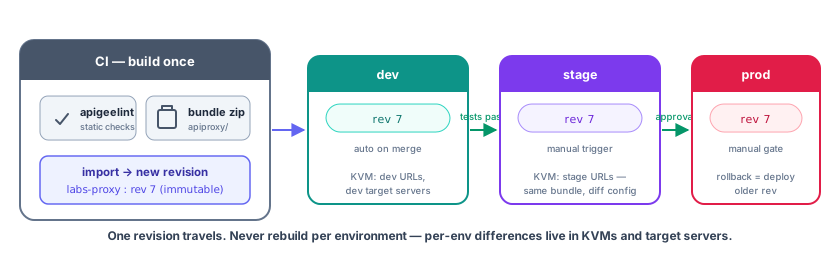

The discipline: one revision travels; never rebuild per env. Anything that differs per environment belongs in KVMs, target servers, or environment properties — not in the bundle.
Lint before deploy
Catches the classics: unused policies, missing <AssignTo>, unbounded
caches, <Step> names that don't match files.
Pipeline sketch (GitLab CI)
stages: [lint, deploy-dev, test, deploy-stage]  # (1)!

lint:
  image: node:22
  script:
    - npm i -g apigeelint
    - apigeelint -s apiproxy -f table.js --exit-code  # (2)!

deploy-dev:
  image: google/cloud-sdk:slim
  script:
    - echo "$GCP_SA_KEY" | gcloud auth activate-service-account --key-file=-  # (3)!
    - TOKEN=$(gcloud auth print-access-token)
    - apigeecli apis create bundle -o "$APIGEE_ORG" -e dev
        --proxy-folder apiproxy -n orders-api -t "$TOKEN" --wait  # (4)!
    - REV=$(apigeecli apis get -o "$APIGEE_ORG" -n orders-api -t "$TOKEN" | jq '.revision[-1]')  # (5)!
    - echo "REV=$REV" >> deploy.env
  artifacts:
    reports:
      dotenv: deploy.env  # (6)!

deploy-stage:
  image: google/cloud-sdk:slim
  needs: [deploy-dev]  # (7)!
  script:
    - apigeecli apis deploy -o "$APIGEE_ORG" -e stage -n orders-api -v "$REV" -t "$(gcloud auth print-access-token)"  # (8)!
  when: manual  # (9)!
- Stages run in order; a failure stops the pipeline, so nothing broken reaches a later environment.
--exit-codemakes lint findings fail the job (otherwise they only print).- Authenticate as a service account whose key is a protected CI variable. (Prefer workload identity federation over long-lived keys where available.)
- Import the bundle as a new revision and deploy it to
dev;--waitblocks until the runtime reports it ready so later test jobs hit the new code. - Capture the revision just created (
.revision[-1]= latest) — this is the one artifact that will travel. dotenvartifacts exportREVto downstream jobs.- Only run after dev succeeded, and inherit its
REV. - Deploy the same revision to stage with
-v— no rebuild, no re-import. - A human gate before the next environment.
Service accounts, not user tokens
Pipelines authenticate as a service account with the Apigee API Admin
role on the org — never a developer's gcloud token.
Per-environment backends
Don't hardcode target URLs per env — use target servers:
apigeecli targetservers create -o "$APIGEE_ORG" -e dev   -t "$TOKEN" \
  -n orders-backend --host orders.dev.internal --port 443 --enable
apigeecli targetservers create -o "$APIGEE_ORG" -e prod  -t "$TOKEN" \
  -n orders-backend --host orders.internal      --port 443 --enable
<!-- targets/default.xml — same file, different resolution per env -->
<HTTPTargetConnection>
  <LoadBalancer>
    <Server name="orders-backend"/>
  </LoadBalancer>
</HTTPTargetConnection>
Quick reference
| Task | Command |
|---|---|
| Deploy/redeploy bundle | apigeecli apis create bundle --proxy-folder apiproxy -n NAME --ovr |
| Pin revision to env | apigeecli apis deploy -e ENV -n NAME -v REV |
| Create product | apigeecli products create --proxies NAME --envs ENV |
| Seed KVM | apigeecli kvms create + kvms entries create |
| Export proxy | apigeecli apis fetch -n NAME -v REV (downloads zip) |
| Shared flows / SF deploys | apigeecli sharedflows create bundle |