Lab 7 — CORS & KVM
Goal: answer browser OPTIONS preflights at the edge, and externalize
environment-specific config into a Key-Value Map so the same bundle promotes
cleanly across environments. ~20 min.
What you'll learn
- How browsers decide to send a preflight, and what the answer must contain
- Handling
OPTIONSwith anAssignMessage-only flow KeyValueMapOperationsfor per-env config (and its cache!)- The pattern that makes one bundle deployable to dev/stage/prod
Before you start
This lab's policies already ran in every earlier lab: KVM-ReadConfig
is in the PreFlow and AM-CORS-Headers in the PostFlow. Now you meet
them properly.
Part A — CORS
Why it exists: a script on https://myspa.example.com is forbidden by
the browser from reading a response from https://api... unless the API
says "that origin is allowed". For "non-simple" requests (custom headers like
Authorization, methods like PUT, JSON bodies) the browser first sends an
OPTIONS preflight asking permission. No Access-Control-* headers
back, no real request.

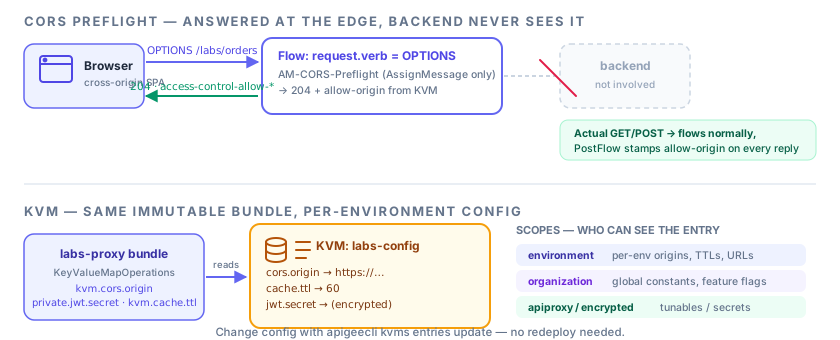
The proxy should short-circuit the preflight — never reach the backend:
<Flow name="cors-preflight">
  <Condition>(request.verb = "OPTIONS")</Condition> <!-- (1)! -->
  <Request>
    <Step><Name>AM-CORS-Preflight</Name></Step> <!-- (2)! -->
  </Request>
  <Response/>
</Flow>
- Any path, any
OPTIONS. It is the first flow, so it wins before path-specific flows (and beforeVerifyAPIKey, which would otherwise reject preflights — browsers never attach credentials to them). - Builds the whole answer; the
edge-onlyRouteRule ensures no backend call.
<AssignMessage async="false" continueOnError="false" enabled="true" name="AM-CORS-Preflight">
  <DisplayName>AM-CORS-Preflight</DisplayName>
  <Set>
    <Headers>
      <Header name="Access-Control-Allow-Origin">{kvm.cors.origin}</Header> <!-- (1)! -->
      <Header name="Access-Control-Allow-Methods">GET, POST, OPTIONS</Header> <!-- (2)! -->
      <Header name="Access-Control-Allow-Headers">authorization, content-type, x-apikey, x-no-cache</Header> <!-- (3)! -->
      <Header name="Access-Control-Max-Age">3600</Header> <!-- (4)! -->
    </Headers>
    <StatusCode>204</StatusCode> <!-- (5)! -->
  </Set>
  <IgnoreUnresolvedVariables>true</IgnoreUnresolvedVariables>
  <AssignTo createNew="false" type="response">response</AssignTo>
</AssignMessage>
- Which origin may call. The value comes from the KVM, so it differs per environment. (This lab returns the configured origin as-is; to support several origins, see experiment 2.)
- Methods the browser may use for the real request.
- Request headers the browser may send. If the real request uses a header
not listed here, the browser blocks it — add
x-no-cachehere because the lab's cache demo sends it from a browser. - Let the browser cache this preflight answer for an hour (browsers cap this at their own maximum) — fewer preflights.
204 No Content: success, empty body.
Actual responses also need Access-Control-Allow-Origin — AM-CORS-Headers
in the PostFlow response stamps it on every successful reply, and the three
error policies stamp it on failures:
<AssignMessage async="false" continueOnError="false" enabled="true" name="AM-CORS-Headers">
  <Set>
    <Headers>
      <Header name="Access-Control-Allow-Origin">{kvm.cors.origin}</Header> <!-- (1)! -->
    </Headers>
  </Set>
  <IgnoreUnresolvedVariables>true</IgnoreUnresolvedVariables>
  <AssignTo createNew="false" type="response">response</AssignTo> <!-- (2)! -->
</AssignMessage>
- Only this one header — the other
Allow-*headers matter for preflights only. - Edit the final response in place.
Exercise it
curl -i -X OPTIONS "https://$APIGEE_HOST/labs/orders" \
  -H "Origin: https://myspa.example.com" \
  -H "Access-Control-Request-Method: GET"
HTTP/2 204
access-control-allow-origin: https://myspa.example.com
access-control-allow-methods: GET, POST, OPTIONS
access-control-max-age: 3600
* with credentials is forbidden
Access-Control-Allow-Origin: * can't coexist with
Access-Control-Allow-Credentials: true. Use a specific origin from an
allowlist (KVM) and, if you support several, echo back the request's
Origin only when it's on the list — and add Vary: Origin.
Part B — KVM
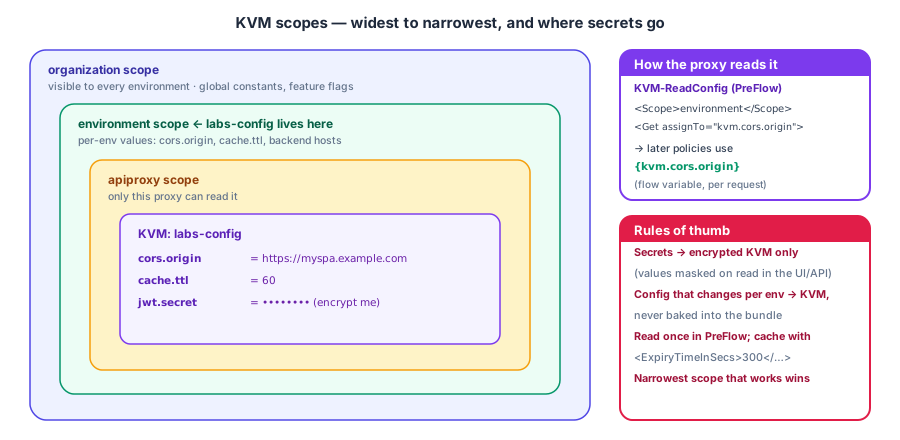
The bundle reads config once per request from the labs-config KVM:
<KeyValueMapOperations async="false" continueOnError="false" enabled="true" name="KVM-ReadConfig" mapIdentifier="labs-config"> <!-- (1)! -->
  <Scope>environment</Scope> <!-- (2)! -->
  <Get assignTo="kvm.cors.origin"> <!-- (3)! -->
    <Key><Parameter>cors.origin</Parameter></Key> <!-- (4)! -->
  </Get>
  <Get assignTo="private.jwt.secret"> <!-- (5)! -->
    <Key><Parameter>jwt.secret</Parameter></Key>
  </Get>
  <Get assignTo="kvm.cache.ttl">
    <Key><Parameter>cache.ttl</Parameter></Key>
  </Get>
  <ExpiryTimeInSecs>300</ExpiryTimeInSecs> <!-- (6)! -->
</KeyValueMapOperations>
mapIdentifier= the KVM's name. Created bydeploy.sh.- Which tier to look in:
environmenthere. Other values:organization,apiproxy. assignTo= the flow variable that receives the value. After this line{kvm.cors.origin}works in any later policy.- The entry (key) to fetch. A KVM is a flat map of key → value.
- Writing to a
private.-prefixed variable keeps the secret masked in Trace — and is required by the JWT policies (Lab 3). - Important: values read are cached on the runtime for 300 s. Changing a KVM entry may take up to five minutes to be seen — plan demos around it (or lower this value while experimenting).
Seed it (deploy.sh does this; manual version):
export TOKEN=$(gcloud auth print-access-token)

apigeecli kvms create -o "$APIGEE_ORG" -e "$APIGEE_ENV" -t "$TOKEN" -n labs-config

apigeecli kvms entries create -o "$APIGEE_ORG" -e "$APIGEE_ENV" -t "$TOKEN" \
  -m labs-config -k cors.origin -v "https://myspa.example.com"
apigeecli kvms entries create -o "$APIGEE_ORG" -e "$APIGEE_ENV" -t "$TOKEN" \
  -m labs-config -k cache.ttl -v "60"
Now change behavior without redeploying:
apigeecli kvms entries update -o "$APIGEE_ORG" -e "$APIGEE_ENV" -t "$TOKEN" \
  -m labs-config -k cors.origin -v "https://staging.myspa.example.com"
Re-run the OPTIONS curl (give it up to the 300 s expiry) — the allow-origin header changed, zero redeploys. That's the promotion story: same immutable revision everywhere, config lives in the environment.
| Scope | Visible to | Use for |
|---|---|---|
environment |
proxies in that env | per-env config (origins, TTLs, URLs) |
organization |
every env | global constants, feature flags |
apiproxy |
this proxy only | proxy-specific tunables |
Encryption is a property of the map, not a scope. Create the KVM with
--encrypted and values are stored encrypted and masked when read via the
API/UI. Put secrets (JWT keys, credentials) there.
Experiments
- Point
cache.ttlintoRC-Orders'sTimeoutInSecvia<TimeoutInSec ref="kvm.cache.ttl"/>— tune caching per env. - Store a comma-separated allowlist in
cors.originsand, in a JS policy, echo theOriginheader only if present in the list (and addVary: Origin). - Encrypted KVM:
apigeecli kvms create ... --encrypted, copyjwt.secretinto it and pointKVM-ReadConfigat it — JWT minting works identically. - Lower
ExpiryTimeInSecsto10, update a value and time how long the change takes to show up. - Add
KVM-ReadConfigto the PostFlow of an error path — what happens tokvm.*vars when the request faults before the PreFlow policy ran? (Variables are per-request state; fault handlers can't rely on unset vars.)
Check yourself
1. Why must the preflight flow come before any flow that verifies a key?
Browsers don't send credentials on preflights, so a key check would reject every preflight with a 401 and the real request would never be sent.
2. You changed a KVM entry and the old value is still served. Why?
KVM-ReadConfig caches reads for ExpiryTimeInSecs (300 s). Wait it out,
or lower the expiry.
3. Where does a value belong if it differs between stage and prod: bundle, KVM or target server?
Never the bundle. A KVM for settings/secrets; a target server for backend host/port.
4. Why is Access-Control-Allow-Origin: * unsafe with cookies/credentials?
Browsers reject the combination, and allowing every origin to read authenticated responses defeats the same-origin protection. Use an explicit allowlist.
Where to go next
You've built a proxy that does what production Apigee proxies do: security, quota, mediation, caching, fault handling, env config. Natural follow-ons:
- Debugging & Troubleshooting — a repeatable method for when it doesn't work
- Advanced Topics — shared flows, threat protection, logging, analytics, hardening
- Cheat Sheet and Glossary
- Policy cookbook — templates for the other policies you'll reach for
- Deploy & CI/CD — promote this revision through environments from a pipeline