03: Kubernetes Fundamentals
Definition
Kubernetes (K8s) = Orchestration platform for:
- Deploying containers at scale
- Managing networking between containers
- Persisting data
- Auto-scaling and self-healing
- Rolling updates with zero downtime
Why Kubernetes?
Without Kubernetes:
  - 100 containers across 50 servers
  - Which server? Crashed? Need to restart?
  - Networking? Load balancing? Configuration?
  → Manual managing nightmare, human error prone

With Kubernetes:
  - "Deploy 100 replicas of my app"
  - K8s figures out which nodes, restart failures, load balancing
  → Automated, reliable, scales automatically
Kubernetes Architecture
graph TB
    A["Kubernetes Cluster"]
    A --> B["Control Plane<br/>(Brain)"]
    A --> C["Worker Nodes<br/>(Workers)"]

    B --> B1["API Server<br/>(REST interface)"]
    B --> B2["etcd<br/>(state storage)"]
    B --> B3["Scheduler<br/>(place pods)"]
    B --> B4["Controller Manager<br/>(desired state)"]

    C --> C1["Node 1"]
    C --> C2["Node 2"]
    C --> C3["Node 3"]

    C1 --> C1A["Pod 1"]
    C1 --> C1B["Pod 2"]
    C2 --> C2A["Pod 3"]
Key Components


 )
)
Control Plane
| Component | Role |
|---|---|
| API Server | REST interface for K8s; every action goes through here |
| etcd | Distributed key-value store; stores all cluster state |
| Scheduler | Decides which node each pod should run on |
| Controller Manager | Runs "controllers" that enforce desired state |
Worker Nodes
| Component | Role |
|---|---|
| kubelet | Agent on each node; ensures pods are running |
| kube-proxy | Networking; handles service to pod routing |
| Container Runtime | Docker, containerd, CRI-O; runs containers |
Core K8s Concepts
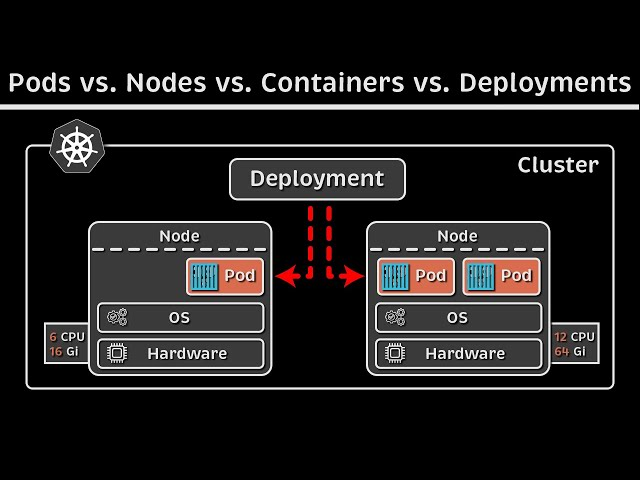
1. Pod (Smallest Unit)
A Pod = 1+ containers (usually 1) that share:
- Network namespace (share IP, can communicate via localhost)
- Storage volumes
- Configuration
YAML example
Key insight: Pods are ephemeral. Don't create pods directly; use Deployments instead.
2. Deployment (Manage Replicas)
A Deployment = Describes desired state of pods.
YAML example
Kubernetes automatically:
- Creates 3 pods
- Restarts if any crashes
- Updates all pods if image version changes
- Scales up/down as needed
3. Service (Networking)
Pods are ephemeral (can be destroyed). Service = stable endpoint for accessing pods.
YAML example
Types:
- ClusterIP: Internal communication only
- NodePort: Expose on each node's port
- LoadBalancer: Cloud load balancer
4. Namespace (Logical Isolation)
Namespaces = logical clusters within one K8s cluster.
# Create namespace
kubectl create namespace production

# Deploy to specific namespace
kubectl apply -f deployment.yaml -n production

# List resources in namespace
kubectl get pods -n production
Common namespaces:
default— Default namespace for testingkube-system— Kubernetes system componentsproduction— Production appsstaging— Staging apps
5. Labels & Selectors (Organization)
Labels = key-value metadata. Selectors = queries on labels.
apiVersion: apps/v1
kind: Deployment
metadata:
  name: api
  labels:
    app: api
    version: v1
spec:
  selector:
    matchLabels:
      app: api  # Match pods with this label
  template:
    metadata:
      labels:
        app: api
        version: v1
Query by labels:
The Core Model
1. Every Pod gets its own real IP. Not virtual, not NAT'd — a real IP that any other pod in the cluster can reach directly, no port mapping needed. This is the "flat network" model: it's a fundamental K8s requirement (implemented by whatever CNI plugin you're running — Calico, Cilium, GKE's own VPC-native networking, etc.).
Contrast with Docker's default networking, where containers on different hosts can't reach each other directly — K8s removes that problem entirely.
2. Pod IPs are ephemeral. Pods die and get rescheduled constantly (crashes, node drains, scaling). A new Pod gets a new IP. So you cannot hardcode a Pod IP anywhere — it'll break within hours.
3. That's the whole reason Services exist. A Service is a stable, persistent address that sits in front of a shifting set of Pods, selected by label. The Service's IP (ClusterIP) never changes even as the Pods behind it come and go. This is a pure abstraction layer — nothing more.
4. How a Service actually routes traffic — kube-proxy. Runs on every node. Watches the API server for
Service and Endpoint changes, and writes iptables (or IPVS) rules on each node: "traffic destined for
ClusterIP X:port → DNAT to one of these live Pod IPs, picked at random/round-robin."
This is why the ClusterIP isn't on any real interface — it's purely rules, not a listener.
5. Service types — what actually differs is where that DNAT entry point is:
- ClusterIP (default): entry point only exists inside the cluster's iptables rules. Internal-only.
- NodePort: same rules, plus a real open port on every node's actual interface (30000-32767 range). Now reachable from outside via <node-IP>:<port>.
- LoadBalancer: cloud provider (GCP here) provisions a real external load balancer that targets the NodePorts across all nodes — so you get one stable external IP instead of having to know node IPs.
- ExternalName: a DNS-level alias, no proxying at all — just a CNAME to something outside the cluster.
6. Service discovery by name, not IP — CoreDNS. Every Service automatically gets a DNS name (servicename.namespace.svc.cluster.local).
CoreDNS runs as pods in the cluster and resolves that name to the ClusterIP. This is why you almost never hardcode IPs
in K8s configs — you use the DNS name.
7. Ingress is a different layer entirely. Services (above) operate at L4 (IP/port). Ingress operates at L7 (HTTP) — hostname/path-based routing, TLS termination, one external entry point fanning out to many Services. An Ingress controller (nginx-ingress, GKE's native one, etc.) is what actually implements this — Ingress objects are just config; they don't do anything without a controller running.
8. NetworkPolicy = firewall rules inside the flat network. By default, any Pod can talk to any Pod (flat network, remember). NetworkPolicy objects restrict that — "only Pods with label X can reach Pods with label Y on port Z." Without a NetworkPolicy, there's no isolation at all between Pods, even across namespaces.
1. Service networking model
Shows how both external traffic (Cloud LB → NodePort) and internal traffic (direct ClusterIP call) land on the same kube-proxy rules on a Node.
flowchart TD
    A[Internet client] --> B[Cloud load balancer]
    C[Pod - internal caller] -->|ClusterIP| E

    subgraph Node
        B -->|NodePort :3xxxx| E[kube-proxy<br/>rewrites traffic to pod IP]
        E --> F[Pod A]
        E --> G[Pod B]
    end
Pod Lifecycle
graph LR
    A["Pending<br/>(scheduling)"] --> B["Running<br/>(executing)"]
    B -->|success| C["Succeeded"]
    B -->|failure| D["Failed"]
    D --> E["CrashLoopBackOff<br/>(restart loop)"]
    E --> B
Pending: Waiting to be scheduled or pulling image
Running: Container is running
Succeeded: Pod completed successfully
Failed: Container exited with error
CrashLoopBackOff: Container crashes repeatedly; K8s keeps restarting it
Key K8s Resources
| Resource | Purpose |
|---|---|
| Pod | Single or multiple containers |
| Deployment | Stateless workload (manage replicas) |
| StatefulSet | Stateful workload (databases, etc.) |
| DaemonSet | Run on every node (logging agent, etc.) |
| Job | One-time task (batch processing) |
| CronJob | Scheduled task (backups, etc.) |
| Service | Network endpoint for pods |
| Ingress | HTTP load balancer / reverse proxy |
| ConfigMap | Configuration data (non-sensitive) |
| Secret | Sensitive data (passwords, tokens) |
| PersistentVolume | Storage resource |
| PersistentVolumeClaim | Request for storage |
2. Ingress request path
End-to-end hop-by-hop path for a request to api.yoursite.com arriving via Ingress.
sequenceDiagram
    participant Client as Internet client
    participant DNS as DNS
    participant LB as Cloud load balancer
    participant IC as Ingress controller
    participant SVC as Service (ClusterIP)
    participant KP as kube-proxy (iptables/IPVS)
    participant Pod as Pod

    Client->>DNS: Resolve api.yoursite.com
    DNS-->>Client: LB external IP
    Client->>LB: HTTPS request
    LB->>IC: Forward to Ingress controller (NodePort/LB-backed)
    IC->>IC: Match host/path rule in Ingress object
    IC->>SVC: Route to matched Service by name
    SVC->>KP: Resolve ClusterIP via kube-proxy rules
    KP->>Pod: DNAT to a live Pod IP:port
    Pod-->>Client: Response (reverse path)
Key point for the write-up: Ingress operates at L7 (host/path routing, TLS termination) and hands off to a normal Service once it's picked a destination — from that point on it's the exact same ClusterIP/kube-proxy mechanism as the diagram above. The Ingress object is just config; nothing happens without an Ingress controller (nginx-ingress, GKE's native one, etc.) actually running and watching for it.
Health Management
Liveness Probe
Checks if container should be restarted.
apiVersion: v1
kind: Pod
metadata:
  name: api
spec:
  containers:
  - name: api
    image: myapp:1.0.0
    livenessProbe:
      httpGet:
        path: /alive
        port: 5000
      initialDelaySeconds: 10
      periodSeconds: 5
      failureThreshold: 3
If /alive fails 3 times → container gets restarted.
Readiness Probe
Checks if pod should receive traffic.
If not ready → Service stops routing traffic to this pod.
Resource Requests & Limits
YAML example
Requests: K8s uses to schedule pod (must fit on node)
Limits: Container can't exceed this
Common kubectl Commands
# Get resources
kubectl get pods
kubectl get pods -n production
kubectl get pods -o wide  # More details
kubectl get deployments
kubectl get services

# Describe resource
kubectl describe pod my-pod

# View logs
kubectl logs my-pod
kubectl logs my-pod -f  # Follow logs
kubectl logs my-pod -c container-name  # Specific container

# Execute command in pod
kubectl exec -it my-pod -- /bin/bash

# Port-forward (access pod locally)
kubectl port-forward my-pod 8080:5000

# Apply manifest
kubectl apply -f deployment.yaml

# Delete resource
kubectl delete pod my-pod
kubectl delete deployment my-app

# Rollout management
kubectl rollout status deployment/my-app
kubectl rollout history deployment/my-app
kubectl rollout undo deployment/my-app  # Rollback

# Scale deployment
kubectl scale deployment/my-app --replicas=5

# Get events
kubectl get events
Interview Questions
Q: What's the difference between a Pod and a Deployment?
A: Pod is a single container instance (ephemeral). Deployment manages multiple pods, handles restarts, updates, and scaling. Create Deployments, not Pods directly.
Q: What does NodePort do?
A: Exposes a service on every node's IP at a specific port. Useful for external access without a cloud load balancer.
Q: What's the difference between Liveness and Readiness probes?
A: Liveness = restart if unhealthy. Readiness = remove from load balancer if not ready (but don't restart).
Key Takeaways
✅ K8s automates deployment, scaling, and management of containers
✅ Pods are ephemeral; use Deployments for stateless apps
✅ Services provide stable network endpoints
✅ Labels enable organization and selection
✅ Health checks (liveness/readiness) keep system healthy
✅ Namespaces provide logical isolation
✅ Resource requests/limits prevent pod overload