Authentication Mechanisms
Ways a party proves “I am who I claim to be” — from credentials to phishing-resistant hardware.
Credentials
User authentication information used to verify and grant access to systems and services: passwords, PINs, API keys, session cookies. See Passwords in DB for storage.
MFA — Multi-Factor Authentication
Combining different factor types — two passwords is not MFA.
| Factor type | Examples | Weakness |
|---|---|---|
| Something you know | password, PIN | phishing, brute force, reuse |
| Something you have | phone (TOTP/push), hardware key, smart card | device theft, SIM swap |
| Something you are | fingerprint, face | biometric spoofing, can’t rotate |
-
TOTP — time-based one-time code (Google Authenticator): shared secret
- current time → 6-digit code. Offline, cheap; still phishable (user can be tricked into typing the code into a fake site).
- Push approval — better UX, but vulnerable to MFA-fatigue/prompt-bombing; number-matching mitigates it.
- SMS OTP — weakest “have” factor (SIM swap, SS7). Acceptable only when nothing better is possible.
- Hardware keys (FIDO2) — phishing-resistant; the gold standard.
SSH Keys
Cryptographic key pairs used to access remote systems and servers securely —
asymmetric auth: server holds the public key (authorized_keys), client
proves possession of the private key without sending it.
-
ssh-ed25519preferred over RSA for new keys - Private key should have a passphrase; use
ssh-agent - At scale, use SSH certificates (short-lived certs signed by an SSH CA)
instead of distributing
authorized_keysfiles
OAuth Tokens
Tokens that provide limited access to user data on third-party applications. See OAuth 2.0.
SSL Certificates
Digital certificates ensure secure and encrypted communication between servers and clients — see HTTPS.
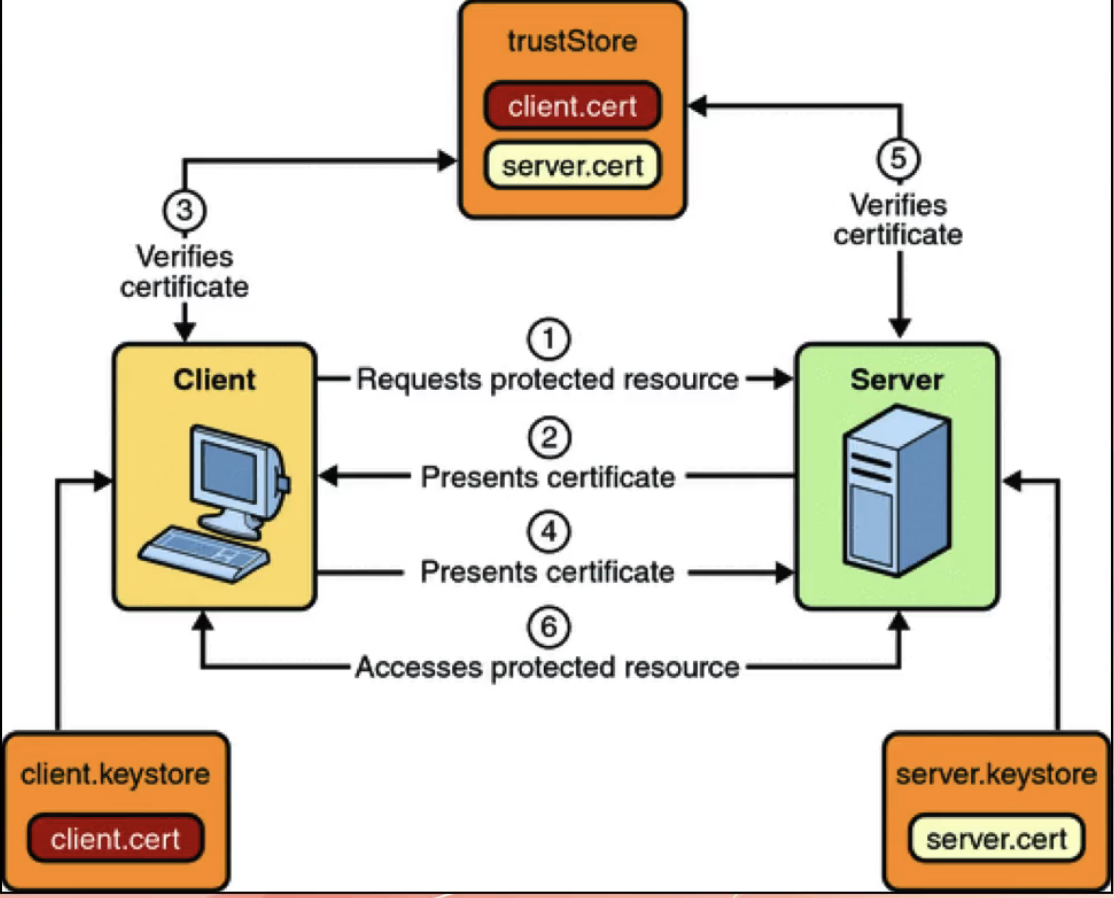
Client Certificate
- Method for authenticating the API caller — mutual TLS (mTLS)
- Client holds a certificate file with a public & private key pair
- During the TLS handshake the server validates the client certificate
- Common for service-to-service auth and enterprise APIs
WebAuthn / Passkeys
Phishing-resistant, passwordless auth built on public-key crypto (FIDO2/WebAuthn standard).
Registration:  device generates key pair ──> public key stored on server
Login:         server sends challenge ──> device signs it (after biometric/
               PIN unlock) ──> server verifies with stored public key
- Facial recognition, fingerprint, security key, or synced passkey
- The private key never leaves the device; the signature is bound to the site’s origin → the user physically cannot type a credential into a fake site — defeats phishing and credential stuffing entirely
- No shared secret stored server-side → server breach leaks only public keys
Choosing a mechanism
| Scenario | Recommended |
|---|---|
| Consumer app | passkey/WebAuthn, fallback TOTP MFA |
| Enterprise workforce | SSO (SAML/OIDC) + MFA — see SSO |
| Service-to-service | mTLS client certs or signed JWTs |
| Third-party API access | OAuth 2.0 tokens |
| CLI/admin to servers | SSH keys/certs + short-lived certs |