Java Multithreading - Part 10: Virtual Threads (Project Loom)
Part 10: Virtual Threads (Project Loom)
Project Loom (Java 21+) introduces Virtual Threads - the most fundamental change in Java. They dramatically simplify concurrent programming for I/O-bound applications.
Official Documentation
| Java21 Virtual threads JEP 444 | Virtual Threads Docs |
Table of Contents
- Platform vs Virtual Threads
- Why Virtual Threads?
- Creating Virtual Threads
- How Virtual Threads Work
- Continuations and Coroutines
- When to Use Virtual Threads
- Virtual Threads with ExecutorService
Platform vs Virtual Threads
Platform Threads (Traditional)
- Platform threads = OS threads
- Each requires ~1MB of stack memory
- Limited to thousands of concurrent threads
- For 10,000 concurrent requests → ~10GB memory just for stacks!
- Typically have a large thread stack and other resources maintained by the operating system
- Platform threads are managed in a FIFO work-stealing ForkJoinPool
- Uses all available processors by default
- Can be modified by tuning the system property
jdk.virtualThreadScheduler.parallelism
- The common pool that’s used by other features like parallel Streams operates in LIFO mode
Diagram: Platform Threads Diagram Code
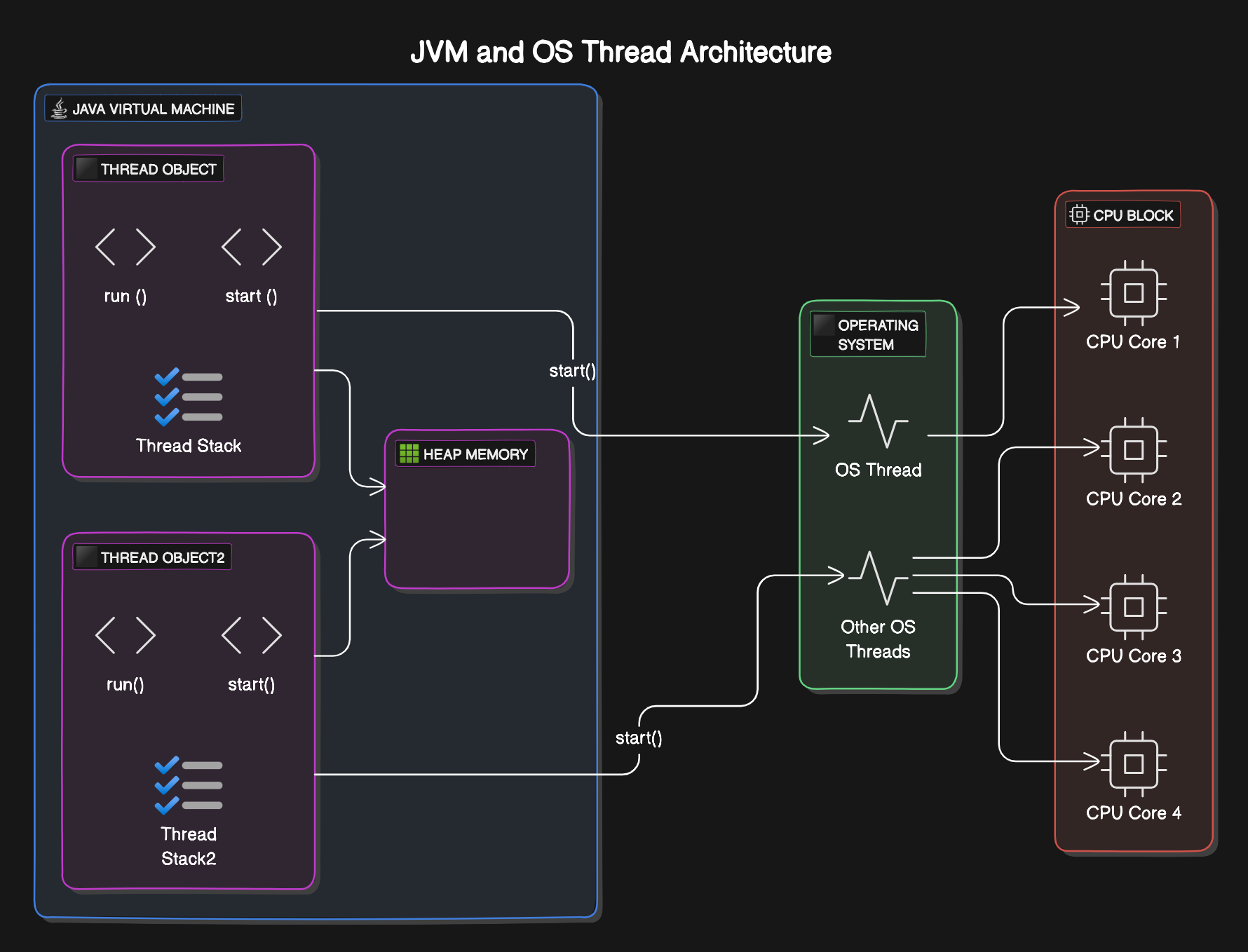
Platform Thread:
┌──────────────────────┐
│  Application Code    │
│         ↓            │
│  Platform Thread     │
│  (~1MB stack)        │
│         ↓            │
│    OS Thread         │
└──────────────────────┘

1 Platform Thread = 1 OS Thread
Virtual Threads (Java 21+)
- JVM-managed lightweight threads
- ~1KB memory footprint
- Millions of concurrent virtual threads possible
- JVM responsible for scheduling
- Suitable for running tasks that spend most of the time blocked, often waiting for I/O operations to complete
- Virtual threads don’t improve the latency of the execution of a task that involves only CPU operations
- Not intended for long-running CPU-intensive operations - for that use existing platform threads
- Not managed or scheduled by the OS, but the JVM is responsible for scheduling
- JVM uses carrier threads (which are platform threads) to “carry” any virtual thread when its time has come to execute
- All Virtual Threads are always daemon threads - don’t forget to call
join()if you want to wait on the main thread- An attempt to set them as non-daemon threads will throw an exception
- Available plentifully and can use the one-thread-per-request model
- If the code calls a blocking I/O operation in a virtual thread, the runtime suspends the virtual thread which can be resumed at an appropriate time later
The Virtual Thread uses:
- Continuations - to store/restore execution state
- Executor Service - for task submission
- ForkJoinPool - for carrier thread management
Diagram: Virtual Thread Architecture Code
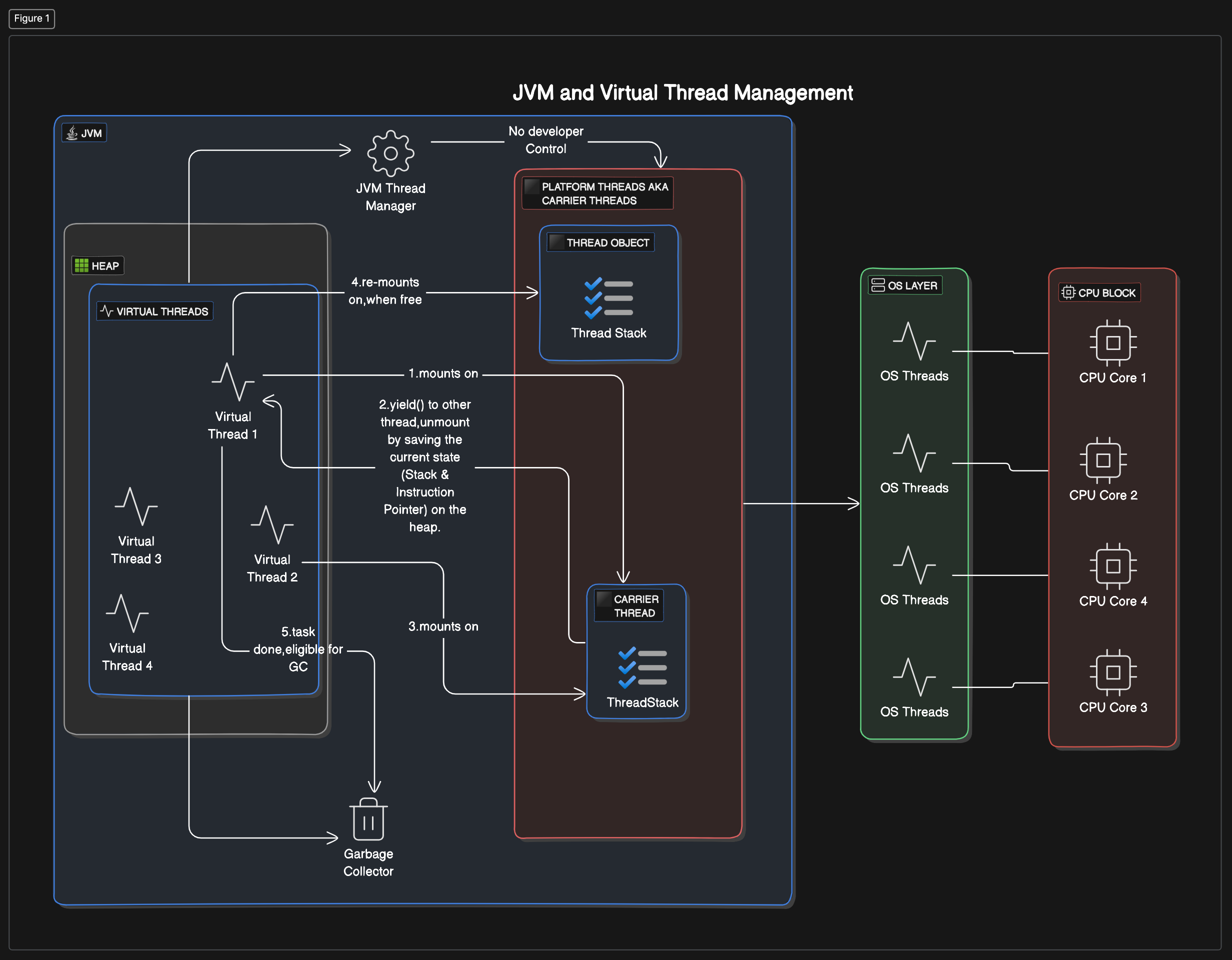
Virtual Thread:
┌──────────────────────┐
│  Application Code    │
│         ↓            │
│   Virtual Thread     │
│   (~1KB stack)       │
│         ↓            │
│  Carrier Thread      │ ← Platform thread that "carries" virtual thread
└──────────────────────┘

N Virtual Threads → Few Carrier Threads → Few OS Threads
Memory Comparison
| Threads | Platform (1MB each) | Virtual (1KB each) |
|---|---|---|
| 1,000 | ~1 GB | ~1 MB |
| 10,000 | ~10 GB | ~10 MB |
| 100,000 | ~100 GB ❌ | ~100 MB ✅ |
| 1,000,000 | Impossible | ~1 GB ✅ |
Key Differences
| Aspect | Platform Thread | Virtual Thread |
|---|---|---|
| Memory | ~1MB stack | ~1KB stack |
| Managed by | OS | JVM |
| Scheduling | OS scheduler | JVM (ForkJoinPool) |
| Blocking I/O | Blocks OS thread | Unmounts, frees carrier |
| Max concurrent | Thousands | Millions |
| Daemon | Default non-daemon | Always daemon |
Why Virtual Threads?
Platform Thread Issues
[warning][os,thread] Failed to start thread "Unknown thread"
- pthread_create failed (EAGAIN) for attributes: stacksize: 1024k
This error is eliminated with virtual threads!
The Magic: Automatic Unmounting
When virtual thread calls blocking I/O:
- JVM suspends the virtual thread
- Unmounts it from carrier thread
- Carrier thread picks up another virtual thread
- When I/O completes, original virtual thread is resumed
Virtual Thread #31: ─────────╳──────────────────
                        blocking I/O
                             │
                        yield (unmount)
                             ▼
Carrier Thread:    [picks up another VT]
                             │
                        I/O completes → resume (mount)
                             ▼
Virtual Thread #31: ─────────────────────────────
Example Output
Start::executeBusinessLogic : VirtualThread[#31]/runnable@ForkJoinPool-1-worker-2
Start::executeBusinessLogic : VirtualThread[#29]/runnable@ForkJoinPool-1-worker-1
END::executeBusinessLogic : VirtualThread[#31]/runnable@ForkJoinPool-1-worker-4  ← Different worker!
END::executeBusinessLogic : VirtualThread[#29]/runnable@ForkJoinPool-1-worker-3
Notice: Virtual thread #31 started by worker-2 but ended by worker-4!
📁 Code: cVirtualThreads/v1Runnable/V1Intro.java
Creating Virtual Threads
Virtual Threads are scheduled on a platform thread (aka carrier thread) for its CPU bound operation. The big advantage is that when we use virtual threads, the OS thread is released automatically during an IO operation.
Method 1: Thread.startVirtualThread()
Quick and simple, but cannot name the thread:
var t = Thread.startVirtualThread(() -> executeBusinessLogic());
//Make sure that the thread terminates before moving on
t.join(); // Virtual threads are daemon - must join! Proceed sequentially after thread completes its task
Method 2: Thread.ofVirtual().start()
Using builder - can name threads.
Note: Builder is NOT thread-safe!
Thread vt = Thread.ofVirtual()
    .name("my-virtual-thread")
    .start(() -> executeBusinessLogic());
vt.join();
Method 3: Thread Factory
ThreadFactory is thread-safe:
ThreadFactory factory = Thread.ofVirtual()
    .name("vt-", 0)  // Names: vt-0, vt-1, vt-2...
    .factory();

Thread t1 = factory.newThread(() -> task());
t1.start();
Method 4: Virtual Thread Executor ✅ (Recommended)
Default Factory: Cannot name threads
Default vs. Custom Factory: The Executors.newVirtualThreadPerTaskExecutor() uses a default virtual thread configuration, while the Executors.newThreadPerTaskExecutor(factory) allows you to specify a custom ThreadFactory with particular configurations (e.g., custom naming).
try (var executor = Executors.newVirtualThreadPerTaskExecutor()) {
    for (int i = 0; i < 10_000; i++) {
        executor.submit(() -> {
            Thread.sleep(Duration.ofSeconds(1));
            return i;
        });
    }
}  // Auto-waits and shuts down
Method 5: Custom Factory with Executor
Custom Factory: The custom factory approach provides the ability to name threads, which can be useful for debugging or monitoring purposes.
- The default virtual thread executor (described above) doesn’t offer this level of customization out of the box.
ThreadFactory factory = Thread.ofVirtual()
    .name("http-", 0)
    .factory();

try (var executor = Executors.newThreadPerTaskExecutor(factory)) {
    executor.submit(() -> handleRequest());
}
Comparison
// Platform Thread
Thread.ofPlatform().name("platform").start(task);

// Virtual Thread
Thread.ofVirtual().name("virtual").start(task);
📁 Code: cVirtualThreads/v1Runnable/V5VirtualThreadCreation.java
How Virtual Threads Work
Architecture
Virtual Thread uses:
- Continuations - to store/restore execution state
- Executor Service - for task submission
- ForkJoinPool - for carrier thread management
Carrier Threads
- Platform threads that “carry” virtual threads
- Managed in a FIFO work-stealing ForkJoinPool
- Uses all available processors by default
- Configurable via
jdk.virtualThreadScheduler.parallelism
Mounting and Unmounting
MOUNTED: Virtual thread executing on carrier
         ┌─────────────────┐
         │  Virtual Thread │
         │        ↓        │
         │ Carrier Thread  │
         └─────────────────┘

UNMOUNTED: Virtual thread waiting (I/O, sleep)
         ┌─────────────────┐
         │  Virtual Thread │ ← Stored in heap
         │     (waiting)   │
         └─────────────────┘

         Carrier Thread    ← Free to run other VTs
Key Points
- Virtual threads are always daemon threads
- Cannot set as non-daemon (throws exception)
- Don’t forget to call
join()when waiting on main thread - OS thread is released automatically during I/O
Continuations and Coroutines
Subroutine vs Coroutine
Subroutine: Just a function, no state. Call and get response.
Coroutine: Cooperative routine - can pause and resume. Multiple entry/exit points.
<img class="plantuml" src="http://www.plantuml.com/plantuml/svg/~h407374617274756d6c0a7061727469636970616e74204d6574686f6420617320410a7061727469636970616e7420436f726f7574696e650a0a41202d3e20436f726f7574696e653a2063616c6c0a4e6f74652072696768743a20456e74727920706f696e7420310a436f726f7574696e65202d2d3e3e20413a207969656c642028456e74727920506f696e742031290a0a41202d3e20436f726f7574696e653a2063616c6c0a4e6f74652072696768743a20456e74727920706f696e7420320a436f726f7574696e65202d2d3e3e20413a207969656c642028456e74727920506f696e742032290a0a41202d3e20436f726f7574696e653a2063616c6c0a4e6f74652072696768743a20456e74727920706f696e7420330a436f726f7574696e65202d2d3e3e20413a207969656c642028456e74727920506f696e742033290a40656e64756d6c">
Continuations
Continuation: Data structure that stores and restores call context.
- Stores Stack Frames and Code Pointer when method yields
- Restores state when resumed
- In Java, continuations are behind the scenes
// Example output showing state preservation:
entering task1 Thread[#1,main,5,main]
entering task2 Thread[#1,main,5,main]  // Same thread picks up task2 when task1 sleeps
exiting task2 Thread[#1,main,5,main]
exiting task1 Thread[#1,main,5,main] - Value of x = 90  // Remembers x value!
Key: When coroutine resumes, it remembers the state via continuations.
📁 Code: cVirtualThreads/v6DelimitedContinuations/C1ContinuationsAsCoroutines.java
When to Use Virtual Threads
✅ USE Virtual Threads For
- I/O-bound tasks: HTTP, DB, File I/O, Network calls
- High concurrency: Web servers, Microservices
- Blocking operations: Sleep, wait
- One-thread-per-request: Can now use this model!
❌ DON’T USE Virtual Threads For
- CPU-bound tasks: Complex calculations, image processing
- Why? Virtual threads yield during I/O, not computation
- CPU-bound tasks block the carrier thread
Performance Impact
I/O-bound task (100,000 tasks with 100ms sleep):
- Platform (200 threads): ~50,000ms
- Virtual threads: ~200ms (250x faster!)
Important Notes
- No harm in blocking code within virtual thread
- Platform thread not held (managed by JVM)
- No sense to pool virtual threads - use and discard like Q-tips
- Combine with CompletableFuture for sophisticated pipelines
Virtual Threads with ExecutorService
Default Virtual Thread Executor
Cannot name threads:
try (var executor = Executors.newVirtualThreadPerTaskExecutor()) {
    IntStream.range(0, 10_000).forEach(i ->
        executor.submit(() -> ioTask(i))
    );
}  // Waits for all to complete
Custom Factory Executor
Can name threads (useful for debugging):
ThreadFactory factory = Thread.ofVirtual()
    .name("worker-", 0)
    .factory();

try (var executor = Executors.newThreadPerTaskExecutor(factory)) {
    executor.submit(() -> handleRequest());
}
Try-With-Resources Benefits
Simplifies the code because no need to join the threads.
Waiting for all threads to complete involves:
- Creating an array of threads and
- Joining with each of them explicitly
In JDK 21 (officially supporting Virtual threads), the ExecutorService is Autocloseable. Which means if you use the try with resource block, the close method will be called on the ExecutorService at the end of the block and this will wait till all the virtual threads are terminated.
This is one example of Structured Concurrency where we wait for all threads started within a block to complete, so that there are no rogue runaway threads.
Scenario: Concurrent Non-Blocking Tasks
When there are multiple independent tasks to be completed, all as part of one thread, without blocking the thread:
Concurrently, run many tasks within a thread in non-blocking fashion
The combination of using virtual threads to write sequential code and futures/CompletableFutures for concurrent code is both readable and powerful.
Whenever we need a new thread, we simply create a new virtual thread without worrying about resources as virtual threads are cheap and efficient.
There is no harm in writing blocking code within a virtual thread:
- Since there are no platform threads which hold on to the resources
- As it is managed and released by the JVM
Writing non-blocking code with Reactive frameworks like Project Reactor or CompletableFutures makes the readability hard. But, if we want sophisticated mechanisms to deal things in pipeline with exception handling and error handling mechanism, the CompletableFutures is a good option.
Virtual Threads with ForkJoinPool

Executor Framework
- ExecutorService: Manages a pool of threads and allows you to submit tasks for execution
- Fixed Thread Pool: Creates a pool with a fixed number of threads
- submit(): Submits a task for execution
- shutdown(): Initiates an orderly shutdown of the executor
- awaitTermination(): Waits for all tasks to complete
CompletableFuture Integration
- runAsync(): Runs a task asynchronously
- allOf(): Waits for all provided CompletableFutures to complete
- join(): Waits for the completion of the CompletableFuture
There is no sense to pool virtual threads - use and discard like Q-tips. Combine with CompletableFuture for sophisticated pipelines.
Summary
✅ Virtual threads = lightweight, JVM-managed threads (~1KB vs ~1MB)
✅ Millions of concurrent virtual threads possible
✅ Automatic unmounting during I/O - carrier thread freed
✅ Always daemon - must join to wait
✅ Use for I/O-bound tasks, NOT CPU-bound
✅ Continuations store/restore execution state
✅ Try-with-resources handles waiting automatically
Quick Reference
// Create virtual threads
Thread.startVirtualThread(runnable);
Thread.ofVirtual().name("name").start(runnable);

// Thread factory
ThreadFactory factory = Thread.ofVirtual().name("vt-", 0).factory();

// Executor (recommended)
try (var executor = Executors.newVirtualThreadPerTaskExecutor()) {
    executor.submit(task);
}

// Custom factory executor
try (var executor = Executors.newThreadPerTaskExecutor(factory)) {
    executor.submit(task);
}

// Check if virtual
Thread.currentThread().isVirtual();
Original Code Gists (Reference)
The following GitHub Gists contain the original code examples for this topic:
| Topic | Gist Link |
|---|---|
| Virtual Thread Builder | |
| Thread Factory | |
| Default Virtual Thread Executor | |
| Thread Per Task Executor | |
| Virtual Threads with CompletableFuture |