Markdown Reference
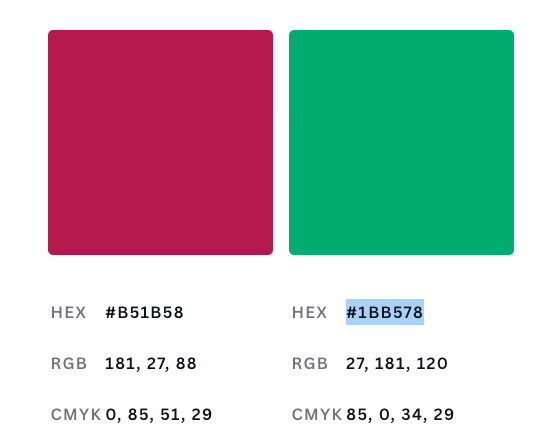
Color Pallet
HEX : #b51b58
RGB : 181, 27, 88
CMYK : 0, 85, 51, 29

HEX : #1bb578
RGB : 27, 181, 120
CMYK : 85, 0, 34, 29
Add Table of contents
-
right side Index bar (on this blog)
{% include toc title="Index" %} - simply add
toc: trueon the front matter.- Has some issues when the page is long
- Contents
{:.no_toc}- Will be replaced with the ToC, excluding the “Contents” header
{:toc}
- Will be replaced with the ToC, excluding the “Contents” header
Escape Liquid template tags in Jekyll posts
-
Use backtick(`) to display a liquid tag as a span of code .
- to begin
{% raw %}and end with{% endraw %} - Another way to escape
{{ tag }}
Include gists
Include code as a gist into the Jekyll post. Uses jekyll-gist plugin.
{% gist nitinkc/8a3eb81f7ccf93b013a2fe8455a04703 %}
Hyperlinks - External links
- Open link in new/other tab -
{:target="\_blank"}[Try me for another Tab](https://www.google.com/){:target="_blank"} - Open link in same tab
[Link title](https://www.google.com/)
Markdown hyperlinks syntax
If you’re building your pages with Markdown, use the following examples to generate internal links.
-
[Link title]({{ site.baseurl }}{% link index.html %}) -
[Link title]({{ site.baseurl }}{% post_url /developertools/2016-04-04-jekyll-blog-GitHub-hosting %}) -
skipping
site.baseurlLink title without site.baseurl``
Image
in a post from specific folder

prefer this :

Resize an image
<img src="assets/images/image.png" width="300" height="200">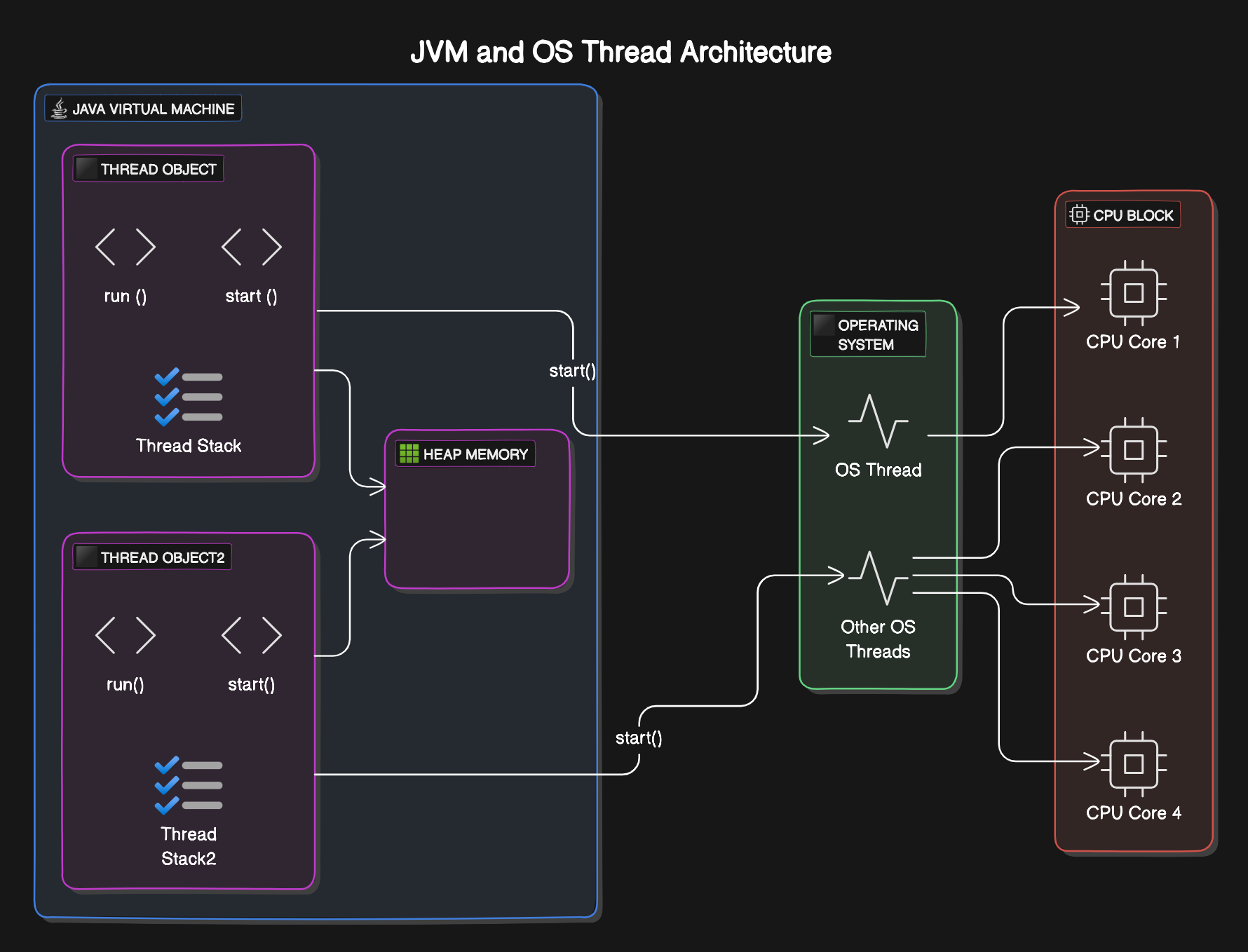{:width="70%" height="50%"}
Video
using iframe
<iframe
src="https://www.youtube.com/embed/1yaUn_PhlM8"
title="git revert - local and remote" frameborder="0"
allow="accelerometer; autoplay; clipboard-write; encrypted-media; gyroscope; picture-in-picture; web-share"
allowfullscreen>
</iframe>
using Spaceship jekyll plugin

multi column videos
<div style="display: grid; grid-template-columns: 2fr 2fr; gap: 1rem; margin-bottom: 2rem;">
<div markdown="1">

</div>
<div markdown="1">

</div>
</div>
Insert Table
Jekyll Spaceship plugin Table https://github.com/jeffreytse/jekyll-spaceship?tab=readme-ov-file#1-table-usage
| Left Aligned Header 1  | Center Aligned Header                 |
|:-----------------------|:-------------------------------------:|
| ⌘E     	             | Move to the last location you edited. |
| ⌘  + 1  	             | It activates the quick fix.           |
Add Sidebar Navigation
In the header tag add
---
sidebar:
  nav: "algo"
---
Embed pdf document
<object data="https://nitinkc.github.io/assets/media/file.pdf"
type="application/pdf"
width="700px"
height="700px">
<embed src="https://nitinkc.github.io/assets/media/file.pdf">
<p>This browser does not support PDFs. Please download the PDF to view it:
<a href="https://nitinkc.github.io/assets/media/file.pdf">Download PDF</a>.
</p>
</embed>
</object>
DateFormatting with Liquid
Use the date filter to change the display format of dates.
-
{{ '2023-04-06' | date: "%B %d, %Y" }}: Displays the date as “April 06, 2023” -
{{ customer.date_of_birth | date: '%D' }}: Displays a customer’s date of birth in the format “03/09/80” -
{{ site.time | date: '%D' }}: Site Build Time to be displayed
Examples
-
{{ 'now' | date: "%Y/%m/%d" }}- 2026/03/24
-
{{ 'now' | date_to_rfc822 }}- Tue, 24 Mar 2026 06:47:39 +0000
-
{{ 'now' | date: "%C" }}- 20 : %C - Year divided by 100 and truncated to integer (00-99)
-
{{ 'now' | date: "%c" }}- Tue Mar 24 06:47:39 2026
-
{{ 'now' | date: "%a, %b %-d %Y - %r %Z" }}- Tue, Mar 24 2026 - 06:47:39 AM America
Code Folding / Collapsing
<details>
  <summary>
  View Functional Interfaces
  </summary>

  <script src="https://gist.github.com/nitinkc/1460522d8e96dc6bb2a7058ed190b9e2.js"> </script>
</details>
Notices with theme
- Default
{: .notice} - Primary {: .notice–primary}
- Info {: .notice–info}
- Warning {: .notice–warning}
- Success {: .notice–success}
- Danger {: .notice–danger}
Writing Math Equations
Traditional using subscript and super-script
-
log<sub>base</sub>index = power==> logbaseindex = power -
base<sup>power</sup> = index==> basepower = index -
log<sub>b</sub><sup>x</sup>+log<sub>b</sub><sup>y</sup>==> log bx+logby
\(\LaTeX\) - Using Lib
- From https://yihui.org/en/2018/07/latex-math-markdown/
- Cheatsheet - html https://quickref.me/latex.html
- Cheatsheet - pdf https://tug.ctan.org/info/latex-refsheet/LaTeX_RefSheet.pdf
https://nitinkc.github.io/developer%20tools/LaTex/
\(\LaTeX\) Summary
| Math Expression | Rendered Output |
|---|---|
| log{_a}{n} | $ log{_a}{n} $ |
| y = ax^2 + bx + c | $ y = ax^2 + bx + c $ |
| \frac{a+b}{2} | $ \frac{a+b}{2} $ |
| \sqrt[n]{a^2+b^2} | $ \sqrt[n]{a^2+b^2} $ |
| x_1, \ldots, x_n | $ x_1, \ldots, x_n $ |
| x_1 + \cdots + x_n | $ x_1 + \cdots + x_n $ |
| \left( a + \frac{1}{2} \right)^2 | $ \left( a + \frac{1}{2} \right)^2 $ |
| \vec{u} \otimes \vec{v} = \mathbf{M} | $ \vec{u} \otimes \vec{v} = \mathbf{M} $ |
| \log \left[1 + \left( \frac{x + \sin y}{z} - \sqrt{a} \right)^b \right] | $ \log \left[1 + \left( \frac{x + \sin y}{z} - \sqrt{a} \right)^b \right] $ |
| \frac{\frac12 - 2}{5 + \frac43} | $ \frac{\frac12 - 2}{5 + \frac43} $ |
| \frac{\displaystyle \frac12 - 2}{\displaystyle 5 + \frac43} | $\frac{\displaystyle \frac12 - 2}{\displaystyle 5 + \frac43} $ |
| \xrightarrow[under]{over} | $ \xrightarrow[under]{over} $ |
| 24\times 60\times 60 \approx \text{90K secs}, \text{1 Day has 86400 seconds} | $ 24\times 60\times 60 \approx \text{90K secs}, \text{1 Day has 86400 seconds} $ |
Spaceship - LaTex, Table, Media, Math, Plant UML
Site Search Configuration
The site supports three search providers configured in _config.yml:
Search Providers
1. Lunr (Default)
Client-side search with no external dependencies.
search_provider: lunr
Pros:
- No setup required
- Fast and privacy-friendly
- Works offline
Cons:
- Basic relevance ranking
- Limited to client-side indexing
2. Google Custom Search
Powered by Google’s search engine.
search_provider: google
google:
  search_engine_id: YOUR_SEARCH_ENGINE_ID
Pros:
- Excellent search quality
- Automatic indexing (Google crawls your site)
- Familiar interface
Cons:
- Requires Google Custom Search Engine setup
- External dependency
Setup: Create a Custom Search Engine at https://programmablesearchengine.google.com/
3. Algolia
Advanced search platform with customizable ranking.
search_provider: algolia
algolia:
  application_id: YOUR_APPLICATION_ID
  index_name: YOUR_INDEX_NAME
  search_only_api_key: YOUR_SEARCH_ONLY_API_KEY
  powered_by: true
Pros:
- Excellent search quality
- Fast and highly customizable
- Advanced features (facets, filters)
Cons:
- Requires manual indexing
- More complex setup
Indexing:
# Index your content to Algolia
ALGOLIA_API_KEY='your_admin_api_key' bundle exec jekyll algolia
Setup: Create an account at https://www.algolia.com/
Switching Between Providers
- Edit
_config.yml - Change
search_providertolunr,google, oralgolia - Add provider-specific configuration if needed
- Rebuild your site:
bundle exec jekyll serve
Diagrams
Mermaid Diagram
Mermaid Live Editor with gist code load
use the tag mermaid!